Coords
🟡 Updated this year⚠️ Install Order · 2 steps
Install in this order, then this mod last — most mods fail to load without their framework and dependencies in place.
🖼️ Gallery (2 images)
🔍 Analysis
- 👍 0.1% endorsement rate
- 🏆 #562 of 611 adventure mods in this game by downloads
📋 About This Mod
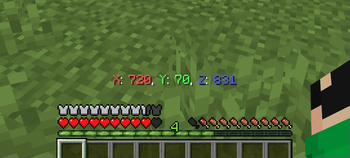
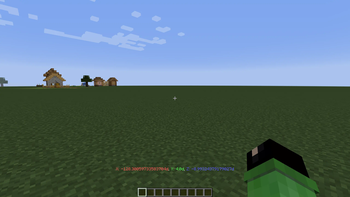
## Description Shows the exact coordinates of your location. !(https://cdn.modrinth.com/data/3opMvIxN/images/6985cec8e16048113b2945f438fe3e651a823eea.png) ## How to use To switch the visibility of coordinates, you need to enter this command ``` /trigger bizcub.coords.t ``` ## Dependencies - Fabric loader requires (https://modrinth.com/mod/fabric-api)
DaySpot Lightweight HUD overlay showing day, time, biome, moon phase, coords, weather FPS , plus a smart danger alert system that warns you about hostile mobs outside your view. Features 6 HUD Positions Top Center (default), corners, above hotbar Per-line Control Toggle + 11 color options per info line Time Format 24h or 12h (AM/PM) Adjustable Scale 0. 5x 1. 5x Danger Alerts 3 tiers: Awareness / Warning / Danger Out-of-view Detection Know what you don t see Per-Mob Settings Creeper, Zombie, Skeleton, Enderman, Witch, Spider, Wither Skeleton 3 Alert Styles Serious / Humorous / Minimal Direction Indicators Know where the threat is coming from Requirements Minecraft : 1. 20. 1 / 1. 21. 1 Loader : Forge / NeoForge / Fabric Cloth Config (Forge/NeoForge): 11.x+ / 15.x+ YACL (Fabric): 3. 6.x+ Client-side only no server install required Installation Install your mod loader Download DaySpot Put the .jar in .minecraft/mods/ Launch and configure via Mods menu Configuration Open: Mods DaySpot Config Display : Position, scale, alignment, colors Danger Alerts : Toggle alerts, cooldown, style, per-mob range All settings are client-side. Compatibility Supports Forge, NeoForge, Fabric (1. 20. 1 / 1. 21. 1) Works on any server Modpack use allowed (MIT License) FAQ Can I use this in a modpack? Yes MIT licensed. Does it work on servers? Client-side only. Install it locally. Have ideas, questions, or feedback? Feel free to visit the official page of Arvani Creations for more information and updates. MIT License Arvani Creations
📊 Mod Details
- Game
- Minecraft Mods
- Author
- BizCub
- Version
- 1.2.2
- Downloads
- 37,657
- Endorsements
- 52
- Category
- adventure
- Created
- 2/27/2024
- Updated
- 8/14/2026
- Game Versions
- 1.13, 1.13.1, 1.13.2, 18w43a, 18w43b
- Tags
- adventure, game-mechanics, utility
🔧 How to Install Minecraft Mods Mods
Download from Modrinth. Use Prism Launcher or drop into your mods folder.
📖 Full step-by-step install guide for Minecraft Mods →
Visit the official mod page for specific installation instructions for this mod.
🎮 Need cheat codes or console commands? Check ur gaming wiki for Minecraft Mods commands, item IDs, and more.
❓ Frequently Asked Questions
Which Minecraft Mods versions does Coords support?
The author lists 1.13, 1.13.1, 1.13.2, 18w43a, 18w43b, 18w43c. Other versions may work but are untested by the author.
What is the latest version of Coords?
Version 1.2.2, published 2026-08-14 with 37,657 downloads recorded at the source.
Keep browsing — more Minecraft Mods mods await