Coordinate Manager
🟡 Updated this year⚠️ Install Order · 2 steps
Install in this order, then this mod last — most mods fail to load without their framework and dependencies in place.
🖼️ Gallery (3 images)
🔍 Analysis
- 👍 0.0% endorsement rate
- 🏆 #857 of 983 fabric mods in this game by downloads
📋 About This Mod
# Coordinate Manager A Fabric-based Minecraft mod for capturing, organizing, and managing coordinates. ## Features - **Capture Modes:** - **Instant**: Save coordinate immediately without prompts. - **Pop-up**: Show a dialog to set a name and adjust coordinate values before saving. - **Capture Cooldown**: Prevent spam by setting a cooldown (below `250ms` disables it). - **Coordinate Thumbnail**: Save a thumbnail of your current view when capturing a coordinate (disabled by default). - **Precise Coordinates**: Saves coordinate values as decimals for accuracy (disabled by default). - **Auto-Copy on Capture**: Automatically copies the saved coordinates to the clipboard when capturing a coordinate (disabled by default). - **System-Aware Copy**: Formats copied coordinates according to the system's locale settings (disabled by default). - **Coordinate History Screen**: View, copy, edit, and manage saved coordinates in-game. - **Copy Coordinates**: Copy any coordinate entry to clipboard for easy sharing. - **Set Favorited Coordinates**: Protect favorited coordinates from accidental deletion. - **Search Functionality**: Find saved coordinates by name or coordinate values. - **Bulk Actions**: - **Favorite**: Toggle favorite status for multiple entries. - **Delete**: Remove multiple selected coordinates at once. - **Delete Options**: - **Delete Individual Coordinates**: Remove specific entries. - **Clear World/Server Coordinates**: Delete all unfavorited coordinates from the current world or server. ## Keybindings Customizable via the in-game controls menu. - **Capture Coordinate**: `` Save the current position. - **Open History**: `` Open coordinate history screen. ## Configuration Configurable via (https://modrinth.com/mod/cloth-config) with (https://modrinth.com/mod/modmenu). | Setting | Description | Default | | - | - | - | | Capture Mode | Determines whether coordinates are saved instantly or with a pop-up for editing. | Instant | | Enable Thumbnail | Captures a thumbnail when saving a coordinate. | Disabled | | Auto-Copy on Capture | Automatically copies the saved coordinates to the clipboard upon capture. | Disabled | | System-Aware Copy | Formats copied coordinates according to the system's locale settings. | Disabled | | Capture Cooldown | Adds a delay between captures to prevent spam (set below 250ms to disable). | 250ms | | Precise Coordinate | Saves coordinates with decimal accuracy for better precision. | Disabled |
# Coordinate Manager
A Fabric-based Minecraft mod for capturing, organizing, and managing coordinates.
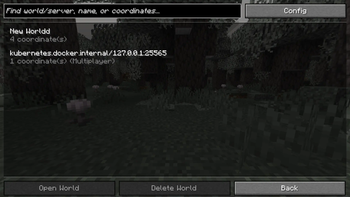
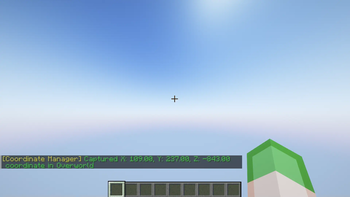
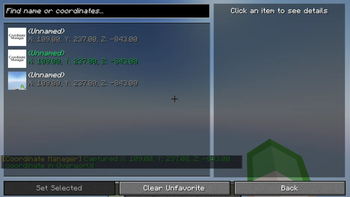
## Features - Capture Modes: - Instant: Save coordinate immediately without prompts. - Pop-up: Show a dialog to set a name and adjust coordinate values before saving. - Capture Cooldown: Prevent spam by setting a cooldown (below `250ms` disables it). - Coordinate Thumbnail: Save a thumbnail of your current view when capturing a coordinate (disabled by default). - Precise Coordinates: Saves coordinate values as decimals for accuracy (disabled by default). - Auto-Copy on Capture: Automatically copies the saved coordinates to the clipboard when capturing a coordinate (disabled by default). - System-Aware Copy: Formats copied coordinates according to the system's locale settings (disabled by default). - Coordinate History Screen: View, copy, edit, and manage saved coordinates in-game. - Copy Coordinates: Copy any coordinate entry to clipboard for easy sharing. - Set Favorited Coordinates: Protect favorited coordinates from accidental deletion. - Search Functionality: Find saved coordinates by name or coordinate values. - Bulk Actions: - Favorite: Toggle favorite status for multiple entries. - Delete: Remove multiple selected coordinates at once. - Delete Options: - Delete Individual Coordinates: Remove specific entries. - Clear World/Server Coordinates: Delete all unfavorited coordinates from the current world or server.
## Keybindings
Customizable via the in-game controls menu.
- Capture Coordinate: `` Save the current position.
- Open History: `` Open coordinate history screen.
## Configuration
Configurable via (https://modrinth.com/mod/cloth-config) with (https://modrinth.com/mod/modmenu).
| Setting | Description | Default | | - | - | - | | Capture Mode | Determines whether coordinates are saved instantly or with a pop-up for editing. | Instant | | Enable Thumbnail | Captures a thumbnail when saving a coordinate. | Disabled | | Auto-Copy on Capture | Automatically copies the saved coordinates to the clipboard upon capture. | Disabled | | System-Aware Copy | Formats copied coordinates according to the system's locale settings. | Disabled | | Capture Cooldown | Adds a delay between captures to prevent spam (set below 250ms to disable). | 250ms | | Precise Coordinate | Saves coordinates with decimal accuracy for better precision. | Disabled |
📊 Mod Details
- Game
- Minecraft Mods
- Author
- AnOrdinaryPeople
- Version
- 1.1.8
- Downloads
- 38,275
- Endorsements
- 12
- Category
- fabric
- Created
- 3/26/2025
- Updated
- 6/18/2026
- Game Versions
- 26.2
- Tags
- utility
🔧 How to Install Minecraft Mods Mods
Download from Modrinth. Use Prism Launcher or drop into your mods folder.
📖 Full step-by-step install guide for Minecraft Mods →
Visit the official mod page for specific installation instructions for this mod.
🎮 Need cheat codes or console commands? Check ur gaming wiki for Minecraft Mods commands, item IDs, and more.
❓ Frequently Asked Questions
Which Minecraft Mods versions does Coordinate Manager support?
The author lists 26.2. Other versions may work but are untested by the author.
What is the latest version of Coordinate Manager?
Version 1.1.8, published 2026-06-18 with 38,275 downloads recorded at the source.
Keep browsing — more Minecraft Mods mods await