Coordboard
🟡 Updated this year⚠️ Install Order · 4 steps
Install in this order, then this mod last — most mods fail to load without their framework and dependencies in place.
🖼️ Gallery (3 images)
🔍 Analysis
- 👍 0.6% endorsement rate
- 🏆 #23 of 70 neoforge mods in this game by downloads
📋 About This Mod
# Coordboard !(https://cdn.modrinth.com/data/fKymtMde/images/cb85f707dc2fcd044fc1715bf4abe0db21d77004.png) **Coordboard** is a small server-side addon for **(https://modrinth.com/mod/create-aeronautics)** that allows a **Navigation Table** to use a **(https://modrinth.com/mod/create) Clipboard** as a navigation target. Instead of crafting or carrying dedicated navigation targets, simply write your destination coordinates on a Clipboard, check the desired entry, and insert it into the Navigation Table. --- ## Features * Use a **Clipboard** directly in the **Navigation Table**. * Read navigation coordinates from a checked Clipboard entry. * Supports multiple coordinate formats. * Reads the **top-most checked entry** on the **last opened Clipboard page**. * Fully server-side; clients do not need to install the mod. --- ## Usage 1. Write one or more coordinates on a Clipboard. 2. Make sure each coordinate entry is written on a **single line**. 3. Check the coordinate you want to navigate to. 4. Make sure it is on the **last page you opened**. 5. Insert the Clipboard into a Navigation Table. The Navigation Table will use the selected coordinate as its navigation target. --- ## Supported Coordinate Formats ### Labeled coordinates ```text X: 120, Z: -450 ``` ```text My Sweet Home: x=120 z=-450 ``` ### Two-coordinate format (X Z) ```text 120 -450 ``` ```text 120, -450 ``` ### Three-coordinate format (X Y Z) ```text 120 64 -450 ``` ```text 120, 64, -450 ``` The **Y** value is ignored. --- ## Notes * Coordinates must be written on a **single line**. * Only **integer** coordinates are supported. * The **Y coordinate is ignored**. * If multiple entries are checked, the **top-most checked entry** on the **last opened Clipboard page** is used. * Only checked entries are considered. --- ## Dependencies * Create **6.0.10+** * Create Aeronautics **1.2.1+** * Minecraft **1.21.1** * NeoForge --- ## Screenshots !(https://cdn.modrinth.com/data/cached_images/86210882392655d2f14e569bf0ef1b46346c9bf4_0.webp) * Clipboard containing coordinate entries. !(https://cdn.modrinth.com/data/cached_images/362bfe4a923cd6c21cab0a348adf91f9ae469e95.png) * Navigation Table successfully recognizing a Clipboard as a navigation target. --- ## License This project is licensed under the **MIT License**. --- ## Source Code GitHub: https://github.com/Hexagreen/Coordboard
# Coordboard !(https://cdn.modrinth.com/data/fKymtMde/images/cb85f707dc2fcd044fc1715bf4abe0db21d77004.png) Coordboard is a small server-side addon for (https://modrinth.com/mod/create-aeronautics)** that allows a Navigation Table to use a (https://modrinth.com/mod/create) Clipboard* as a navigation target.
Instead of crafting or carrying dedicated navigation targets, simply write your destination coordinates on a Clipboard, check the desired entry, and insert it into the Navigation Table.
## Features
Use a Clipboard directly in the Navigation Table. Read navigation coordinates from a checked Clipboard entry. Supports multiple coordinate formats. Reads the top-most checked entry on the last opened Clipboard page. Fully server-side; clients do not need to install the mod.
1. Write one or more coordinates on a Clipboard. 2. Make sure each coordinate entry is written on a single line. 3. Check the coordinate you want to navigate to. 4. Make sure it is on the last page you opened. 5. Insert the Clipboard into a Navigation Table.
The Navigation Table will use the selected coordinate as its navigation target.
## Supported Coordinate Formats
### Labeled coordinates
```text X: 120, Z: -450 ```
```text My Sweet Home: x=120 z=-450 ```
### Two-coordinate format (X Z)
```text 120 -450 ```
```text 120, -450 ```
### Three-coordinate format (X Y Z)
```text 120 64 -450 ```
```text 120, 64, -450 ```
The Y value is ignored.
Coordinates must be written on a single line. Only integer coordinates are supported. The Y coordinate is ignored. If multiple entries are checked, the top-most checked entry on the last opened Clipboard page is used. Only checked entries are considered.
## Dependencies
Create 6. 0. 10+ Create Aeronautics 1. 2. 1+ Minecraft 1. 21. 1 NeoForge
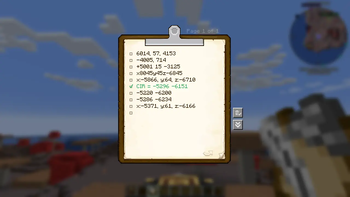
## Screenshots !(https://cdn.modrinth.com/data/cached_images/86210882392655d2f14e569bf0ef1b46346c9bf4_0.webp) Clipboard containing coordinate entries.
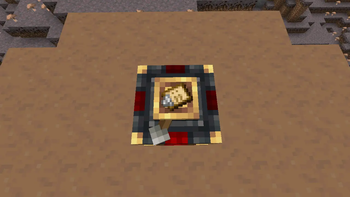
!(https://cdn.modrinth.com/data/cached_images/362bfe4a923cd6c21cab0a348adf91f9ae469e95.png) * Navigation Table successfully recognizing a Clipboard as a navigation target.
This project is licensed under the MIT License.
## Source Code
GitHub: https://github.com/Hexagreen/Coordboard
📊 Mod Details
- Game
- Minecraft Mods
- Author
- Hexagreen
- Version
- 1.0.0
- Downloads
- 893
- Endorsements
- 5
- Category
- neoforge
- Created
- 7/13/2026
- Updated
- 7/7/2026
- Game Versions
- 1.21.1
- Tags
- utility
📦 Requires 2 Mods
This mod requires these to work — install them first.
🔧 How to Install Minecraft Mods Mods
Download from Modrinth. Use Prism Launcher or drop into your mods folder.
📖 Full step-by-step install guide for Minecraft Mods →
Visit the official mod page for specific installation instructions for this mod.
🎮 Need cheat codes or console commands? Check ur gaming wiki for Minecraft Mods commands, item IDs, and more.
❓ Frequently Asked Questions
What do I need installed before Coordboard?
It depends on 2 other mods: create, create aeronautics. Install those first — the mod will not load without them.
Which Minecraft Mods versions does Coordboard support?
The author lists 1.21.1. Other versions may work but are untested by the author.
What is the latest version of Coordboard?
Version 1.0.0, published 2026-07-07 with 893 downloads recorded at the source.
Keep browsing — more Minecraft Mods mods await