Command on Interval
🟡 Updated this year⚠️ Install Order · 2 steps
Install in this order, then this mod last — most mods fail to load without their framework and dependencies in place.
🖼️ Gallery (2 images)

🔍 Analysis
- 🏆 #670 of 907 fabric mods in this game by downloads
📋 About This Mod
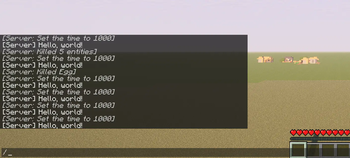
**(https://github.com/FelixAgairu/command-on-interval/blob/main/README.md)** (https://github.com/FelixAgairu/command-on-interval/blob/main/README-zh_cn.md) ## What is that A mod runs in-game command with customize configs.\ For now the commands will run as soon as server mod initialize. ## Use Also load the require mod (https://modrinth.com/mod/config-manager)\ Remember that Singleplayer contains an integrated server. ## Features - Multi-command support - Ticks or seconds: Whether use game ticks or seconds (20 ticks) in timing - Delays: Add delay before command run - Interval: The cycle of each command does - ~~There's no reason to run a command from Java code~~ ## Example !(https://cdn.modrinth.com/data/cached_images/50dbf240015376229c8493ce18401910cf1004d1_0.webp) `command_on_interval.json`: ```json { "0":{ "enabled":true, "unit-use-ticks":false, "delay":0, "interval":10, "command":"say Hello, world!" }, "1":{ "enabled":true, "unit-use-ticks":true, "delay":0, "interval":180, "command":"time set day" }, "2":{ "enabled":true, "unit-use-ticks":true, "delay":5, "interval":200, "command":"kill @e" } } ``` ## Config Locate your config in Minecraft installation location.\ > Default location using official launcher on Windows:\ > `%APPDATA%\.minecraft\config\command_on_interval.json`\ > Or\ > `C:\Users\YOUR_USER_NAME\AppData\Roaming\.minecraft\config\command_on_interval.json` You will get somethings like that: ```json { "0":{ "enabled":true, "unit-use-ticks":false, "delay":0, "interval":10, "command":"" } } ``` #### "0" > No. 1 command,you can add `"1"` also `"2"` etc... #### enabled > True enable this entry of setting, vice versa #### unit-use-ticks > For delay or interval, `true` use ticks, `false` ues seconds #### delay > Delay before each command runs #### interval > Cycles interval for each command #### command > In-game command without **`/`** prefix\ > Eg. `time set day` (https://github.com/FelixAgairu/command-on-interval/blob/a84597bd1226937d9cecaf0b035119eac5612c4a/src/main/resources/assets/command-on-interval/icon.png) © 2025 by (https://github.com/FelixAgairu) is licensed under (https://creativecommons.org/licenses/by-nc-sa/4.0/)
(https://github.com/FelixAgairu/command-on-interval/blob/main/README.md)** [简体中文](https://github.com/FelixAgairu/command-on-interval/blob/main/README-zh_cn.md) ## What is that A mod runs in-game command with customize configs.\ For now the commands will run as soon as server mod initialize.
## Use Also load the require mod (https://modrinth.com/mod/config-manager)\ Remember that Singleplayer contains an integrated server.
## Features - Multi-command support - Ticks or seconds: Whether use game ticks or seconds (20 ticks) in timing - Delays: Add delay before command run - Interval: The cycle of each command does - ~~There's no reason to run a command from Java code~~
## Example !(https://cdn.modrinth.com/data/cached_images/50dbf240015376229c8493ce18401910cf1004d1_0.webp) `command_on_interval.json`: ```json { "0":{ "enabled":true, "unit-use-ticks":false, "delay":0, "interval":10, "command":"say Hello, world!" }, "1":{ "enabled":true, "unit-use-ticks":true, "delay":0, "interval":180, "command":"time set day" }, "2":{ "enabled":true, "unit-use-ticks":true, "delay":5, "interval":200, "command":"kill @e" } } ```
## Config Locate your config in Minecraft installation location.\ > Default location using official launcher on Windows:\ > `%APPDATA%\.minecraft\config\command_on_interval.json`\ > Or\ > `C:\Users\YOUR_USER_NAME\AppData\Roaming\.minecraft\config\command_on_interval.json`
You will get somethings like that: ```json { "0":{ "enabled":true, "unit-use-ticks":false, "delay":0, "interval":10, "command":"" } } ```
#### "0" > No. 1 command,you can add `"1"` also `"2"` etc...
#### enabled > True enable this entry of setting, vice versa
#### unit-use-ticks > For delay or interval, `true` use ticks, `false` ues seconds
#### delay > Delay before each command runs
#### interval > Cycles interval for each command
#### command > In-game command without `/`** prefix\ > Eg. `time set day`
(https://github.com/FelixAgairu/command-on-interval/blob/a84597bd1226937d9cecaf0b035119eac5612c4a/src/main/resources/assets/command-on-interval/icon.png) © 2025 by (https://github.com/FelixAgairu) is licensed under (https://creativecommons.org/licenses/by-nc-sa/4. 0/)
📊 Mod Details
- Game
- Minecraft Mods
- Author
- FelixAgairu
- Version
- 0.4.0-alpha
- Downloads
- 396
- Endorsements
- 1
- Category
- fabric
- Created
- 4/16/2025
- Updated
- 1/1/2026
- Game Versions
- 1.21, 1.21.1
- Tags
- game-mechanics, management, utility
🔧 How to Install Minecraft Mods Mods
Download from Modrinth. Use Prism Launcher or drop into your mods folder.
📖 Full step-by-step install guide for Minecraft Mods →
Visit the official mod page for specific installation instructions for this mod.
🎮 Need cheat codes or console commands? Check ur gaming wiki for Minecraft Mods commands, item IDs, and more.
❓ Frequently Asked Questions
Which Minecraft Mods versions does Command on Interval support?
The author lists 1.21, 1.21.1. Other versions may work but are untested by the author.
What is the latest version of Command on Interval?
Version 0.4.0-alpha, published 2026-01-01 with 396 downloads recorded at the source.
Keep browsing — more Minecraft Mods mods await