Combo+
🟡 Updated this year⚠️ Install Order · 2 steps
Install in this order, then this mod last — most mods fail to load without their framework and dependencies in place.
🖼️ Gallery (7 images)
🔍 Analysis
- 👍 0.5% endorsement rate
- 🏆 #228 of 551 adventure mods in this game by downloads
📋 About This Mod
# Combo+ ⚔️🔥 !(https://cdn.modrinth.com/data/cached_images/7557ad4b5bb8524b9a3b955347f27cde67c04464.png) <iframe width="560" height="315" src="https://www.youtube-nocookie.com/embed/ZrOb0LzfdJs" title="YouTube video player" frameborder="0" allow="accelerometer; autoplay; clipboard-write; encrypted-media; gyroscope; picture-in-picture; web-share" allowfullscreen></iframe> A fast-paced combo tracker for PvP that rewards precision, timing, and consistency with satisfying visuals, sounds, and milestones. ## Combo System 🧠 Track your hit streaks in real time and push your limits during combat. How It Works Your combo increases with every successful hit Taking damage or waiting too long resets your combo Combos start displaying at 3 hits Built-in delay protection prevents false double-counts ## Judgment System 🎯 Every hit is evaluated based on timing, distance, and accuracy. Hit Ratings PERFECT / SMASH / HEADSHOT – high-skill hits GOOD – solid timing BAD / HORRID – weak or poorly timed hits Features Floating 3D judgments rendered in the world Works for both melee and ranged combat Headshots and smash attacks have unique feedback Optional: disable judgments for a cleaner experience ## Combo HUD 🖥️ A dynamic on-screen combo display designed for PvP clarity. Features Animated combo counter with scaling + fade effects Appears only when actively chaining hits Automatically disappears after inactivity Supports: Custom number textures Minecraft font mode Minimal “Simple Mode” UI ## Simple Mode ✨ A clean, modern combo display for minimal setups. Text-based combo counter Smooth pulsing animation at higher combos Dynamic color shifting Displays milestone titles alongside combo ## Milestone System 🏆 Reach higher combos to unlock visual and audio rewards. Features Milestones every 5 hits Special milestone tiers (10, 25, 50, 100, etc.) Custom: Sounds Text Textures “Perfect streak” system: Miss a perfect hit → lose milestone visuals ## Sound Feedback 🔊 Audio feedback that evolves with your combo. Unique sounds for each hit in a chain Special sounds for milestone combos Increasing pitch as combo grows Fully toggleable ## Customization ⚙️ Control everything directly in-game. Commands /comboplus on|off – Enable/disable mod /comboplus ui on|off – Toggle HUD /comboplus sound on|off – Toggle sounds /comboplus number on|off – Toggle number UI /comboplus perfect on|off – Toggle judgments /comboplus simple on|off – Toggle simple mode /comboplus font minecraft|normal – Switch font /comboplus gui – Open settings screen ## Keybinds ⌨️ Quick toggles for everything: Toggle Mod Toggle UI Toggle Sounds Toggle Number UI Toggle Perfect Judgments Toggle Simple Mode Open Config GUI (All keybinds are customizable in controls) ## Config GUI 🧩 A built-in settings screen for quick adjustments. Toggle all major features Instant feedback on changes Accessible via command or keybind ### Why Use Combo+? 💡 ⚔️ Improve combat timing and consistency 🎯 Get instant feedback on your hits 🔥 Make PvP feel more rewarding 🎨 Customize your experience to match your style Milestones Credits Caioxbz
# Combo+ ⚔️🔥
!(https://cdn.modrinth.com/data/cached_images/7557ad4b5bb8524b9a3b955347f27cde67c04464.png)
A fast-paced combo tracker for PvP that rewards precision, timing, and consistency with satisfying visuals, sounds, and milestones.
## Combo System 🧠
Track your hit streaks in real time and push your limits during combat.
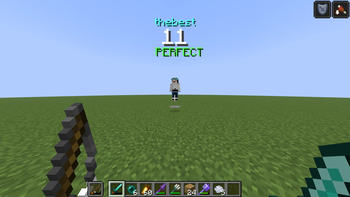
How It Works Your combo increases with every successful hit Taking damage or waiting too long resets your combo Combos start displaying at 3 hits Built-in delay protection prevents false double-counts ## Judgment System 🎯
Every hit is evaluated based on timing, distance, and accuracy.
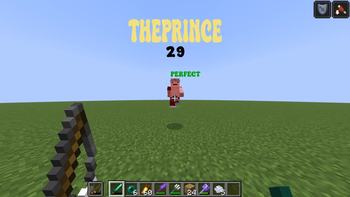
Hit Ratings PERFECT / SMASH / HEADSHOT – high-skill hits GOOD – solid timing BAD / HORRID – weak or poorly timed hits Features Floating 3D judgments rendered in the world Works for both melee and ranged combat Headshots and smash attacks have unique feedback Optional: disable judgments for a cleaner experience ## Combo HUD 🖥️
A dynamic on-screen combo display designed for PvP clarity.
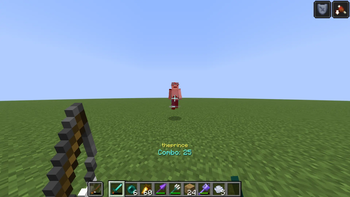
Features Animated combo counter with scaling + fade effects Appears only when actively chaining hits Automatically disappears after inactivity Supports: Custom number textures Minecraft font mode Minimal “Simple Mode” UI ## Simple Mode ✨
A clean, modern combo display for minimal setups.
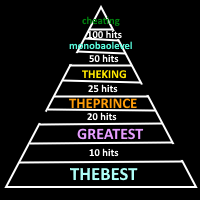
Text-based combo counter Smooth pulsing animation at higher combos Dynamic color shifting Displays milestone titles alongside combo ## Milestone System 🏆
Reach higher combos to unlock visual and audio rewards.
Features Milestones every 5 hits Special milestone tiers (10, 25, 50, 100, etc.) Custom: Sounds Text Textures “Perfect streak” system: Miss a perfect hit → lose milestone visuals ## Sound Feedback 🔊
Audio feedback that evolves with your combo.
Unique sounds for each hit in a chain Special sounds for milestone combos Increasing pitch as combo grows Fully toggleable ## Customization ⚙️
Control everything directly in-game.
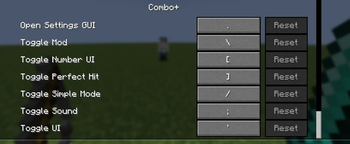
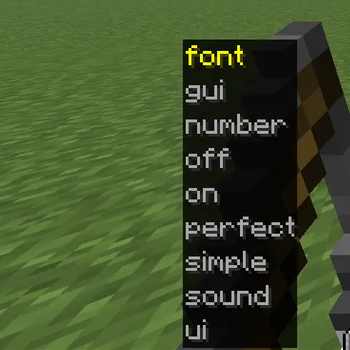
Commands /comboplus on|off – Enable/disable mod /comboplus ui on|off – Toggle HUD /comboplus sound on|off – Toggle sounds /comboplus number on|off – Toggle number UI /comboplus perfect on|off – Toggle judgments /comboplus simple on|off – Toggle simple mode /comboplus font minecraft|normal – Switch font /comboplus gui – Open settings screen ## Keybinds ⌨️
Quick toggles for everything:
Toggle Mod Toggle UI Toggle Sounds Toggle Number UI Toggle Perfect Judgments Toggle Simple Mode Open Config GUI
(All keybinds are customizable in controls)
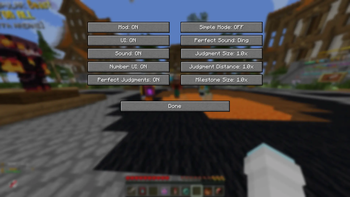
## Config GUI 🧩 A built-in settings screen for quick adjustments. Toggle all major features Instant feedback on changes Accessible via command or keybind
### Why Use Combo+? 💡 ⚔️ Improve combat timing and consistency 🎯 Get instant feedback on your hits 🔥 Make PvP feel more rewarding 🎨 Customize your experience to match your style
Milestones Credits Caioxbz
📊 Mod Details
- Game
- Minecraft Mods
- Author
- monobao
- Version
- 1.0-BETA
- Downloads
- 1,086
- Endorsements
- 5
- Category
- adventure
- Created
- 5/11/2026
- Updated
- 5/9/2026
- Game Versions
- 1.21.11
- Tags
- adventure, game-mechanics, utility
🔧 How to Install Minecraft Mods Mods
Download from Modrinth. Use Prism Launcher or drop into your mods folder.
📖 Full step-by-step install guide for Minecraft Mods →
Visit the official mod page for specific installation instructions for this mod.
🎮 Need cheat codes or console commands? Check ur gaming wiki for Minecraft Mods commands, item IDs, and more.
❓ Frequently Asked Questions
Which Minecraft Mods versions does Combo+ support?
The author lists 1.21.11. Other versions may work but are untested by the author.
What is the latest version of Combo+?
Version 1.0-BETA, published 2026-05-09 with 1,086 downloads recorded at the source.
Keep browsing — more Minecraft Mods mods await