CombatDistanceHUD
🟡 Updated this year⚠️ Install Order · 2 steps
Install in this order, then this mod last — most mods fail to load without their framework and dependencies in place.
🖼️ Gallery (3 images)
🔍 Analysis
- 🏆 #815 of 899 fabric mods in this game by downloads
📋 About This Mod
⚔️ Combat Distance HUD A lightweight, fully customizable Fabric client-side HUD mod for **Minecraft 1.21.9 – 1.21.11** that displays real-time combat distance information directly on your screen. Track enemy distance, hit reach, incoming hits, and combat opponents with fully customizable text, colors, positions, and styling. --- ✨ Features 🎯 Target Distance HUD Displays the distance to the player you're currently looking at. Examples: ```text Distance: 3.42 blocks 🎯 3.42 Target → 3.42 Blocks Away ⚔ Steve | 3.42 ``` ⚔ Last Hit Distance HUD Shows the exact distance when you successfully hit another player. Examples: ```text Last Hit: 3.12 blocks ⚔ Reach: 3.12 Hit Steve: 3.12b ``` ☠ Hit-By Distance HUD Shows the distance at which another player hit you. Examples: ```text Hit By: 2.98 blocks ☠ Enemy Reach: 2.98 Steve hit you: 2.98b ``` 👤 Opponent Tracker HUD Tracks the most recent player you entered combat with and updates their distance in real time. Examples: ```text ⚔ Steve | 4.32 blocks Tracking: Steve - 4.32 🎯 Steve: 4.32 blocks ``` --- 🔥 Main Features * 4 independent HUD modules * Real-time distance updates * Fully customizable text formatting * Drag-and-drop HUD editor * Per-module settings * Global appearance settings * Unicode symbol support * Emoji support * Mod Menu integration * Multi-language support * Zero server installation required * Client-side only * Extremely lightweight --- 📝 Placeholder Support Use placeholders anywhere in your HUD text. | Placeholder | Description | | ------------ | -------------- | | `{distance}` | Distance value | | `{player}` | Player name | | `{unit}` | Unit label | Example: ```text ⚔ {player}: {distance} {unit} ``` Output: ```text ⚔ Steve: 3.42 blocks ``` --- 🎨 Customization Every module supports: Position * X Offset * Y Offset * Anchor Selection * Drag & Drop Placement Appearance * Text Color * Background Color * Outline Color * Shadow Color * Opacity * Padding * Scale * Font Scale Formatting * Custom Text Templates * Decimal Precision * Unit Labels * Visibility Options --- ⚙️ Commands | Command | Description | | -------------------------- | -------------------- | | `/combatdistance` | Mod information | | `/combatdistance config` | Open config screen | | `/combatdistance reload` | Reload config | | `/combatdistance toggle` | Enable / disable mod | | `/combatdistance reset` | Reset HUD positions | | `/combatdistance resetall` | Reset all settings | --- 📥 Installation Requirements * Minecraft 1.21.9–1.21.11 * Fabric Loader 0.17.2+ * Fabric API * Java 21+ Optional * Mod Menu Installation Steps 1. Install Fabric Loader. 2. Install Fabric API. 3. Download Combat Distance HUD. 4. Place the mod inside your `mods` folder. 5. Launch Minecraft. --- 📌 Supported Versions | Version | Status | | ------- | ------ | | 1.21.9 | ✅ | | 1.21.10 | ✅ | | 1.21.11 | ✅ | --- ⚡ Performance Designed to have virtually no FPS impact. * CPU Usage: Negligible * Memory Usage: < 2 MB * Render Time: < 0.01ms/frame * Safe for 500+ FPS clients --- 🔧 Compatibility Works on: * Vanilla Servers * Fabric Servers * Paper Servers * Spigot Servers * PvP Servers * Minigame Servers No server-side installation required. --- ❓ FAQ - Does this work on servers? Yes. The mod is entirely client-side and works on virtually any server. - Is this allowed? The mod only displays information already available to your client. Always follow individual server rules regarding client modifications. - Can I move HUD elements? Yes. Use the built-in HUD editor or configure positions manually. - Can I use custom symbols? Yes. Unicode symbols and emojis are supported. - Does it affect performance? No measurable impact during normal gameplay. --- ❤️ Credits * Fabric Team * Mojang * TerraformersMC (Mod Menu) --- 📄 License All Rights Reserved. --- **Combat Distance HUD — Know your reach, track your combat, dominate every fight. ⚔️** <iframe width="560" height="315" src="https://www.youtube-nocookie.com/embed/FJSdYXDKQUc" title="YouTube video player" frameborder="0" allow="accelerometer; autoplay; clipboard-write; encrypted-media; gyroscope; picture-in-picture; web-share" allowfullscreen></iframe>
⚔️ Combat Distance HUD
A lightweight, fully customizable Fabric client-side HUD mod for Minecraft 1. 21. 9 – 1. 21. 11 that displays real-time combat distance information directly on your screen.
Track enemy distance, hit reach, incoming hits, and combat opponents with fully customizable text, colors, positions, and styling.
🎯 Target Distance HUD
Displays the distance to the player you're currently looking at.
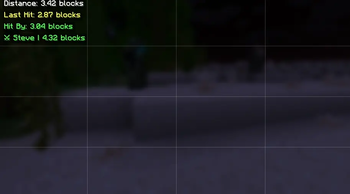
```text Distance: 3. 42 blocks 🎯 3. 42 Target → 3. 42 Blocks Away ⚔ Steve | 3. 42 ```
⚔ Last Hit Distance HUD
Shows the exact distance when you successfully hit another player.
```text Last Hit: 3. 12 blocks ⚔ Reach: 3. 12 Hit Steve: 3. 12b ```
☠ Hit-By Distance HUD
Shows the distance at which another player hit you.
```text Hit By: 2. 98 blocks ☠ Enemy Reach: 2. 98 Steve hit you: 2. 98b ```
👤 Opponent Tracker HUD
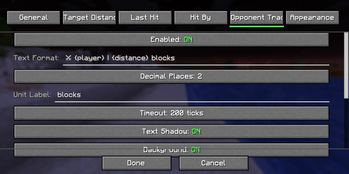
Tracks the most recent player you entered combat with and updates their distance in real time.
```text ⚔ Steve | 4. 32 blocks Tracking: Steve - 4. 32 🎯 Steve: 4. 32 blocks ```
🔥 Main Features
4 independent HUD modules Real-time distance updates Fully customizable text formatting Drag-and-drop HUD editor Per-module settings Global appearance settings Unicode symbol support Emoji support Mod Menu integration Multi-language support Zero server installation required Client-side only Extremely lightweight
📝 Placeholder Support
Use placeholders anywhere in your HUD text.
| Placeholder | Description | | ------------ | -------------- | | `{distance}` | Distance value | | `{player}` | Player name | | `{unit}` | Unit label |
```text ⚔ {player}: {distance} {unit} ```
```text ⚔ Steve: 3. 42 blocks ```
🎨 Customization
Every module supports:
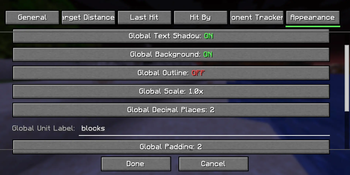
X Offset Y Offset Anchor Selection Drag & Drop Placement
Text Color Background Color Outline Color Shadow Color Opacity Padding Scale Font Scale
Custom Text Templates Decimal Precision Unit Labels Visibility Options
⚙️ Commands
| Command | Description | | -------------------------- | -------------------- | | `/combatdistance` | Mod information | | `/combatdistance config` | Open config screen | | `/combatdistance reload` | Reload config | | `/combatdistance toggle` | Enable / disable mod | | `/combatdistance reset` | Reset HUD positions | | `/combatdistance resetall` | Reset all settings |
📥 Installation
Requirements
Minecraft 1. 21. 9–1. 21. 11 Fabric Loader 0. 17. 2+ Fabric API Java 21+
Mod Menu
Installation Steps
1. Install Fabric Loader. 2. Install Fabric API. 3. Download Combat Distance HUD. 4. Place the mod inside your `mods` folder. 5. Launch Minecraft.
📌 Supported Versions
| Version | Status | | ------- | ------ | | 1. 21. 9 | ✅ | | 1. 21. 10 | ✅ | | 1. 21. 11 | ✅ |
⚡ Performance
Designed to have virtually no FPS impact.
CPU Usage: Negligible Memory Usage: < 2 MB Render Time: < 0. 01ms/frame Safe for 500+ FPS clients
🔧 Compatibility
Vanilla Servers Fabric Servers Paper Servers Spigot Servers PvP Servers Minigame Servers
No server-side installation required.
- Does this work on servers?
Yes. The mod is entirely client-side and works on virtually any server.
- Is this allowed?
The mod only displays information already available to your client. Always follow individual server rules regarding client modifications.
- Can I move HUD elements?
Yes. Use the built-in HUD editor or configure positions manually.
- Can I use custom symbols?
Yes. Unicode symbols and emojis are supported.
- Does it affect performance?
No measurable impact during normal gameplay.
Fabric Team Mojang * TerraformersMC (Mod Menu)
All Rights Reserved.
Combat Distance HUD — Know your reach, track your combat, dominate every fight. ⚔️
📊 Mod Details
- Game
- Minecraft Mods
- Author
- geturplugins
- Version
- 1.0.0
- Downloads
- 154
- Endorsements
- 0
- Category
- fabric
- Created
- 7/1/2026
- Updated
- 6/23/2026
- Game Versions
- 1.21.9, 1.21.10, 1.21.11
- Tags
- game-mechanics, technology, utility
🔧 How to Install Minecraft Mods Mods
Download from Modrinth. Use Prism Launcher or drop into your mods folder.
📖 Full step-by-step install guide for Minecraft Mods →
Visit the official mod page for specific installation instructions for this mod.
🎮 Need cheat codes or console commands? Check ur gaming wiki for Minecraft Mods commands, item IDs, and more.
❓ Frequently Asked Questions
Which Minecraft Mods versions does CombatDistanceHUD support?
The author lists 1.21.9, 1.21.10, 1.21.11. Other versions may work but are untested by the author.
What is the latest version of CombatDistanceHUD?
Version 1.0.0, published 2026-06-23 with 154 downloads recorded at the source.
Keep browsing — more Minecraft Mods mods await