Combat-Hud Indicator
🟡 Updated this year⚠️ Install Order · 2 steps
Install in this order, then this mod last — most mods fail to load without their framework and dependencies in place.
Preview

🔍 Analysis
- 🏆 #220 of 909 fabric mods in this game by downloads
📋 About This Mod
**Combat-Hud Indicator** offers real-time tracking for cooldowns, health alerts, utility timers, and more, all in a sleek, customizable interface designed specifically for Minecraft 1.21.11. # How to Use: Simply place the latest mod file, "**combat-hud-indicator-1.21.11-1.2.0.jar**", into your **.minecraft\mods** folder. # Key Features: - **Combat Trackers:** Monitor your shield, ender pearl, and wind charge cooldowns with clear and precise icons. - **Vital Warnings:** Visual alerts when player take damage and many sprite warnings for low item and armor durabilities. - **Tactical Timers:** Stay ahead with built-in TNT primed timers and Totem counters. - **Resource Tracking:** Keep an eye on your arrows, and XYZ coordinates. - **Survival Needs:** Track health and hunger efficiently. - **Chat Privacy:** Optional chat blocker to avoid distractions or toxicity while playing. # Fully Customizable: Access the configuration menu via the ESC menu to toggle any feature, specifically the button "**Hud**", including: - Heart & Low Health Icons - Hunger & Armor Display - Shield & Hurt Detection - Arrow Count & Totem Counter - Ender Pearl & Wind Charge Cooldowns - TNT Timer & XYZ Coordinates - Chat Block - Experimental features (NEW!) - Hud Scaling (NEW!) Need a smaller HUD? Cycle through three scales: **1 (default)**, **2 (small)**, and **3 (smaller)** to fit your preference. # Technical Info - **Platform:** Fabric (latest version) - **Fabric API needed:** "fabric-api-0.141.3+1.21.1+-" - **Minecraft Version:** 1.21.11 (older or newer versions are untested but it might work.) # Note: If configuration changes don’t apply on newer updates, delete the old **combat-hud-indicator** folder located at **.minecraft/config** for a fresh start. ## (HUD elements are spaced out for a clear overview, avoiding clutter or screen overcrowding) !(https://cdn.modrinth.com/data/cached_images/1f9ead69ad01ef2c347072cd4ea5b7aa0407ae1e.png) ## (Screenshot of the stylish and sexy Options Menu for Combat-Hud Indicator) !(https://cdn.modrinth.com/data/cached_images/96d0d2650498fa25db353234f2e662a65f7b288d.png) ``` © Jsll. Do not redistribute, sell, or claim as your own. If you encounter any bugs or want to add more suggestions DM me in discord: @sirarmis Got any mod ideas? I’m happy to code them for fun, completely free! Slight issues to be fixed in the next update (hopefully xD): - Heart Section (inconsistent) - Hunger Section (inconsistent) Possible future updates: - Movable Hud-editor - Speed/velocity meter - Potion counters - Reach indicator - Bow Power indicator (icon) - Ping display ``` ### Special thanks to Mushroomify for their contributions and support.
Combat-Hud Indicator offers real-time tracking for cooldowns, health alerts, utility timers, and more, all in a sleek, customizable interface designed specifically for Minecraft 1. 21. 11.
# How to Use: Simply place the latest mod file, "combat-hud-indicator-1. 21. 11-1. 2. 0.jar", into your .minecraft\mods folder.
# Key Features: - Combat Trackers: Monitor your shield, ender pearl, and wind charge cooldowns with clear and precise icons. - Vital Warnings: Visual alerts when player take damage and many sprite warnings for low item and armor durabilities. - Tactical Timers: Stay ahead with built-in TNT primed timers and Totem counters. - Resource Tracking: Keep an eye on your arrows, and XYZ coordinates. - Survival Needs: Track health and hunger efficiently. - Chat Privacy: Optional chat blocker to avoid distractions or toxicity while playing.
# Fully Customizable: Access the configuration menu via the ESC menu to toggle any feature, specifically the button "Hud", including: - Heart & Low Health Icons - Hunger & Armor Display - Shield & Hurt Detection - Arrow Count & Totem Counter - Ender Pearl & Wind Charge Cooldowns - TNT Timer & XYZ Coordinates - Chat Block - Experimental features (NEW!) - Hud Scaling (NEW!)
Need a smaller HUD? Cycle through three scales: 1 (default), 2 (small), and 3 (smaller) to fit your preference.
# Technical Info - Platform: Fabric (latest version) - Fabric API needed: "fabric-api-0. 141. 3+1. 21. 1+-" - Minecraft Version: 1. 21. 11 (older or newer versions are untested but it might work.)
# Note: If configuration changes don’t apply on newer updates, delete the old combat-hud-indicator folder located at .minecraft/config for a fresh start.
## (HUD elements are spaced out for a clear overview, avoiding clutter or screen overcrowding) 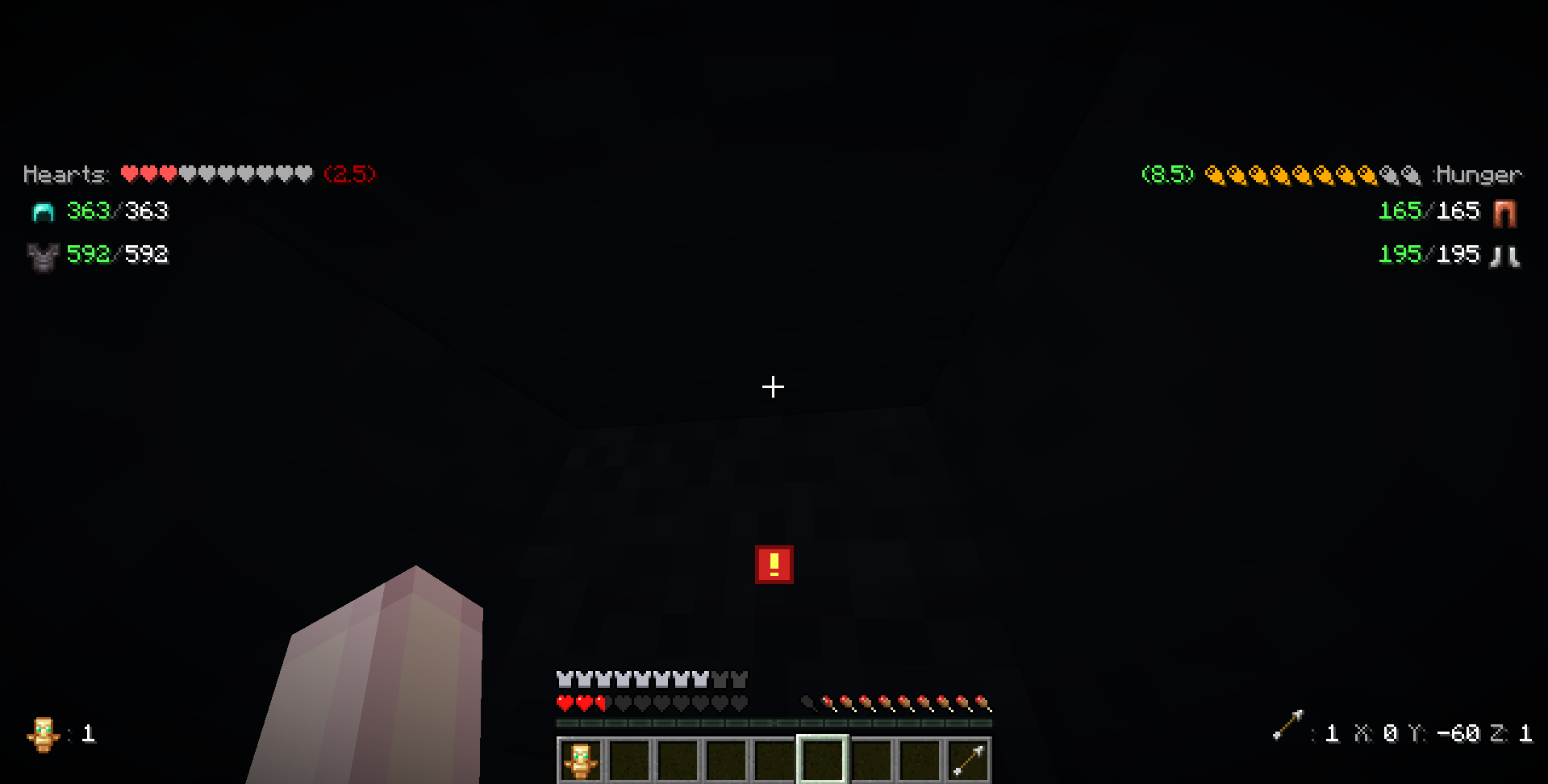
## (Screenshot of the stylish and sexy Options Menu for Combat-Hud Indicator) !(https://cdn.modrinth.com/data/cached_images/96d0d2650498fa25db353234f2e662a65f7b288d.png)
``` © Jsll. Do not redistribute, sell, or claim as your own. If you encounter any bugs or want to add more suggestions DM me in discord: @sirarmis Got any mod ideas? I’m happy to code them for fun, completely free!
Slight issues to be fixed in the next update (hopefully xD): - Heart Section (inconsistent) - Hunger Section (inconsistent)
Possible future updates: - Movable Hud-editor - Speed/velocity meter - Potion counters - Reach indicator - Bow Power indicator (icon) - Ping display ```
### Special thanks to Mushroomify for their contributions and support.
📊 Mod Details
- Game
- Minecraft Mods
- Author
- Jsll
- Version
- 1.2.0
- Downloads
- 284
- Endorsements
- 1
- Category
- fabric
- Created
- 4/18/2026
- Updated
- 4/23/2026
- Game Versions
- 1.21.11
- Tags
- management, storage, utility
🔧 How to Install Minecraft Mods Mods
Download from Modrinth. Use Prism Launcher or drop into your mods folder.
📖 Full step-by-step install guide for Minecraft Mods →
Visit the official mod page for specific installation instructions for this mod.
🎮 Need cheat codes or console commands? Check ur gaming wiki for Minecraft Mods commands, item IDs, and more.
❓ Frequently Asked Questions
Which Minecraft Mods versions does Combat-Hud Indicator support?
The author lists 1.21.11. Other versions may work but are untested by the author.
What is the latest version of Combat-Hud Indicator?
Version 1.2.0, published 2026-04-23 with 284 downloads recorded at the source.
Keep browsing — more Minecraft Mods mods await