Colored Alphabet blocks
🟡 Updated this year⚠️ Install Order · 2 steps
Install in this order, then this mod last — most mods fail to load without their framework and dependencies in place.
🖼️ Gallery (1 images)
🔍 Analysis
- 🏆 #4 of 222 decoration mods in this game by downloads
📋 About This Mod
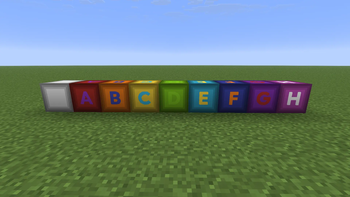
# Alphabet Block Mod A Minecraft mod that adds beautiful, fully dyeable A-Z alphabet blocks to the game! decorating building or creating word-guessing games. Offical fork from (https://modrinth.com/mod/thai-alphabet-blocks) (https://img.shields.io/badge/Minecraft-1.21.11-blue.svg)](#) (https://img.shields.io/badge/Fabric-Supported-brightgreen.svg)](#) (https://img.shields.io/badge/Forge-Supported-green.svg)](#) (https://img.shields.io/badge/NeoForge-Supported-green.svg)](#) (https://img.shields.io/badge/License-Apache%202.0-yellow.svg)](LICENSE) --- ## ✨ Features - **27 Placeable Alphabet Blocks**: Includes all English letters (A-Z) and a matching empty wood block. - **Dual-Layer Dyeing System**: - **Background Panel Customization**: Right-click a block with any of the 16 Minecraft Dyes to dye the background wood panel. - **Glyph/Letter Customization**: Sneak + Right-click a block with any dye to customize the letter color independently! - **High-Quality Cutout Rendering**: Crafted using transparent cutout layers, ensuring sharp letter edges, crisp visibility, and integration with the surrounding wood texture. - **Dedicated Creative Tab**: Comes with an organized custom Creative Tab containing all the letters in alphabetical order for quick access. - **Multi-Loader Support**: Runs natively on **Fabric**, **Forge**, and **NeoForge** for Minecraft `1.21.11`. --- ## 🎨 Dyeing Guide | Action | Target | Description | | :------------------------------- | :-------------------- | :--------------------------------------------------------------------------- | | **Right-Click with Dye** | Background Wood Panel | Colors the background panel to any of the 16 vanilla dye colors. | | **Shift + Right-Click with Dye** | Glyph / Letter | Colors the character (letter) itself. _(Does not apply to the Empty Block)._ | --- ## 📥 Installation 1. Make sure you have installed the mod loader of your choice: - (https://fabricmc.net/) - (https://files.minecraftforge.net/) - (https://neoforged.net/) 2. _(Fabric Users)_ Download and install the (https://modrinth.com/mod/fabric-api) for your version of Minecraft. 3. Download the mod `.jar` file matching your Mod Loader and Minecraft version `1.21.11`. 4. Place the downloaded `.jar` file into your `.minecraft/mods/` folder. 5. Boot up the game and look for the **Alphabet Blocks** creative tab! --- ## 📝 License This project is licensed under the (LICENSE).
# Alphabet Block Mod
A Minecraft mod that adds beautiful, fully dyeable A-Z alphabet blocks to the game! decorating building or creating word-guessing games.
Offical fork from (https://modrinth.com/mod/thai-alphabet-blocks)
[!(https://img.shields.io/badge/Minecraft-1. 21. 11-blue.svg)](#) [!(https://img.shields.io/badge/Fabric-Supported-brightgreen.svg)](#) [!(https://img.shields.io/badge/Forge-Supported-green.svg)](#) [!(https://img.shields.io/badge/NeoForge-Supported-green.svg)](#) [!(https://img.shields.io/badge/License-Apache%202. 0-yellow.svg)](LICENSE)
## ✨ Features
- 27 Placeable Alphabet Blocks: Includes all English letters (A-Z) and a matching empty wood block.
- Dual-Layer Dyeing System:
- - Background Panel Customization: Right-click a block with any of the 16 Minecraft Dyes to dye the background wood panel.
- - Glyph/Letter Customization: Sneak + Right-click a block with any dye to customize the letter color independently!
- High-Quality Cutout Rendering: Crafted using transparent cutout layers, ensuring sharp letter edges, crisp visibility, and integration with the surrounding wood texture.
- Dedicated Creative Tab: Comes with an organized custom Creative Tab containing all the letters in alphabetical order for quick access.
- Multi-Loader Support: Runs natively on Fabric, Forge, and NeoForge for Minecraft `1. 21. 11`.
## 🎨 Dyeing Guide
| Action | Target | Description | | :------------------------------- | :-------------------- | :--------------------------------------------------------------------------- | | Right-Click with Dye | Background Wood Panel | Colors the background panel to any of the 16 vanilla dye colors. | | Shift + Right-Click with Dye | Glyph / Letter | Colors the character (letter) itself. _(Does not apply to the Empty Block)._ |
## 📥 Installation
1. Make sure you have installed the mod loader of your choice: - (https://fabricmc.net/) - (https://files.minecraftforge.net/) - (https://neoforged.net/) 2. _(Fabric Users)_ Download and install the (https://modrinth.com/mod/fabric-api) for your version of Minecraft. 3. Download the mod `.jar` file matching your Mod Loader and Minecraft version `1. 21. 11`. 4. Place the downloaded `.jar` file into your `.minecraft/mods/` folder. 5. Boot up the game and look for the Alphabet Blocks creative tab!
## 📝 License
This project is licensed under the (LICENSE).
📊 Mod Details
- Game
- Minecraft Mods
- Author
- ArtZakura
- Version
- v2.0.0-mc1.21.11-Neoforge
- Downloads
- 191
- Endorsements
- 2
- Category
- decoration
- Created
- 6/22/2026
- Updated
- 8/17/2026
- Game Versions
- 1.21.11
- Tags
- decoration
🔧 How to Install Minecraft Mods Mods
Download from Modrinth. Use Prism Launcher or drop into your mods folder.
📖 Full step-by-step install guide for Minecraft Mods →
Visit the official mod page for specific installation instructions for this mod.
🎮 Need cheat codes or console commands? Check ur gaming wiki for Minecraft Mods commands, item IDs, and more.
❓ Frequently Asked Questions
Which Minecraft Mods versions does Colored Alphabet blocks support?
The author lists 1.21.11. Other versions may work but are untested by the author.
What is the latest version of Colored Alphabet blocks?
Version v2.0.0-mc1.21.11-Neoforge, published 2026-08-17 with 191 downloads recorded at the source.
Keep browsing — more Minecraft Mods mods await