ClubClient
🟡 Updated this year⚠️ Install Order · 2 steps
Install in this order, then this mod last — most mods fail to load without their framework and dependencies in place.
🖼️ Gallery (7 images)
🔍 Analysis
- 👍 0.7% endorsement rate
- 🏆 #7 of 285 equipment mods in this game by downloads
📋 About This Mod
# Club A first-person utility client for Fabric — **1.21.1, 1.21.6, 1.21.8 and 1.21.11**. Zoom, Fullbright, Freelook, a movable HUD, hand and animation controls — in one menu, without fighting the game underneath it. Same mod on every version. Same menu, same modules, same keybinds, same config. ## 🎛️ The menu **Right Shift.** Flat, calm, dark. No glow, no glass, no cheat-client neon. Every module is a card; right-click a card for its own settings. The whole menu is keyboard-navigable, and every module can take its own hotkey. ## 👁️ See more - 🔍 **Zoom** — hold **C** to magnify, with an eased FOV rather than a snap. Scroll while holding to dial it from 2× to 8×. Your look sensitivity slows with the zoom, so the world crosses the screen at one speed at any magnification — a zoom you can actually aim with. - 💡 **Fullbright** — full brightness in caves and at night. It only touches the world lightmap, so your real Brightness slider and your `options.txt` are never overwritten. - 🎥 **Freelook** — hold **Left Alt** to swing the camera around yourself without turning. Your aim and your movement don't change. It's a camera, not an aim tool. - 🖼️ **Screen Stretch**, **No Hurt Cam**, **No Fire Overlay**, **No Bobbing** — a calmer view, your way. ## 🏃 Move better - ⚡ **Toggle Sprint** — sprint without holding the key, with a quiet chip on screen so you always know it's on. - ✋ **Hands** — reposition and scale the first-person hands, each hand independently. - ⚔️ **Custom attack animations** — pick a style, then tune its speed and swing. ## ⚔️ In a fight - 🛡️ **Low Shield** — a raised, blocking shield drops out of your face instead of covering half the screen. - ✝️ **Small Totem** — the totem-of-undying pop is smaller and lifted out of the centre, so the pop that just saved you doesn't blind you to the fight it saved you from. Both are always on, drawing-only, and the block and the totem work exactly as the game intends underneath. - 📦 **Hitboxes** — restyle Minecraft's own F3+B hitbox overlay: one clean outline instead of the white box and two debug lines, coloured from the menu's palette, line width 1.0–4.0, and the entity under your crosshair picked out from the rest. It paints the game's own boxes — it never enlarges one, never draws through a wall, and adds no reach. - 🎯 **Hit Distance** — a HUD readout of how far away your *last* hit landed, in blocks, held for ten seconds and then gone. It reports the hit you already threw, not the range to a target you have not — the line the Target chip won't cross either. Its on/off card lives in Combat. ## 📦 See inside a shulker **Shulker Tooltip** — hover a shulker box (or any container item) and its contents appear as a chest-slot grid, the real items with their counts, without placing and opening it. Prefer Minecraft's plain text list? Turn it off in Misc. ## 🍗 Read the hunger bar in full **Saturation** — an AppleSkin-style read on food and hunger, off until you turn it on in Misc. Your hidden saturation is drawn as a thin overlay on the hunger bar, and hovering a piece of food previews the hunger, saturation and hearts it would restore before you eat it. It reads only values the client already holds, so it never asks the server for anything and behaves the same on a public server as in single-player. There is no exhaustion line: a vanilla server never sends that number to the client, so drawing it anywhere but single-player would be a guess dressed as a fact — and everything Saturation shows is a value the client genuinely has. ## ✨ Particles — choose what you see Every particle the game has, sorted into groups you can reason about: Combat, Blocks, Ambient, Fire & Light, Water, Explosions and Status. Pick a group on the left, flip particles one by one on the right — or use the group's own switch to turn all of it off at once. The search finds a particle across every group at the same time. **Everything is on by default.** Club does not quietly take particles out of your game; the point is that the switches exist. Nothing is protected, either — the potion swirls sitting in your face in a fight are yours to turn off, like the rest of them. A hidden particle is never created at all: not ticked, not drawn. This is a **visual** choice, not a performance feature. Turning types off does less work, but there is no number here, because the honest one depends entirely on what is on your screen at the time. ## 🖱️ Item Scrolling Move items with the mouse instead of clicking them one at a time. - **Scroll** over a slot to move one item · **Shift** for the whole stack · **Ctrl** for every stack of that type · **Ctrl+Shift** for everything · **Shift+drag** across slots to move each one you cross. - Every gesture is **rebindable** — pick the modifier and the button for each action, on its own screen. Two actions can never share a gesture, and if one of yours overrides something vanilla already does with it, the row says so
A first-person utility client for Fabric — 1. 21. 1, 1. 21. 6, 1. 21. 8 and 1. 21. 11. Zoom, Fullbright, Freelook, a movable HUD, hand and animation controls — in one menu, without fighting the game underneath it.
Same mod on every version. Same menu, same modules, same keybinds, same config.
## 🎛️ The menu
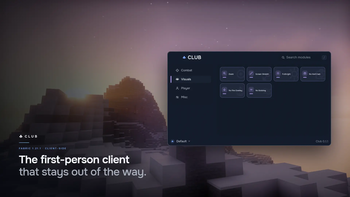
Right Shift. Flat, calm, dark. No glow, no glass, no cheat-client neon. Every module is a card; right-click a card for its own settings. The whole menu is keyboard-navigable, and every module can take its own hotkey.
## 👁️ See more
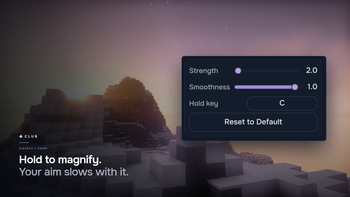
- 🔍 Zoom — hold C to magnify, with an eased FOV rather than a snap. Scroll while holding to dial it
- from 2× to 8×. Your look sensitivity slows with the zoom, so the world crosses the screen at one speed at any
- magnification — a zoom you can actually aim with.
- 💡 Fullbright — full brightness in caves and at night. It only touches the world lightmap, so your real
- Brightness slider and your `options.txt` are never overwritten.
- 🎥 Freelook — hold Left Alt to swing the camera around yourself without turning. Your aim and your
- movement don't change. It's a camera, not an aim tool.
- 🖼️ Screen Stretch, No Hurt Cam, No Fire Overlay, No Bobbing — a calmer view, your way.
## 🏃 Move better
- ⚡ Toggle Sprint — sprint without holding the key, with a quiet chip on screen so you always know it's on.
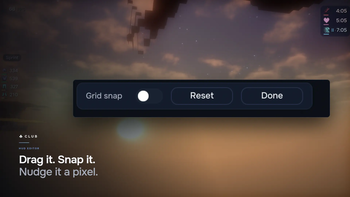
- ✋ Hands — reposition and scale the first-person hands, each hand independently.
- ⚔️ Custom attack animations — pick a style, then tune its speed and swing.
## ⚔️ In a fight
- 🛡️ Low Shield — a raised, blocking shield drops out of your face instead of covering half the screen.
- ✝️ Small Totem — the totem-of-undying pop is smaller and lifted out of the centre, so the pop that just
- saved you doesn't blind you to the fight it saved you from.
Both are always on, drawing-only, and the block and the totem work exactly as the game intends underneath.
- 📦 Hitboxes — restyle Minecraft's own F3+B hitbox overlay: one clean outline instead of the white box and
- two debug lines, coloured from the menu's palette, line width 1. 0–4. 0, and the entity under your crosshair
- picked out from the rest. It paints the game's own boxes — it never enlarges one, never draws through a wall,
- and adds no reach.
- 🎯 Hit Distance — a HUD readout of how far away your last hit landed, in blocks, held for ten seconds
- and then gone. It reports the hit you already threw, not the range to a target you have not — the line the
- Target chip won't cross either. Its on/off card lives in Combat.
## 📦 See inside a shulker
Shulker Tooltip — hover a shulker box (or any container item) and its contents appear as a chest-slot grid, the real items with their counts, without placing and opening it. Prefer Minecraft's plain text list? Turn it off in Misc.
## 🍗 Read the hunger bar in full
Saturation — an AppleSkin-style read on food and hunger, off until you turn it on in Misc. Your hidden saturation is drawn as a thin overlay on the hunger bar, and hovering a piece of food previews the hunger, saturation and hearts it would restore before you eat it.
It reads only values the client already holds, so it never asks the server for anything and behaves the same on a public server as in single-player. There is no exhaustion line: a vanilla server never sends that number to the client, so drawing it anywhere but single-player would be a guess dressed as a fact — and everything Saturation shows is a value the client genuinely has.
## ✨ Particles — choose what you see
Every particle the game has, sorted into groups you can reason about: Combat, Blocks, Ambient, Fire & Light, Water, Explosions and Status.
Pick a group on the left, flip particles one by one on the right — or use the group's own switch to turn all of it off at once. The search finds a particle across every group at the same time.
Everything is on by default. Club does not quietly take particles out of your game; the point is that the switches exist. Nothing is protected, either — the potion swirls sitting in your face in a fight are yours to turn off, like the rest of them.
A hidden particle is never created at all: not ticked, not drawn. This is a visual choice, not a performance feature. Turning types off does less work, but there is no number here, because the honest one depends entirely on what is on your screen at the time.
## 🖱️ Item Scrolling
Move items with the mouse instead of clicking them one at a time.
- Scroll over a slot to move one item · Shift for the whole stack · Ctrl for every stack of that
- type · Ctrl+Shift for everything · Shift+drag across slots to move each one you cross.
- Every gesture is rebindable — pick the modifier and the button for each action, on its own screen. Two
- actions can never share a gesture, and if one of yours overrides something vanilla already does with it, the
- row says so
📊 Mod Details
- Game
- Minecraft Mods
- Author
- ClubStudio
- Version
- 0.1.6+mc1.21.11
- Downloads
- 739
- Endorsements
- 5
- Category
- equipment
- Created
- 7/13/2026
- Updated
- 7/25/2026
- Game Versions
- 1.21.11
- Tags
- equipment, optimization, utility
🔧 How to Install Minecraft Mods Mods
Download from Modrinth. Use Prism Launcher or drop into your mods folder.
📖 Full step-by-step install guide for Minecraft Mods →
Visit the official mod page for specific installation instructions for this mod.
🎮 Need cheat codes or console commands? Check ur gaming wiki for Minecraft Mods commands, item IDs, and more.
❓ Frequently Asked Questions
Which Minecraft Mods versions does ClubClient support?
The author lists 1.21.11. Other versions may work but are untested by the author.
What is the latest version of ClubClient?
Version 0.1.6+mc1.21.11, published 2026-07-25 with 739 downloads recorded at the source.
Keep browsing — more Minecraft Mods mods await