Clipboard
🟠 Updated over a year ago⚠️ Install Order · 2 steps
Install in this order, then this mod last — most mods fail to load without their framework and dependencies in place.
🖼️ Gallery (3 images)
🔍 Analysis
- 👍 0.4% endorsement rate
- 🏆 #489 of 874 fabric mods in this game by downloads
📋 About This Mod
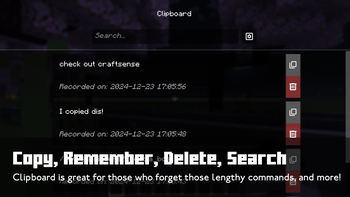
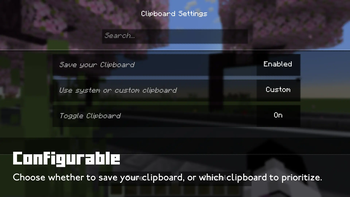
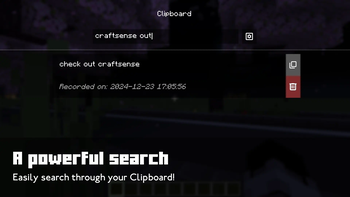
# Clipboard **Clipboard** is a Minecraft mod that introduces a clipboard manager in Minecraft! Useful to save long commands right in-game and be able to copy them right away at any time. You can also choose whether to prioritize the System clipboard or the Custom clipboard, choose whether to save the clipboard or not, or to enable/disable it altogether. To open the Clipboard screen, press (B) by default, and click on the Settings button to configure it. !(https://cdn.modrinth.com/data/cached_images/604e13c0bbb215b6cdf1284a1d7e748c3d4abc37_0.webp) (https://cdn.modrinth.com/data/cached_images/a685ead2dbd4fde1c93e6ee01ec6f35525610d12.png)](https://modrinth.com/mod/omnilib) **Requires Fabric API and Omnilib. Also compatible with Forge and NeoForge, using (https://modrinth.com/mod/connector), requires (https://modrinth.com/mod/forgified-fabric-api).** !(https://cdn.modrinth.com/data/cached_images/e3334517c4414a7768a5f5ea52d8b5879614f042_0.webp) ## **How it works** **If Clipboard is enabled and Custom Clipboard is prioritized**: - **Ctrl + C**: Copies to both the System clipboard and the Custom clipboard. - **Ctrl + V**: Pastes from the Custom clipboard. **If Clipboard is enabled but Custom Clipboard is not prioritized**: - **Ctrl + C**: Copies to both the System clipboard and the Custom clipboard. - **Ctrl + V**: Pastes from the System clipboard. **If Clipboard is disabled**: - The Custom clipboard will remain untouched and inactive, but you can still view its contents. **Managing Clipboard Items**: - **Delete an item**: Press the delete button or use **Shift + Left Click**. - **Copy an item**: Left Click the item or click the Copy button to move it to the top of the list, and copy to your System and Custom Clipboard. **Official Downloads**: - CurseForge: https://www.curseforge.com/minecraft/mc-mods/clipboardplus - GitHub: https://github.com/dooji2/clipboard - Modrinth: https://modrinth.com/mod/clipboard
# Clipboard
Clipboard is a Minecraft mod that introduces a clipboard manager in Minecraft! Useful to save long commands right in-game and be able to copy them right away at any time. You can also choose whether to prioritize the System clipboard or the Custom clipboard, choose whether to save the clipboard or not, or to enable/disable it altogether. To open the Clipboard screen, press (B) by default, and click on the Settings button to configure it.
!(https://cdn.modrinth.com/data/cached_images/604e13c0bbb215b6cdf1284a1d7e748c3d4abc37_0.webp) [!(https://cdn.modrinth.com/data/cached_images/a685ead2dbd4fde1c93e6ee01ec6f35525610d12.png)](https://modrinth.com/mod/omnilib)
Requires Fabric API and Omnilib. Also compatible with Forge and NeoForge, using (https://modrinth.com/mod/connector), requires (https://modrinth.com/mod/forgified-fabric-api).**
!(https://cdn.modrinth.com/data/cached_images/e3334517c4414a7768a5f5ea52d8b5879614f042_0.webp)
## How it works If Clipboard is enabled and Custom Clipboard is prioritized: - Ctrl + C: Copies to both the System clipboard and the Custom clipboard. - Ctrl + V: Pastes from the Custom clipboard.
If Clipboard is enabled but Custom Clipboard is not prioritized: - Ctrl + C: Copies to both the System clipboard and the Custom clipboard. - Ctrl + V: Pastes from the System clipboard.
If Clipboard is disabled: - The Custom clipboard will remain untouched and inactive, but you can still view its contents.
Managing Clipboard Items: - Delete an item: Press the delete button or use Shift + Left Click. - Copy an item: Left Click the item or click the Copy button to move it to the top of the list, and copy to your System and Custom Clipboard.
Official Downloads**: - CurseForge: https://www.curseforge.com/minecraft/mc-mods/clipboardplus - GitHub: https://github.com/dooji2/clipboard - Modrinth: https://modrinth.com/mod/clipboard
📊 Mod Details
- Game
- Minecraft Mods
- Author
- Dooji
- Version
- 1.0.1
- Downloads
- 1,800
- Endorsements
- 8
- Category
- fabric
- Created
- 12/23/2024
- Updated
- 12/23/2024
- Game Versions
- 1.21, 1.21.1
- Tags
- management, technology, utility
🔧 How to Install Minecraft Mods Mods
Download from Modrinth. Use Prism Launcher or drop into your mods folder.
📖 Full step-by-step install guide for Minecraft Mods →
Visit the official mod page for specific installation instructions for this mod.
🎮 Need cheat codes or console commands? Check ur gaming wiki for Minecraft Mods commands, item IDs, and more.
❓ Frequently Asked Questions
Which Minecraft Mods versions does Clipboard support?
The author lists 1.21, 1.21.1. Other versions may work but are untested by the author.
What is the latest version of Clipboard?
Version 1.0.1, published 2024-12-23 with 1,800 downloads recorded at the source.
Keep browsing — more Minecraft Mods mods await