Client Ping
⚪ Last updated 2023⚠️ Install Order · 2 steps
Install in this order, then this mod last — most mods fail to load without their framework and dependencies in place.
🖼️ Gallery (1 images)
🔍 Analysis
- 👍 1.2% endorsement rate — high engagement, a strong quality signal
📋 About This Mod
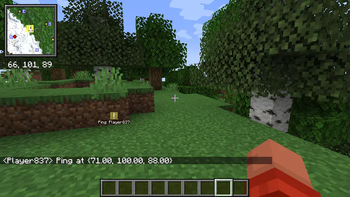
# Client Ping **Client Ping** is a client-side Minecraft mod that implements "pinging" (marking an object as a point of interest) on vanilla servers. ## Usage By default, **Client Ping** uses the <kbd>z</kbd> key to ping the block you are looking at (within 1000m). You can change this key bind in the Minecraft controls menu. Pings will be visible for a short time to yourself and all players on the same server with this mod installed. - Pings disappear after 10 seconds (configurable through (https://modrinth.com/mod/modmenu)) - You may ping once per second ## How it works **Client Ping** works by sending pings through vanilla server chat. This way, even players without the mod installed can see the coordinate you have pinged. No more copying from the <kbd>F3</kbd> menu! Chat messages come in the following format: ```text <Player> Ping at {x.xx, y.yy, z.zz} ``` When a client receives and parses one of these ping messages, a temporary waypoint is injected into (https://modrinth.com/mod/xaeros-minimap). This allows the ping mark to be rendered on screen according to your existing waypoint rendering settings. It'll also be marked on your map if you have (https://modrinth.com/mod/xaeros-world-map) installed.
# Client Ping
Client Ping is a client-side Minecraft mod that implements "pinging" (marking an object as a point of interest) on vanilla servers.
By default, Client Ping uses the z key to ping the block you are looking at (within 1000m). You can change this key bind in the Minecraft controls menu.
Pings will be visible for a short time to yourself and all players on the same server with this mod installed.
- Pings disappear after 10 seconds (configurable through (https://modrinth.com/mod/modmenu))
- You may ping once per second
## How it works
Client Ping works by sending pings through vanilla server chat. This way, even players without the mod installed can see the coordinate you have pinged. No more copying from the F3 menu!
Chat messages come in the following format:
```text
When a client receives and parses one of these ping messages, a temporary waypoint is injected into (https://modrinth.com/mod/xaeros-minimap). This allows the ping mark to be rendered on screen according to your existing waypoint rendering settings. It'll also be marked on your map if you have (https://modrinth.com/mod/xaeros-world-map) installed.
📊 Mod Details
- Game
- Minecraft Mods
- Author
- ewpratten
- Version
- 1.2.0+1.20
- Downloads
- 909
- Endorsements
- 11
- Category
- quilt
- Created
- 4/28/2023
- Updated
- 6/12/2023
- Game Versions
- 1.20, 1.20.1
- Tags
- social, utility
🔧 How to Install Minecraft Mods Mods
Download from Modrinth. Use Prism Launcher or drop into your mods folder.
📖 Full step-by-step install guide for Minecraft Mods →
Visit the official mod page for specific installation instructions for this mod.
🎮 Need cheat codes or console commands? Check ur gaming wiki for Minecraft Mods commands, item IDs, and more.
❓ Frequently Asked Questions
Which Minecraft Mods versions does Client Ping support?
The author lists 1.20, 1.20.1. Other versions may work but are untested by the author.
What is the latest version of Client Ping?
Version 1.2.0+1.20, published 2023-06-12 with 909 downloads recorded at the source.
Keep browsing — more Minecraft Mods mods await