Stardew Chest Buttons
🟡 Updated this year⚠️ Install Order · 2 steps
Install in this order, then this mod last — most mods fail to load without their framework and dependencies in place.
🖼️ Gallery (4 images)
🔍 Analysis
- 👍 0.5% endorsement rate
- 🏆 #141 of 896 fabric mods in this game by downloads
📋 About This Mod
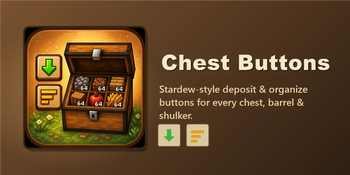
**Chest Buttons** recreates two of Stardew Valley's most-loved chest-UI buttons in Minecraft. Open any chest, double chest, barrel, or shulker box and two icon buttons appear on the left side of the screen: - **Add to Existing Stacks**: for every item type the chest already holds, instantly moves all your matching items into it. It tops up existing stacks first, then starts new stacks in any empty slots, so a chest that already has some cobblestone will swallow your entire cobblestone haul in one click. Item types the chest *doesn't* already contain are left in your inventory - it never dumps unrelated items in. - **Organize**: consolidates partial stacks and sorts the entire chest neatly by item. No more dragging items one stack at a time. Deposit and tidy a chest in a single click. **Multiplayer** Fully server-aware. The buttons are drawn client-side, but every item move is validated on the server, so it's completely cheat-safe. The mod is **required on both the client and the server**; if only the client has it, the buttons simply won't appear. **Requirements** - Minecraft **26.2** - **Fabric Loader** and **Fabric API** - Java **25**
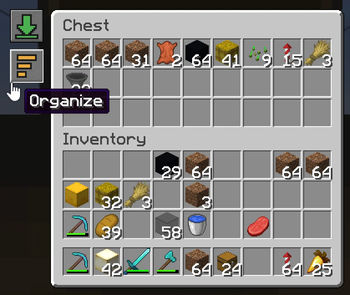
Chest Buttons recreates two of Stardew Valley's most-loved chest-UI buttons in Minecraft. Open any chest, double chest, barrel, or shulker box and two icon buttons appear on the left side of the screen:
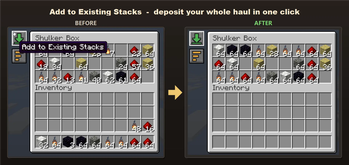
- Add to Existing Stacks: for every item type the chest already holds, instantly moves all your matching items into it. It tops up existing stacks first, then starts new stacks in any empty slots, so a chest that already has some cobblestone will swallow your entire cobblestone haul in one click. Item types the chest doesn't already contain are left in your inventory - it never dumps unrelated items in.
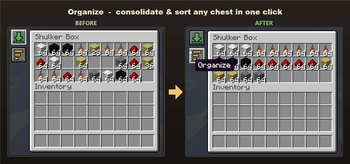
- Organize: consolidates partial stacks and sorts the entire chest neatly by item.
No more dragging items one stack at a time. Deposit and tidy a chest in a single click.
Multiplayer
Fully server-aware. The buttons are drawn client-side, but every item move is validated on the server, so it's completely cheat-safe. The mod is required on both the client and the server; if only the client has it, the buttons simply won't appear.
Requirements
- Minecraft 26. 2
- Fabric Loader and Fabric API
- Java 25
📊 Mod Details
- Game
- Minecraft Mods
- Author
- johnnyscriptt
- Version
- 1.0.0
- Downloads
- 566
- Endorsements
- 3
- Category
- fabric
- Created
- 7/15/2026
- Updated
- 7/9/2026
- Game Versions
- 26.2
- Tags
- management, storage, utility
🔧 How to Install Minecraft Mods Mods
Download from Modrinth. Use Prism Launcher or drop into your mods folder.
📖 Full step-by-step install guide for Minecraft Mods →
Visit the official mod page for specific installation instructions for this mod.
🎮 Need cheat codes or console commands? Check ur gaming wiki for Minecraft Mods commands, item IDs, and more.
❓ Frequently Asked Questions
Which Minecraft Mods versions does Stardew Chest Buttons support?
The author lists 26.2. Other versions may work but are untested by the author.
What is the latest version of Stardew Chest Buttons?
Version 1.0.0, published 2026-07-09 with 566 downloads recorded at the source.
Keep browsing — more Minecraft Mods mods await