CheckYourChest
🟠 Updated over a year ago⚠️ Install Order · 2 steps
Install in this order, then this mod last — most mods fail to load without their framework and dependencies in place.
🖼️ Gallery (1 images)
🔍 Analysis
- 🏆 #277 of 367 forge mods in this game by downloads
📋 About This Mod
<p align="center"> <img src="https://github.com/user-attachments/assets/aff5f6d0-e6aa-4339-9aeb-2bee402dbfe4" alt="checkyourchest_header""/> </p> <h1 align="center">CheckYourChest</h1> <p align="center"> <strong>CheckYourChest</strong> is a Minecraft utility mod designed for both servers and single-player worlds, perfect for players managing farms or automated item systems. The mod allows players to mark specific chests, track their contents in real-time, and receive detailed inventories via a webhook directly to a Discord server.<br><br> Whether you're away from your base or want to monitor your storage, CheckYourChest provides a seamless way to stay updated on what's happening in your chests. <br> <img src="https://minecraft.wiki/images/Invicon_Chest.png" alt="Chest Icon" /> </p> --- ## Features🛠️ - **Mark Any Chest** Mark any single or double chest in your world and monitor its contents. - **Track Single and Double Chests** Automatically handle both single and double chests with ease. - **Real-Time Updates** Monitor chest contents in real-time and automatically send updates at specified intervals. - **Discord Integration via Webhook** Send detailed inventory reports directly to a Discord channel using a webhook. - **Ideal for Automated Systems** Perfect for automation, farms, and large storage systems where keeping track of resources is essential. --- ## How It Works 1. **Marking a Chest** Use a custom item (`Marking Stick`) to mark any chest. When a chest is marked, its contents will be tracked and updated at regular intervals. 2. **Chest Monitoring** Track the chest's contents in real-time. The mod works with both single and double chests, ensuring comprehensive tracking for all your storage needs. 3. **Automatic Webhook Updates** At each interval (defined in the config), the contents of the marked chest(s) are sent to your designated Discord webhook, providing a detailed list of items and their quantities. --- ## Installation 1. **Requirements** - Minecraft Forge (Version 1.20.1 or above) - (https://github.com/your-repo/checkyourchest/releases) of the mod 2. **Install the Mod** - Place the downloaded `.jar` file into your Minecraft `mods` folder. - Ensure you have the correct Forge version installed. --- ## Configuration🔧 1. **Webhook Setup** To set up a Discord webhook, follow these steps: - Go to your Discord channel settings. - Under the "Integrations" tab, create a new webhook and copy its URL. - Start the server / client world once. - Now you can either enter the command `/cyc setWebhookURL <URL>` or paste the URL in the mod's configuration file (`config/checkyourchest-common.toml`). - Restart the server. 2. **Interval Settings** You can customize how often chest updates are sent to the webhook by adjusting the `checkInterval` in the config file. This value is in minutes. For example: ``` checkInterval = 60 # Sends updates every hour ``` Additionally, you can set the interval dynamically in-game using the following command: ``` /cyc setCheckInterval <minutes> ``` ## Usage 1. **Command to Get the Marking Stick** Use the `/cyc` command in the game to get the **Marking Stick**. This special item allows you to mark chests for monitoring. 2. **Marking a Chest** To mark a chest, hold the **Marking Stick** and **sneak right-click** on the chest you want to track. The mod will start monitoring the contents of the chest and send updates to your webhook at the configured interval. 3. **Unmarking a Chest** To unmark a chest, simply **sneak right-click** on the marked chest or any other block with the **Marking Stick**, and the chest will be unmarked. ## Force Load Chunks You can also use the `/cyc forceload <true|false>` command to enable or disable chunk force loading for marked chests. This ensures that the chunk where the chest is located remains loaded, even if no players are nearby. Additionally, you can configure this setting in the mod's configuration file (`config/checkyourchest-common.toml`). For example: ```toml forceLoadChunks = true # Ensures marked chests' chunks are always loaded ``` By default, chunk force loading is disabled. If enabled, chunks containing marked chests will remain loaded to guarantee uninterrupted monitoring and updates. --- <p align="center">Made with Love ❤️</p>
CheckYourChest
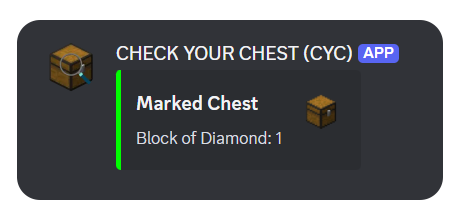
CheckYourChest is a Minecraft utility mod designed for both servers and single-player worlds, perfect for players managing farms or automated item systems. The mod allows players to mark specific chests, track their contents in real-time, and receive detailed inventories via a webhook directly to a Discord server.
Whether you're away from your base or want to monitor your storage, CheckYourChest provides a seamless way to stay updated on what's happening in your chests.

## Features🛠️
- Mark Any Chest
- Mark any single or double chest in your world and monitor its contents.
- Track Single and Double Chests
- Automatically handle both single and double chests with ease.
- Real-Time Updates
- Monitor chest contents in real-time and automatically send updates at specified intervals.
- Discord Integration via Webhook
- Send detailed inventory reports directly to a Discord channel using a webhook.
- Ideal for Automated Systems
- Perfect for automation, farms, and large storage systems where keeping track of resources is essential.
## How It Works
1. Marking a Chest Use a custom item (`Marking Stick`) to mark any chest. When a chest is marked, its contents will be tracked and updated at regular intervals.
2. Chest Monitoring Track the chest's contents in real-time. The mod works with both single and double chests, ensuring comprehensive tracking for all your storage needs.
3. Automatic Webhook Updates At each interval (defined in the config), the contents of the marked chest(s) are sent to your designated Discord webhook, providing a detailed list of items and their quantities.
## Installation
1. Requirements - Minecraft Forge (Version 1. 20. 1 or above) - (https://github.com/your-repo/checkyourchest/releases) of the mod
2. Install the Mod - Place the downloaded `.jar` file into your Minecraft `mods` folder. - Ensure you have the correct Forge version installed.
## Configuration🔧
1. Webhook Setup
To set up a Discord webhook, follow these steps:
- Go to your Discord channel settings.
- Under the "Integrations" tab, create a new webhook and copy its URL.
- Start the server / client world once.
- Now you can either enter the command `/cyc setWebhookURL
2. Interval Settings
You can customize how often chest updates are sent to the webhook by adjusting the `checkInterval` in the config file. This value is in minutes. For example:
```
checkInterval = 60 # Sends updates every hour
```
Additionally, you can set the interval dynamically in-game using the following command:
```
/cyc setCheckInterval
1. Command to Get the Marking Stick Use the `/cyc` command in the game to get the Marking Stick. This special item allows you to mark chests for monitoring.
2. Marking a Chest To mark a chest, hold the Marking Stick and sneak right-click on the chest you want to track. The mod will start monitoring the contents of the chest and send updates to your webhook at the configured interval.
3. Unmarking a Chest To unmark a chest, simply sneak right-click on the marked chest or any other block with the Marking Stick, and the chest will be unmarked. ## Force Load Chunks
You can also use the `/cyc forceload
Additionally, you can configure this setting in the mod's configuration file (`config/checkyourchest-common.toml`). For example: ```toml forceLoadChunks = true # Ensures marked chests' chunks are always loaded ``` By default, chunk force loading is disabled. If enabled, chunks containing marked chests will remain loaded to guarantee uninterrupted monitoring and updates.
- --
Made with Love ❤️
📊 Mod Details
- Game
- Minecraft Mods
- Author
- samxel
- Version
- 1.0
- Downloads
- 394
- Endorsements
- 7
- Category
- forge
- Created
- 6/21/2025
- Updated
- 6/13/2025
- Game Versions
- 1.21.1
- Tags
- game-mechanics, storage, technology
🔧 How to Install Minecraft Mods Mods
Download from Modrinth. Use Prism Launcher or drop into your mods folder.
📖 Full step-by-step install guide for Minecraft Mods →
Visit the official mod page for specific installation instructions for this mod.
🎮 Need cheat codes or console commands? Check ur gaming wiki for Minecraft Mods commands, item IDs, and more.
❓ Frequently Asked Questions
Which Minecraft Mods versions does CheckYourChest support?
The author lists 1.21.1. Other versions may work but are untested by the author.
What is the latest version of CheckYourChest?
Version 1.0, published 2025-06-13 with 394 downloads recorded at the source.
Keep browsing — more Minecraft Mods mods await