Chat Screen
🟡 Updated this year⚠️ Install Order · 2 steps
Install in this order, then this mod last — most mods fail to load without their framework and dependencies in place.
🖼️ Gallery (1 images)
🔍 Analysis
- 👍 0.1% endorsement rate
- 🏆 #578 of 920 fabric mods in this game by downloads
📋 About This Mod
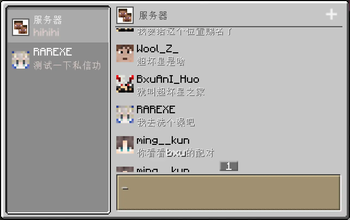
# Chat Screen This mod add a modern chat screen to Minecraft. The new chat screen is specifically designed for chatting of players. This mod is **client-side only** and has no effect on the server-side. !(https://cdn.modrinth.com/data/cached_images/025490f26ca915a521cf6441ceccb40a6fe6accd.jpeg) ## Use chat screen The chat screen is only available in Multiplayer worlds. When the client connected to a server (including integrated servers, just like the vanilla social interactions screen), you can open the chat screen with **C key** (defaulted). ## Server chat You can always use the Server chat to send or receive chat message of the server. When you send a message through this chat, the client will send this message to the server like you type it in vanilla chat hud. ## Team chat You can use the Team chat when you are joined to a team. When you send a message through this chat, the client will send a `/teammsg`(the same as `/tm`) command to the server. ## Personal chat You can use a personal chat of any online player. When you send a message through this chat, the client will send a `/msg`(the same as `/tell` or `/w`) command to the server. # FAQ - Unable to receive messages (of one or all types) through the chat screen. This may be due to the server using a custom format to sent clients chat messages. Some plugins, such as CMI, can change that format. If so, the chat screen cannot be used normally on this server unless you can persuade the admin to disable that custom format. - Unable to send messages (of one or all types) through the chat screen. This may be due to the server disabling some commands of sending message, like `/msg`, `/teammsg` and so on. If so, the chat screen cannot send that kind of message normally on this server unless you can persuade the admin to reenable those commands.
# Chat Screen This mod add a modern chat screen to Minecraft. The new chat screen is specifically designed for chatting of players.
This mod is client-side only and has no effect on the server-side.
!(https://cdn.modrinth.com/data/cached_images/025490f26ca915a521cf6441ceccb40a6fe6accd.jpeg)
## Use chat screen The chat screen is only available in Multiplayer worlds.
When the client connected to a server (including integrated servers, just like the vanilla social interactions screen), you can open the chat screen with C key (defaulted).
## Server chat You can always use the Server chat to send or receive chat message of the server. When you send a message through this chat, the client will send this message to the server like you type it in vanilla chat hud.
## Team chat You can use the Team chat when you are joined to a team. When you send a message through this chat, the client will send a `/teammsg`(the same as `/tm`) command to the server.
## Personal chat You can use a personal chat of any online player. When you send a message through this chat, the client will send a `/msg`(the same as `/tell` or `/w`) command to the server.
- Unable to receive messages (of one or all types) through the chat screen.
This may be due to the server using a custom format to sent clients chat messages. Some plugins, such as CMI, can change that format.
If so, the chat screen cannot be used normally on this server unless you can persuade the admin to disable that custom format.
- Unable to send messages (of one or all types) through the chat screen.
This may be due to the server disabling some commands of sending message, like `/msg`, `/teammsg` and so on.
If so, the chat screen cannot send that kind of message normally on this server unless you can persuade the admin to reenable those commands.
📊 Mod Details
- Game
- Minecraft Mods
- Author
- whyvo
- Version
- 0.1.2
- Downloads
- 4,753
- Endorsements
- 7
- Category
- fabric
- Created
- 11/9/2025
- Updated
- 11/6/2025
- Game Versions
- 1.21.1
- Tags
- social
🔧 How to Install Minecraft Mods Mods
Download from Modrinth. Use Prism Launcher or drop into your mods folder.
📖 Full step-by-step install guide for Minecraft Mods →
Visit the official mod page for specific installation instructions for this mod.
🎮 Need cheat codes or console commands? Check ur gaming wiki for Minecraft Mods commands, item IDs, and more.
❓ Frequently Asked Questions
Which Minecraft Mods versions does Chat Screen support?
The author lists 1.21.1. Other versions may work but are untested by the author.
What is the latest version of Chat Screen?
Version 0.1.2, published 2025-11-06 with 4,753 downloads recorded at the source.
Keep browsing — more Minecraft Mods mods await