chatqalc
⚪ Last updated 2023⚠️ Install Order · 2 steps
Install in this order, then this mod last — most mods fail to load without their framework and dependencies in place.
🖼️ Gallery (3 images)
🔍 Analysis
- 👍 0.8% endorsement rate
- 🏆 #454 of 896 fabric mods in this game by downloads
📋 About This Mod
# ChatQalc An interface to (https://github.com/Qalculate/libqalculate#readme) - the best cli calculator. (Included for Windows/Linux) !(https://camo.githubusercontent.com/a9c9f614b77ffdafc7b32741cbdd0a0b2288bb110c5bb3a1cba4c17e344ad24f/687474703a2f2f71616c63756c6174652e6769746875622e696f2f696d616765732f71616c632e706e67) ### Features - Installs and runs portable interactive `qalc` cli calculator when you start Minecraft - Operates in chat screen (`T` or `/`) - `NumPadEnter` or `Ctrl+Enter` = Send message to qalc instead of chat - `Ctrl+Tab` = Convert last expression without spaces to calculated result (escape spaces with `\`) - `Shift+Enter` = Send message to qalc and replace chat field with last line of the result (You can look at the result and decide to share it with everybody by pressing `Enter`) - `Ctrl+Shift+Enter` = Same as `Ctrl+Enter`, but result is broadcast from your name to the whole server. And without colors. (Use when you want to share multiple lines) - `Shift+Tab` = Get completions - Chat history of your queries. Very helpful. - Open config in ModMenu to get a graphical interface. All settings are there. (`Edit` tab) - Some Minecraft-related units and variables (`100it = 1 stack + 36 items`) `it` `st` `sb` `pdc` `pdcwh` `gt` `iph` `hs`, `ch`|`chunk`|`chunks` ### Qalculate! features https://qalculate.github.io/features.html Manual: https://qalculate.github.io/manual/qalc.html Most notably: - `/help` then `Ctrl+Enter` - Use `->` for unit conversion (`1km->m = 1000 m`) - Fault-tolerant parsing of strings (almost natural language) - Ability to disable functions, variables, units or unknown variables for less confusion: e.g. when you do not want (a+b)^2 to mean (are+barn)^2 but ("a"+"b")^2 - Verbose error messages, Arbitrary precision - Symbolic calculation - Functions, Units, Variables, Constants (persistent between restarts) - Gnuplot (opens a new window with plot, you have to install GNUplot separately for it to work) - Comments start with `#` You can get a 30KB noinstall version if you (https://qalculate.github.io/downloads.html) or link Qalculate to `./minecraft/config/chatqalc/` manually or run the full version once. <a href='https://ko-fi.com/M4M4I866V' target='_blank'><img height='36' style='border:0px;height:36px;' src='https://storage.ko-fi.com/cdn/kofi1.png?v=3' border='0' alt='Buy Me a Coffee at ko-fi.com' /></a>
An interface to (https://github.com/Qalculate/libqalculate#readme) - the best cli calculator. (Included for Windows/Linux) 
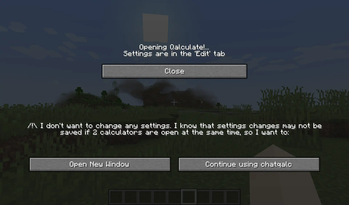
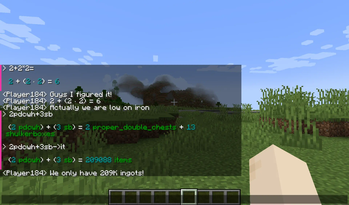
### Features - Installs and runs portable interactive `qalc` cli calculator when you start Minecraft - Operates in chat screen (`T` or `/`) - `NumPadEnter` or `Ctrl+Enter` = Send message to qalc instead of chat - `Ctrl+Tab` = Convert last expression without spaces to calculated result (escape spaces with `\`) - `Shift+Enter` = Send message to qalc and replace chat field with last line of the result (You can look at the result and decide to share it with everybody by pressing `Enter`) - `Ctrl+Shift+Enter` = Same as `Ctrl+Enter`, but result is broadcast from your name to the whole server. And without colors. (Use when you want to share multiple lines) - `Shift+Tab` = Get completions - Chat history of your queries. Very helpful. - Open config in ModMenu to get a graphical interface. All settings are there. (`Edit` tab) - Some Minecraft-related units and variables (`100it = 1 stack + 36 items`) `it` `st` `sb` `pdc` `pdcwh` `gt` `iph` `hs`, `ch`|`chunk`|`chunks`
### Qalculate! features https://qalculate.github.io/features.html
Manual: https://qalculate.github.io/manual/qalc.html
Most notably: - `/help` then `Ctrl+Enter` - Use `->` for unit conversion (`1km->m = 1000 m`) - Fault-tolerant parsing of strings (almost natural language) - Ability to disable functions, variables, units or unknown variables for less confusion: e.g. when you do not want (a+b)^2 to mean (are+barn)^2 but ("a"+"b")^2 - Verbose error messages, Arbitrary precision - Symbolic calculation - Functions, Units, Variables, Constants (persistent between restarts) - Gnuplot (opens a new window with plot, you have to install GNUplot separately for it to work) - Comments start with `#`
You can get a 30KB noinstall version if you (https://qalculate.github.io/downloads.html) or link Qalculate to `./minecraft/config/chatqalc/` manually or run the full version once.

📊 Mod Details
- Game
- Minecraft Mods
- Author
- vlad2305m
- Version
- 1.2.1
- Downloads
- 523
- Endorsements
- 4
- Category
- fabric
- Created
- 8/24/2023
- Updated
- 8/19/2023
- Game Versions
- 1.20, 1.20.1, 1.20.2, 1.20.3, 1.20.4
- Tags
- utility
🔧 How to Install Minecraft Mods Mods
Download from Modrinth. Use Prism Launcher or drop into your mods folder.
📖 Full step-by-step install guide for Minecraft Mods →
Visit the official mod page for specific installation instructions for this mod.
🎮 Need cheat codes or console commands? Check ur gaming wiki for Minecraft Mods commands, item IDs, and more.
❓ Frequently Asked Questions
Which Minecraft Mods versions does chatqalc support?
The author lists 1.20, 1.20.1, 1.20.2, 1.20.3, 1.20.4. Other versions may work but are untested by the author.
What is the latest version of chatqalc?
Version 1.2.1, published 2023-08-19 with 523 downloads recorded at the source.
Keep browsing — more Minecraft Mods mods await