chatbox
🟡 Updated this year⚠️ Install Order · 2 steps
Install in this order, then this mod last — most mods fail to load without their framework and dependencies in place.
🖼️ Gallery (3 images)
🔍 Analysis
- 👍 0.0% endorsement rate
- 🏆 #980 of 1032 fabric mods in this game by downloads
📋 About This Mod
# Mod Introduction ChatBox is a dialog box mod designed for Minecraft, inspired by the dialog systems found in Galgames. You can configure it using data packs: - Pre-set multiple themes for dialog boxes and switch between them anytime using commands. - Customize the appearance, position, and size of dialog boxes, option boxes, history buttons, and character portraits. - Character portraits support multiple types: images, player avatars, and item textures. You can define custom entry animations for these portraits, with images having 3 preset animations. - Configure dialog text and multiple options for each line. Clicking options can trigger custom commands and jump to other dialogs. - All text elements (dialogs, options) support translation keys. Since all dialog configurations are implemented through data packs, you can reload all dialog settings directly using the /reload command. Create beautiful dialog systems without modifying any code! # Built-in Commands Switch themes: /chatbox theme <data_pack_path : ResourceLocation> Jump to a specific dialog: /chatbox skip <data_pack_path : ResourceLocation> <group : String> <index : int> Open dialog box: /chatbox open # Event System For KubeJS users, the mod provides predefined events: ```javascript //client_script // Triggered BEFORE dialog rendering. Provides GuiGraphics for custom rendering. Cancellable. ChatBoxEvents.renderPre(event=>{ let getGuiGraphics = event.getGuiGraphics() event.cancel() }) // Triggered AFTER dialog rendering. Provides GuiGraphics for custom rendering. ChatBoxEvents.renderPost(event=>{ let getGuiGraphics = event.getGuiGraphics() }) // Triggered when jumping to a dialog. Provides dialog metadata for custom functionality. ChatBoxEvents.skipChat(event => { let { chatBoxScreen, resourceLocation, group, index } = event }) ``` Additional Information Example data packs and documentation are available on GitHub. Upcoming feature: The author is developing a web-based JSON generator to simplify dialog configuration. Stay tuned for its release!
# Mod Introduction
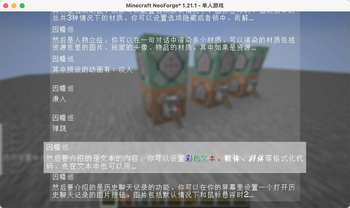
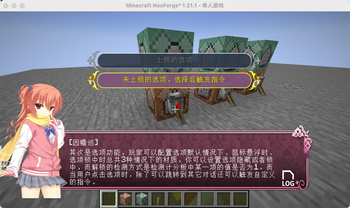
ChatBox is a dialog box mod designed for Minecraft, inspired by the dialog systems found in Galgames. You can configure it using data packs:
- Pre-set multiple themes for dialog boxes and switch between them anytime using commands.
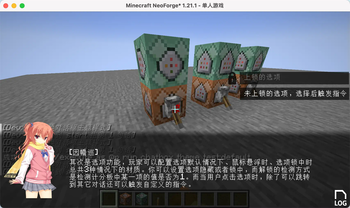
- Customize the appearance, position, and size of dialog boxes, option boxes, history buttons, and character portraits.
- Character portraits support multiple types: images, player avatars, and item textures. You can define custom entry animations for these portraits, with images having 3 preset animations.
- Configure dialog text and multiple options for each line. Clicking options can trigger custom commands and jump to other dialogs.
- All text elements (dialogs, options) support translation keys.
Since all dialog configurations are implemented through data packs, you can reload all dialog settings directly using the /reload command. Create beautiful dialog systems without modifying any code!
# Built-in Commands
Switch themes:
/chatbox theme
Jump to a specific dialog:
/chatbox skip
Open dialog box:
/chatbox open
# Event System
For KubeJS users, the mod provides predefined events:
```javascript //client_script
// Triggered BEFORE dialog rendering. Provides GuiGraphics for custom rendering. Cancellable. ChatBoxEvents.renderPre(event=>{ let getGuiGraphics = event.getGuiGraphics() event.cancel() })
// Triggered AFTER dialog rendering. Provides GuiGraphics for custom rendering. ChatBoxEvents.renderPost(event=>{ let getGuiGraphics = event.getGuiGraphics() })
// Triggered when jumping to a dialog. Provides dialog metadata for custom functionality. ChatBoxEvents.skipChat(event => { let { chatBoxScreen, resourceLocation, group, index } = event }) ``` Additional Information
Example data packs and documentation are available on GitHub. Upcoming feature: The author is developing a web-based JSON generator to simplify dialog configuration. Stay tuned for its release!
📊 Mod Details
- Game
- Minecraft Mods
- Author
- zhenshiz
- Version
- 1.1.4-forge-1.20.1
- Downloads
- 96,920
- Endorsements
- 10
- Category
- fabric
- Created
- 5/30/2025
- Updated
- 7/3/2026
- Game Versions
- 1.20.1
- Tags
- technology
🔧 How to Install Minecraft Mods Mods
Download from Modrinth. Use Prism Launcher or drop into your mods folder.
📖 Full step-by-step install guide for Minecraft Mods →
Visit the official mod page for specific installation instructions for this mod.
🎮 Need cheat codes or console commands? Check ur gaming wiki for Minecraft Mods commands, item IDs, and more.
❓ Frequently Asked Questions
Which Minecraft Mods versions does chatbox support?
The author lists 1.20.1. Other versions may work but are untested by the author.
What is the latest version of chatbox?
Version 1.1.4-forge-1.20.1, published 2026-07-03 with 96,920 downloads recorded at the source.
Keep browsing — more Minecraft Mods mods await