Chat Upgrade
🟡 Updated this year⚠️ Install Order · 2 steps
Install in this order, then this mod last — most mods fail to load without their framework and dependencies in place.
🖼️ Gallery (8 images)
🔍 Analysis
- 👍 0.9% endorsement rate
- 🏆 #352 of 896 fabric mods in this game by downloads
📋 About This Mod
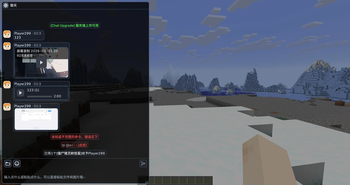
### English Description **Chat Upgrade** is a Fabric mod that enhances Minecraft chat with rich media rendering. #### Key Features - **Inline media preview**: Recognizes `]` payloads and replaces links with placeholders. Renders images, audio players, and video players directly inside the chat message area. - **Inline emojis**: Uses `` syntax (e.g. ``) and a mapping from `owo.json` to display square emoji images. - **Flexible upload modes**: - **Auto mode (default)**: If the server supports media uploads, files go directly to the server. Otherwise, uses third‑party hosting (Litterbox, ~1h expiry). - **Server mode / Third‑party mode**: Forced routing via commands or config. - **Optional server‑side storage**: When installed on the server, clients upload media directly to the server. Other clients fetch the bytes via server packets and render them. - **Rich command system**: Upload from folder, picker, or clipboard; adjust volumes, limits, manual reveal toggles, and plugin management (FFmpeg, APNG). - **High‑definition rendering**: Uses supersampling and proper texture scaling to keep previews sharp at any GUI scale or window size. - **ChatImage compatibility mode**: Can send images using the `]` format for compatibility with ChatImage. #### Commands (Client‑side, `/chatupgrade …`) - `send`, `sendaudio`, `sendvideo` – Send a URL as a media payload. - `upload folder|pick|paste` – Upload and send image from local path/file picker/clipboard. - `uploadaudio`, `uploadvideo` – Same for audio or video files. - `config …` – Change upload mode, manual reveal, volumes, size limits, smooth scroll, etc. - `plugin status|load|download` – Manage FFmpeg and APNG plugins (auto‑downloaded on first use). #### Configuration File: `config/chat-upgrade/chat-upgrade.json` Options include: `ciCompatibility`, `manualImageReveal`, `audioVolumePercent`, `maxReceiveBytes`, `uploadMode`, and more. Reloadable in‑game. #### Notes - FFmpeg and APNG plugins are **not bundled** – they are downloaded automatically on first use to `config/chat-upgrade/libs/`. - Server‑side direct upload mode does **not** support the `CICode` compatibility format. - Supported formats: images (png, apng, jpg, gif, webp, bmp, tif, ico, etc.), audio (ogg, wav, mp3, flac, m4a, aac, opus, webm), video (mp4, webm, mov, mkv, m4v, avi). --- ### 中文说明 **Chat Upgrade** 是一款基于 Fabric 的模组,让 Minecraft 聊天支持丰富的多媒体渲染。 #### 主要功能 - **内联媒体预览**:识别形如 `]` 的载荷文本,将链接替换为占位符,并在聊天消息区域内直接渲染图片、音频播放器和视频播放器。 - **行内表情**:使用 `` 语法(例如 ``),配合 `owo.json` 的映射表显示方形表情图片。 - **灵活的上传模式**: - **自动模式(默认)**:如果服务端支持媒体上传,文件直接上传到服务器;否则使用第三方托管(Litterbox,约 1 小时有效期)。 - **服务端模式 / 第三方模式**:通过命令或配置强制指定路由。 - **可选的服务端存储**:当服务端也安装本模组后,客户端直接上传到服务器,其他客户端通过服务端数据包拉取媒体并渲染。 - **丰富的命令系统**:支持从文件夹、文件选择器或剪贴板上传;调整音量、体积限制、手动触发开关;管理 FFmpeg 和 APNG 插件。 - **高清渲染**:使用超采样和合适的纹理缩放,在任何 GUI 缩放比例或窗口大小下都能保持预览清晰。 - **ChatImage 兼容模式**:可切换为 `]` 格式发送图片,与 ChatImage 模组兼容。 #### 命令(客户端命令,`/chatupgrade …`) - `send` / `sendaudio` / `sendvideo` – 将某个 URL 作为媒体载荷发送到聊天。 - `upload folder|pick|paste` – 从本地路径/文件选择器/剪贴板上传并发送图片。 - `uploadaudio` / `uploadvideo` – 同理,上传音频或视频文件。 - `config …` – 修改上传模式、手动触发开关、音量、大小限制、平滑滚动等。 - `plugin status|load|download` – 管理 FFmpeg 和 APNG 插件(首次使用时会自动下载)。 #### 配置文件 位置:`config/chat-upgrade/chat-upgrade.json` 选项包括:`ciCompatibility`、`manualImageReveal`、`audioVolumePercent`、`maxReceiveBytes`、`uploadMode` 等。可在游戏中重载配置。 #### 注意事项 - FFmpeg 和 APNG 插件**不内置** – 首次使用时自动下载到 `config/chat-upgrade/libs/`。 - 服务端直传模式**不支持** `CICode` 兼容格式。 - 支持格式:图片(png、apng、jpg、gif、webp、bmp、tif、ico 等)、音频(ogg、wav、mp3、flac、m4a、aac、opus、webm)、视频(mp4、webm、mov、mkv、m4v、avi)。
### English Description
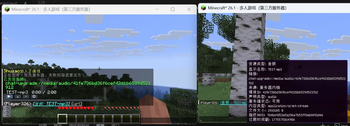
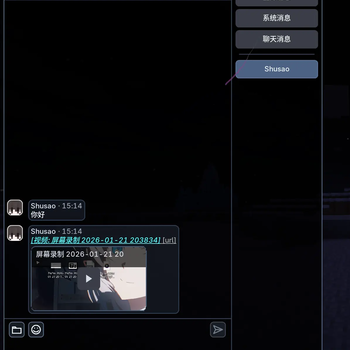
Chat Upgrade is a Fabric mod that enhances Minecraft chat with rich media rendering.
#### Key Features
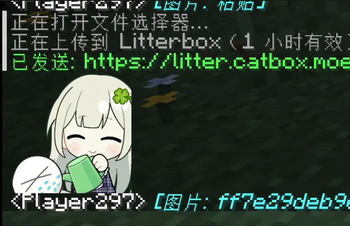
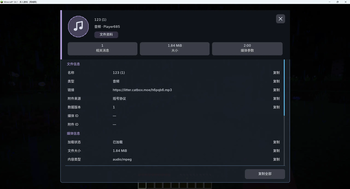
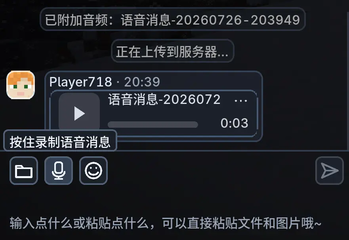
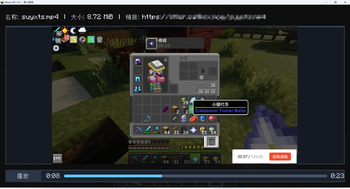
- Inline media preview: Recognizes `[]` payloads and replaces links with placeholders. Renders images, audio players, and video players directly inside the chat message area.
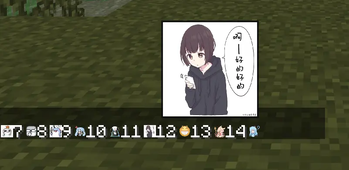
- Inline emojis: Uses `[:token]` syntax (e.g. `[:bilibili_tv_gif-2]`) and a mapping from `owo.json` to display square emoji images.
- Flexible upload modes:
- - Auto mode (default): If the server supports media uploads, files go directly to the server. Otherwise, uses third‑party hosting (Litterbox, ~1h expiry).
- - Server mode / Third‑party mode: Forced routing via commands or config.
- Optional server‑side storage: When installed on the server, clients upload media directly to the server. Other clients fetch the bytes via server packets and render them.
- Rich command system: Upload from folder, picker, or clipboard; adjust volumes, limits, manual reveal toggles, and plugin management (FFmpeg, APNG).
- High‑definition rendering: Uses supersampling and proper texture scaling to keep previews sharp at any GUI scale or window size.
- ChatImage compatibility mode: Can send images using the `[]` format for compatibility with ChatImage.
#### Commands (Client‑side, `/chatupgrade …`)
- `send`, `sendaudio`, `sendvideo` – Send a URL as a media payload.
- `upload folder|pick|paste` – Upload and send image from local path/file picker/clipboard.
- `uploadaudio`, `uploadvideo` – Same for audio or video files.
- `config …` – Change upload mode, manual reveal, volumes, size limits, smooth scroll, etc.
- `plugin status|load|download` – Manage FFmpeg and APNG plugins (auto‑downloaded on first use).
#### Configuration
File: `config/chat-upgrade/chat-upgrade.json` Options include: `ciCompatibility`, `manualImageReveal`, `audioVolumePercent`, `maxReceiveBytes`, `uploadMode`, and more. Reloadable in‑game.
- FFmpeg and APNG plugins are not bundled – they are downloaded automatically on first use to `config/chat-upgrade/libs/`.
- Server‑side direct upload mode does not support the `CICode` compatibility format.
- Supported formats: images (png, apng, jpg, gif, webp, bmp, tif, ico, etc.), audio (ogg, wav, mp3, flac, m4a, aac, opus, webm), video (mp4, webm, mov, mkv, m4v, avi).
Chat Upgrade 是一款基于 Fabric 的模组,让 Minecraft 聊天支持丰富的多媒体渲染。
- 内联媒体预览:识别形如 `[]` 的载荷文本,将链接替换为占位符,并在聊天消息区域内直接渲染图片、音频播放器和视频播放器。
- 行内表情:使用 `[:token]` 语法(例如 `[:bilibili_tv_gif-2]`),配合 `owo.json` 的映射表显示方形表情图片。
- 灵活的上传模式:
- - 自动模式(默认):如果服务端支持媒体上传,文件直接上传到服务器;否则使用第三方托管(Litterbox,约 1 小时有效期)。
- - 服务端模式 / 第三方模式:通过命令或配置强制指定路由。
- 可选的服务端存储:当服务端也安装本模组后,客户端直接上传到服务器,其他客户端通过服务端数据包拉取媒体并渲染。
- 丰富的命令系统:支持从文件夹、文件选择器或剪贴板上传;调整音量、体积限制、手动触发开关;管理 FFmpeg 和 APNG 插件。
- 高清渲染:使用超采样和合适的纹理缩放,在任何 GUI 缩放比例或窗口大小下都能保持预览清晰。
- ChatImage 兼容模式:可切换为 `[]` 格式发送图片,与 ChatImage 模组兼容。
#### 命令(客户端命令,`/chatupgrade …`)
- `send` / `sendaudio` / `sendvideo` – 将某个 URL 作为媒体载荷发送到聊天。
- `upload folder|pick|paste` – 从本地路径/文件选择器/剪贴板上传并发送图片。
- `uploadaudio` / `uploadvideo` – 同理,上传音频或视频文件。
- `config …` – 修改上传模式、手动触发开关、音量、大小限制、平滑滚动等。
- `plugin status|load|download` – 管理 FFmpeg 和 APNG 插件(首次使用时会自动下载)。
位置:`config/chat-upgrade/chat-upgrade.json` 选项包括:`ciCompatibility`、`manualImageReveal`、`audioVolumePercent`、`maxReceiveBytes`、`uploadMode` 等。可在游戏中重载配置。
- FFmpeg 和 APNG 插件不内置 – 首次使用时自动下载到 `config/chat-upgrade/libs/`。
- 服务端直传模式不支持 `CICode` 兼容格式。
- 支持格式:图片(png、apng、jpg、gif、webp、bmp、tif、ico 等)、音频(ogg、wav、mp3、flac、m4a、aac、opus、webm)、视频(mp4、webm、mov、mkv、m4v、avi)。
📊 Mod Details
- Game
- Minecraft Mods
- Author
- LoosePrince
- Version
- 2.4.0+26.2-fabric
- Downloads
- 536
- Endorsements
- 5
- Category
- fabric
- Created
- 4/25/2026
- Updated
- 8/18/2026
- Game Versions
- 26.2
- Tags
- social
🔧 How to Install Minecraft Mods Mods
Download from Modrinth. Use Prism Launcher or drop into your mods folder.
📖 Full step-by-step install guide for Minecraft Mods →
Visit the official mod page for specific installation instructions for this mod.
🎮 Need cheat codes or console commands? Check ur gaming wiki for Minecraft Mods commands, item IDs, and more.
❓ Frequently Asked Questions
Which Minecraft Mods versions does Chat Upgrade support?
The author lists 26.2. Other versions may work but are untested by the author.
What is the latest version of Chat Upgrade?
Version 2.4.0+26.2-fabric, published 2026-08-18 with 536 downloads recorded at the source.
Keep browsing — more Minecraft Mods mods await