Chat Magic
⚪ Last updated 2024⚠️ Install Order · 2 steps
Install in this order, then this mod last — most mods fail to load without their framework and dependencies in place.
🖼️ Gallery (1 images)
🔍 Analysis
- 👍 1.7% endorsement rate — high engagement, a strong quality signal
- 🏆 #375 of 896 fabric mods in this game by downloads
📋 About This Mod
# What is Chat Magic Do you hate the not human friendly view of WorldEdit's materials in the commands? This is a graphic displayer for you architects! !(https://cdn.modrinth.com/data/cached_images/57127242b819718cc969524ce06183ae429fa8c3.png) !(https://cdn.modrinth.com/data/cached_images/dda3d73f73f3072bd7f5dcb305a550074c73cacf.png) This mod will display the content of the command you entered above the input widget, making it beautiful and meaningful. **The source is on github (https://github.com/JackyBlackson/Chat-Magic/), please leave a star if this mod is of some help.** # Currently Supported Features * Parse, render and display items when mentions `Identifier` in chat. Supports both `name` and `namespace:name`. * When input `WorldEdit` random materials, such as `30%stone,70%grass` etc, will display a bar chart to indicate the portions of each single material. * Supports materials with custom blockstate such as `stone_stairs`, will display in the tooptip when you put your mouse on the item. * Complex worldedit materials, including selector start with `#` and recursive material expressions. Each selector's param list can expand to display simply by moving the mouse on to it. * For example: `//set 15%stone,20%dirt,bar={4}],30%#perlin,oak_planks,andesite,redstone,red_terracotta],10%#simplex` will look like this: !(https://cdn.modrinth.com/data/cached_images/57127242b819718cc969524ce06183ae429fa8c3.png) * Better display system with fixs on positionings and font and style. * Making adjustments to charts' height and background transparency possible by adding 2 slide bars to the chat screen: !(https://cdn.modrinth.com/data/cached_images/8aad0c9cb8dd270273466cc45a8fc448c27445df.png) # Future Plans * Add support to complex WE mask expressions * Improve chart and text positioning * Add support to multi-langrage and translations * Add support to config files and screens
# What is Chat Magic
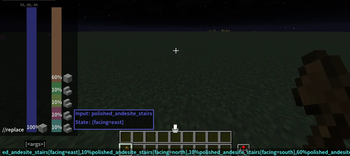
Do you hate the not human friendly view of WorldEdit's materials in the commands? This is a graphic displayer for you architects!
!(https://cdn.modrinth.com/data/cached_images/57127242b819718cc969524ce06183ae429fa8c3.png)
!(https://cdn.modrinth.com/data/cached_images/dda3d73f73f3072bd7f5dcb305a550074c73cacf.png)
This mod will display the content of the command you entered above the input widget, making it beautiful and meaningful.
The source is on github (https://github.com/JackyBlackson/Chat-Magic/), please leave a star if this mod is of some help.
# Currently Supported Features
Parse, render and display items when mentions `Identifier` in chat. Supports both `name` and `namespace:name`. When input `WorldEdit` random materials, such as `30%stone,70%grass` etc, will display a bar chart to indicate the portions of each single material. Supports materials with custom blockstate such as `stone_stairs`, will display in the tooptip when you put your mouse on the item.
Complex worldedit materials, including selector start with `#` and recursive material expressions. Each selector's param list can expand to display simply by moving the mouse on to it. For example: `//set 15%stone,20%dirt,bar={4}],30%#perlin[#perlin,oak_planks,andesite,redstone,red_terracotta],10%#simplex` will look like this: !(https://cdn.modrinth.com/data/cached_images/57127242b819718cc969524ce06183ae429fa8c3.png)
Better display system with fixs on positionings and font and style.
Making adjustments to charts' height and background transparency possible by adding 2 slide bars to the chat screen: !(https://cdn.modrinth.com/data/cached_images/8aad0c9cb8dd270273466cc45a8fc448c27445df.png)
# Future Plans
Add support to complex WE mask expressions Improve chart and text positioning Add support to multi-langrage and translations * Add support to config files and screens
📊 Mod Details
- Game
- Minecraft Mods
- Author
- Jacky_Blackson
- Version
- 2.2.0
- Downloads
- 533
- Endorsements
- 9
- Category
- fabric
- Created
- 8/22/2024
- Updated
- 9/13/2024
- Game Versions
- 1.20.4, 1.20.5, 1.20.6
- Tags
- optimization, utility
🔧 How to Install Minecraft Mods Mods
Download from Modrinth. Use Prism Launcher or drop into your mods folder.
📖 Full step-by-step install guide for Minecraft Mods →
Visit the official mod page for specific installation instructions for this mod.
🎮 Need cheat codes or console commands? Check ur gaming wiki for Minecraft Mods commands, item IDs, and more.
❓ Frequently Asked Questions
Which Minecraft Mods versions does Chat Magic support?
The author lists 1.20.4, 1.20.5, 1.20.6. Other versions may work but are untested by the author.
What is the latest version of Chat Magic?
Version 2.2.0, published 2024-09-13 with 533 downloads recorded at the source.
Keep browsing — more Minecraft Mods mods await