CameraHUD
🟠 Updated over a year ago⚠️ Install Order · 2 steps
Install in this order, then this mod last — most mods fail to load without their framework and dependencies in place.
🖼️ Gallery (2 images)

🔍 Analysis
- 👍 0.0% endorsement rate
- 🏆 #218 of 296 decoration mods in this game by downloads
📋 About This Mod
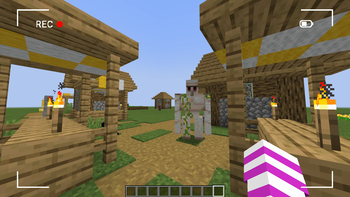
# CameraHUD **An immersive Minecraft experience with a simple and effective camera HUD.** Have you always dreamed of an interface that makes you feel like a cameraman in your Minecraft world? CameraHUD adds a minimalist and customizable HUD (Heads-Up Display) that transforms your view. ### Features: - **Camera HUD:** Displays a simple camera interface on your screen, perfect for cinematics or video creation. - **Full Control:** Adjust the HUD's transparency directly in your mod's configuration file. - **Lightweight and Compatible:** Designed to run smoothly and be compatible with other mods, CameraHUD is the perfect addition to any adventure. ### How It Works: CameraHUD adds a simple visual effect to your screen in first-person view. It's ideal for those who enjoy building, taking screenshots, or making short films in Minecraft. ### Configuration: The mod generates a configuration file where you can enable or disable the HUD and adjust its opacity. - **enableHUD** : Enables or disables the HUD. - **hudOpacity** : Controls the HUD's transparency (from 0 to 255).
# CameraHUD An immersive Minecraft experience with a simple and effective camera HUD.
Have you always dreamed of an interface that makes you feel like a cameraman in your Minecraft world? CameraHUD adds a minimalist and customizable HUD (Heads-Up Display) that transforms your view.
### Features: - Camera HUD: Displays a simple camera interface on your screen, perfect for cinematics or video creation. - Full Control: Adjust the HUD's transparency directly in your mod's configuration file. - Lightweight and Compatible: Designed to run smoothly and be compatible with other mods, CameraHUD is the perfect addition to any adventure.
### How It Works: CameraHUD adds a simple visual effect to your screen in first-person view. It's ideal for those who enjoy building, taking screenshots, or making short films in Minecraft.
### Configuration: The mod generates a configuration file where you can enable or disable the HUD and adjust its opacity.
- enableHUD : Enables or disables the HUD.
- hudOpacity : Controls the HUD's transparency (from 0 to 255).
📊 Mod Details
- Game
- Minecraft Mods
- Author
- PikaCat
- Version
- 1.0.0
- Downloads
- 6,823
- Endorsements
- 3
- Category
- decoration
- Created
- 8/24/2025
- Updated
- 8/24/2025
- Game Versions
- 1.20.1
- Tags
- decoration, utility
🔧 How to Install Minecraft Mods Mods
Download from Modrinth. Use Prism Launcher or drop into your mods folder.
📖 Full step-by-step install guide for Minecraft Mods →
Visit the official mod page for specific installation instructions for this mod.
🎮 Need cheat codes or console commands? Check ur gaming wiki for Minecraft Mods commands, item IDs, and more.
❓ Frequently Asked Questions
Which Minecraft Mods versions does CameraHUD support?
The author lists 1.20.1. Other versions may work but are untested by the author.
What is the latest version of CameraHUD?
Version 1.0.0, published 2025-08-24 with 6,823 downloads recorded at the source.
Keep browsing — more Minecraft Mods mods await