Calendarz
🟠 Updated over a year ago⚠️ Install Order · 2 steps
Install in this order, then this mod last — most mods fail to load without their framework and dependencies in place.
🖼️ Gallery (3 images)
🔍 Analysis
- 🏆 #70 of 84 neoforge mods in this game by downloads
📋 About This Mod
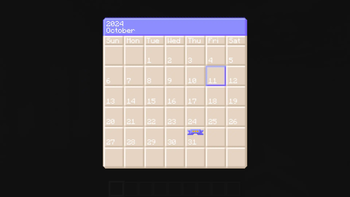
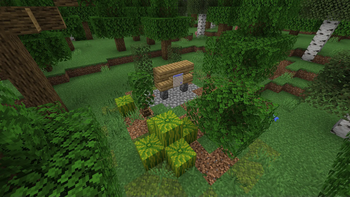
# About Calendarz Introducing Calendarz, a versatile Minecraft mod that brings fully customizable in-game calendars right to your server! With Calendarz, players can easily craft a user-friendly block that displays the calendar GUI by right-clicking on the block with support for viewing multiple events on any given day. While regular players can view events, admins have complete control with the /calendaradmin command, which allows direct configuration management without needing to stop the server. Calendarz requires installation on both the client and server, and it works seamlessly across single-player, LAN, and multiplayer setups. Admin commands are logged directly to the console, simplifying troubleshooting and offering the flexibility to manage settings through the console itself. Other mods can also add support for custom events using the admin command, enhancing its versatility. Managing events is a breeze with the events.json file’s straightforward structure, and even the event tooltip speed can be adjusted through commands or the configuration file. Scroll down for a full feature list and see how Calendarz can transform your Minecraft experience! # Features ## Core Features - Compatible with Single Player, LAN, and Multiplayer modes. - Admins can add, edit, and remove events via the admin command. - Events are fully customizable. - Supports leap years. - Days of the week are supported (Sun, Mon, Tue, Wed, Thu, Fri, and Sat). - The calendar grid functions similarly to real-world months. - Current day and event icons are overlaid on the calendar. - Displays the current month and year at the top of the calendar. - Admin commands and messages are logged to the server console. - Administrators kick players from the Calendar UI to enable real-time configuration changes. - Only the current month's calendar view is accessible. - Calendar and Thin Wood Stump blocks. - Rare randomly generated structures in the forest biome. - Per map settings using map ID technology. - A command to get the Map ID to allow other mod creators a way to get the folder name. ## Admin Command - Server admins can modify the configuration file using the /calendaradmin command. - The admin command allows adjusting the speed of the event index cycle. - Admins can remove specific months, days, and events from the calendar. - Events for a specified month or day can be retrieved, displaying an index number to facilitate targeted deletions. - New events can be added, either by creating new months/days or adding to existing ones. - Calendar events cycle through the event array indexes. ## Known Issues - Manually editing and saving changes to the events.json file while players are viewing the configuration will cause crashes. - Solution: Use the admin command to update the file in real time. # Mod Sites - (https://github.com/northwesttrees-gaming/calendarz) (Issue Tracker, Wiki, and Alternate Download) - (https://www.curseforge.com/minecraft/mc-mods/calendarz) (Alternate Download) - (https://mcreator.net/modification/110754/calendarz) (Alternate Download)
# About Calendarz Introducing Calendarz, a versatile Minecraft mod that brings fully customizable in-game calendars right to your server! With Calendarz, players can easily craft a user-friendly block that displays the calendar GUI by right-clicking on the block with support for viewing multiple events on any given day. While regular players can view events, admins have complete control with the /calendaradmin command, which allows direct configuration management without needing to stop the server.
Calendarz requires installation on both the client and server, and it works seamlessly across single-player, LAN, and multiplayer setups. Admin commands are logged directly to the console, simplifying troubleshooting and offering the flexibility to manage settings through the console itself. Other mods can also add support for custom events using the admin command, enhancing its versatility.
Managing events is a breeze with the events.json file’s straightforward structure, and even the event tooltip speed can be adjusted through commands or the configuration file.
Scroll down for a full feature list and see how Calendarz can transform your Minecraft experience!
# Features ## Core Features - Compatible with Single Player, LAN, and Multiplayer modes. - Admins can add, edit, and remove events via the admin command. - Events are fully customizable. - Supports leap years. - Days of the week are supported (Sun, Mon, Tue, Wed, Thu, Fri, and Sat). - The calendar grid functions similarly to real-world months. - Current day and event icons are overlaid on the calendar. - Displays the current month and year at the top of the calendar. - Admin commands and messages are logged to the server console. - Administrators kick players from the Calendar UI to enable real-time configuration changes. - Only the current month's calendar view is accessible. - Calendar and Thin Wood Stump blocks. - Rare randomly generated structures in the forest biome. - Per map settings using map ID technology. - A command to get the Map ID to allow other mod creators a way to get the folder name. ## Admin Command - Server admins can modify the configuration file using the /calendaradmin command. - The admin command allows adjusting the speed of the event index cycle. - Admins can remove specific months, days, and events from the calendar. - Events for a specified month or day can be retrieved, displaying an index number to facilitate targeted deletions. - New events can be added, either by creating new months/days or adding to existing ones. - Calendar events cycle through the event array indexes. ## Known Issues - Manually editing and saving changes to the events.json file while players are viewing the configuration will cause crashes. - Solution: Use the admin command to update the file in real time. # Mod Sites - (https://github.com/northwesttrees-gaming/calendarz) (Issue Tracker, Wiki, and Alternate Download) - (https://www.curseforge.com/minecraft/mc-mods/calendarz) (Alternate Download) - (https://mcreator.net/modification/110754/calendarz) (Alternate Download)
📊 Mod Details
- Game
- Minecraft Mods
- Author
- NorthWestTrees
- Version
- 1.1.0
- Downloads
- 247
- Endorsements
- 4
- Category
- neoforge
- Created
- 10/13/2024
- Updated
- 10/15/2024
- Game Versions
- 1.21.1
- Tags
- social, utility
🔧 How to Install Minecraft Mods Mods
Download from Modrinth. Use Prism Launcher or drop into your mods folder.
📖 Full step-by-step install guide for Minecraft Mods →
Visit the official mod page for specific installation instructions for this mod.
🎮 Need cheat codes or console commands? Check ur gaming wiki for Minecraft Mods commands, item IDs, and more.
❓ Frequently Asked Questions
Which Minecraft Mods versions does Calendarz support?
The author lists 1.21.1. Other versions may work but are untested by the author.
What is the latest version of Calendarz?
Version 1.1.0, published 2024-10-15 with 247 downloads recorded at the source.
Keep browsing — more Minecraft Mods mods await