BundleInCreative
🟡 Updated this year⚠️ Install Order · 2 steps
Install in this order, then this mod last — most mods fail to load without their framework and dependencies in place.
🖼️ Gallery (2 images)

🔍 Analysis
- 🏆 #253 of 367 forge mods in this game by downloads
📋 About This Mod
# Bundle In Creative Give the vanilla Bundle the attention it deserves: drop it into any creative tab, keep recipe viewers honest, and choose which crafting recipes you want enabled without touching a datapack. !(https://cdn.modrinth.com/data/cached_images/44164e1929cad4559067958e4b97b9f8d268f674_0.webp) !(https://cdn.modrinth.com/data/cached_images/5b23ca675f5f94ca642e9407605b260266ef61a4_0.webp) ## Features At A Glance - Creative menu support – the Bundle is injected into the Tools & Utilities tab by default, or any tab you pick (Building Blocks, Redstone, Combat, etc.). - Searchable everywhere – EMI/JEI/REI and quest books (FTB Quests) recognize the item so players can find it quickly. - Built-in config screen – open Mods → Bundle In Creative → Config (Configured/Forge Config Screen) to toggle options in-game. - Recipe control – disable the Bundle entirely, enable just the classic rabbit-hide recipe, opt into the modern leather recipe, or run both simultaneously. - Server friendly – options live in `bundleincreative-common.toml`, so you can ship the same ruleset to clients and servers. ## Configuration 1. Launch Minecraft with Forge 1.20.1 and this mod installed. 2. Open the Mods list, select **Bundle In Creative**, and click **Config** (or use the Forge Mod Menu button). 3. Adjust: - **Show in Creative** – hide/show the Bundle globally. - **Creative Tab** – cycle through curated tab names until you find the one you want. - **Bundle Recipe** – choose `Off`, `Rabbit Hide`, `Leather`, or `Both`. 4. Click **Done** to save (writes to `config/bundleincreative-common.toml`). 5. `/reload` or restart your game to finalize the settings. Prefer manual editing? Open `config/bundleincreative-common.toml` and change `enableBundle`, `creativeTab`, or `recipeMode`. <p align="center"> <img src="assets/Config Menu.png" width="80%"> </p> ## Recipe Modes The `recipeMode` toggle controls two built-in recipe JSONs gated by a custom Forge condition: | Mode | Enabled recipes | |---------|------------------------------------| | `off` | No Bundle crafting recipes | | `rabbit`| Classic rabbit hide + string pattern | | `leather` | Leather-based pattern (string spine) | | `both` | Both recipes load together | !(https://cdn.modrinth.com/data/cached_images/3450d2ef657ad533f0f9fa246cb572f474922dcf_0.webp) ## Installation 1. Download or build the mod JAR. 2. Drop the JAR into your Minecraft `mods` folder. 3. Launch Minecraft with Forge 47.3.0 (MC 1.20.1) and Java 17. ## Building From Source ```bash # Windows gradlew.bat build # Linux/macOS ./gradlew build ```
# Bundle In Creative
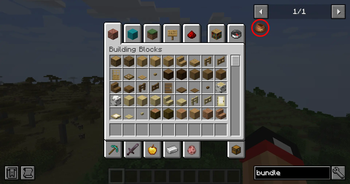
Give the vanilla Bundle the attention it deserves: drop it into any creative tab, keep recipe viewers honest, and choose which crafting recipes you want enabled without touching a datapack.
!(https://cdn.modrinth.com/data/cached_images/44164e1929cad4559067958e4b97b9f8d268f674_0.webp)
!(https://cdn.modrinth.com/data/cached_images/5b23ca675f5f94ca642e9407605b260266ef61a4_0.webp)
## Features At A Glance
- Creative menu support – the Bundle is injected into the Tools & Utilities tab by default, or any tab you pick (Building Blocks, Redstone, Combat, etc.).
- Searchable everywhere – EMI/JEI/REI and quest books (FTB Quests) recognize the item so players can find it quickly.
- Built-in config screen – open Mods → Bundle In Creative → Config (Configured/Forge Config Screen) to toggle options in-game.
- Recipe control – disable the Bundle entirely, enable just the classic rabbit-hide recipe, opt into the modern leather recipe, or run both simultaneously.
- Server friendly – options live in `bundleincreative-common.toml`, so you can ship the same ruleset to clients and servers.
## Configuration
1. Launch Minecraft with Forge 1. 20. 1 and this mod installed. 2. Open the Mods list, select Bundle In Creative, and click Config (or use the Forge Mod Menu button). 3. Adjust: - Show in Creative – hide/show the Bundle globally. - Creative Tab – cycle through curated tab names until you find the one you want. - Bundle Recipe – choose `Off`, `Rabbit Hide`, `Leather`, or `Both`. 4. Click Done to save (writes to `config/bundleincreative-common.toml`). 5. `/reload` or restart your game to finalize the settings.
Prefer manual editing? Open `config/bundleincreative-common.toml` and change `enableBundle`, `creativeTab`, or `recipeMode`.

## Recipe Modes
The `recipeMode` toggle controls two built-in recipe JSONs gated by a custom Forge condition:
| Mode | Enabled recipes | |---------|------------------------------------| | `off` | No Bundle crafting recipes | | `rabbit`| Classic rabbit hide + string pattern | | `leather` | Leather-based pattern (string spine) | | `both` | Both recipes load together |
!(https://cdn.modrinth.com/data/cached_images/3450d2ef657ad533f0f9fa246cb572f474922dcf_0.webp)
## Installation
1. Download or build the mod JAR. 2. Drop the JAR into your Minecraft `mods` folder. 3. Launch Minecraft with Forge 47. 3. 0 (MC 1. 20. 1) and Java 17.
## Building From Source
```bash # Windows gradlew.bat build
# Linux/macOS ./gradlew build ```
📊 Mod Details
- Game
- Minecraft Mods
- Author
- Dmor
- Version
- 1.1.0
- Downloads
- 400
- Endorsements
- 0
- Category
- forge
- Created
- 11/19/2025
- Updated
- 11/15/2025
- Game Versions
- 1.20.1
- Tags
- game-mechanics, storage, utility
🔧 How to Install Minecraft Mods Mods
Download from Modrinth. Use Prism Launcher or drop into your mods folder.
📖 Full step-by-step install guide for Minecraft Mods →
Visit the official mod page for specific installation instructions for this mod.
🎮 Need cheat codes or console commands? Check ur gaming wiki for Minecraft Mods commands, item IDs, and more.
❓ Frequently Asked Questions
Which Minecraft Mods versions does BundleInCreative support?
The author lists 1.20.1. Other versions may work but are untested by the author.
What is the latest version of BundleInCreative?
Version 1.1.0, published 2025-11-15 with 400 downloads recorded at the source.
Keep browsing — more Minecraft Mods mods await