Buildify
⚪ Last updated 2024⚠️ Install Order · 2 steps
Install in this order, then this mod last — most mods fail to load without their framework and dependencies in place.
🖼️ Gallery (3 images)
🔍 Analysis
- 👍 0.3% endorsement rate
- 🏆 #82 of 346 forge mods in this game by downloads
📋 About This Mod
Buildify mostly adds creative tools for builders but has a few survival features as well. Most features can be enabled and disabled in the configs.
# FEATURES ### Hammer and Nails: The hammer allows players to cycle through all blockstate properties with left click and change the various states with right click. This item can be crafted at a crafting table with (1 Iron Ingot, 1 Stick and 1 Leather).
The hammer can be used in creative mode for free. However, in suvival mode the hammer will require nails for each use. The nails can be crafted at a crafting table with (2 Iron Ingots) per 10 nails.
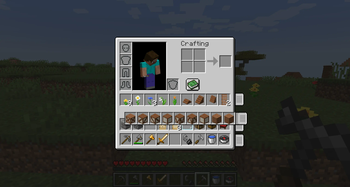
### Hot Swapping Sliders: These slider allow players to move entire rows of their survival inventory. This is very useful for survial builders as you can place your different palettes on seperate rows and swap them to your hot bar quick and easy. This feature can be disabled in the _buildify-client.toml_ configuration file.
!(https://cdn.modrinth.com/data/cached_images/4fc02d42191532ae8f0cbea142538bdd6c6e67c6.png)
### Personal Inventory and Chest Sorting: Yet another sorting solution for your inventory. These buttons allow the player to sort their inventory by category (based on the custom creative tabs) or alphabetically. This feature can be disabled in the _buildify-client.toml_ configuration file.
### Custom Creative Inventory _(creative only)_: The creative inventory has been reorganized! I made custom tabs that sort the blocks in a fashion that is more useful for creative builders. Mod developers and players alike can add compatibility with new mods by just adding tags to _buildify/tags/items/creative_tabs/tag_name_. I have included several popular mod's blocks already but I encourage mod devs to add these tags to their mods. This feature can be disabled in the _buildify-common.toml_ configuration file.
### Copy Block _(creative only)_: Use the Copy Block feature to copy the targeted block and it's current block state exactly as it is in that moment. (CTRL+Middle-Click) is hard coded but you can also asign another hotkey if you'd like (B) by default. This feature is very useful for placing long stretches of roofing, stairs, etc as you can copy the block and move to an easier position for placement.
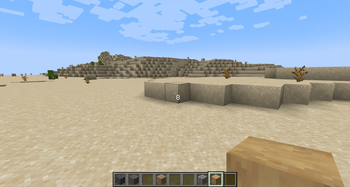
### Reach Distance Modifier _(creative only)_: Use the configurable reach distance modifier key (N) by default, to change the reach distance while in creative mode. This is very useful during creative building allowing you to place and break blocks from any distance. The max distance is configurable in the _buildify-common.toml_ configuration file. Just target the block you want to change your distance to and press (N), the distance will be displayed on screen.
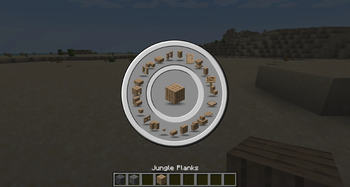
### Block Picker _(creative only)_: The crown jewel and original purpose of the mod. The Block Picker allows for easy selection of all related blocks to the one you are currently holding. The vanilla block families are used by default but if installed with a compatible mod, like (https://modrinth.com/mod/caliber-mod), it will display a wide range of block shapes that are of the same type in a nice radial GUI. Just press (V) by default to access the Block Picker while holding any block in creative mode.
The Block Picker was inspired by Conquest Reforged but I have made it available for anyone to use and have made it easy for other mods to include compatibility with their mods too. Players can also customize the their own Block Picker lists using data packs. Check out the wiki on github for more info.
!(https://cdn.modrinth.com/data/cached_images/4202a7bd81262f2a7d27e88c244cd583e6e34c1d.png)
### OP Commands: - /time | Use this command to set the server time to various settings. This command will affect the time for entire server. - /ptime | Use this command to change the time to any number of settings or set it back to server time. This only affects the player. - /pweather | Use this command to change the weather or set it back to server weather. This only affects the player. - /gm | Use this command to change your gamemode without having to type gamemode. Just type /gm 0,1,2,3 intead! - /repair | Use this command to repair the item currently held in your hand. This command will repair the item to full durability. - /heal | Use this command to heal yourself or the specified player. This command will heal the player and max out their food saturation as well. - /fly | Use this command to toggle flying on or off. This command will allow the player to fly in survival mode. - /tpall | Use this command to teleport all players to the specified player. This command will teleport all players to the player specified.
_ALL COMMANDS ARE OP ONLY AND THEY CAN BE DISABLED IN THE COMMON-CONFIG IF DESIRED._
## INSTALLATION - Server and Client installation are required to use this mod - Mod Packs feel free to use th
📊 Mod Details
- Game
- Minecraft Mods
- Author
- CaliberMC
- Version
- 0.2.5-1.20.1
- Downloads
- 3,758
- Endorsements
- 13
- Category
- forge
- Created
- 12/7/2023
- Updated
- 4/28/2024
- Game Versions
- 1.20.1
- Tags
- game-mechanics, optimization, utility
🔧 How to Install Minecraft Mods Mods
Download from Modrinth. Use Prism Launcher or drop into your mods folder.
📖 Full step-by-step install guide for Minecraft Mods →
Visit the official mod page for specific installation instructions for this mod.
🎮 Need cheat codes or console commands? Check ur gaming wiki for Minecraft Mods commands, item IDs, and more.
❓ Frequently Asked Questions
Which Minecraft Mods versions does Buildify support?
The author lists 1.20.1. Other versions may work but are untested by the author.
What is the latest version of Buildify?
Version 0.2.5-1.20.1, published 2024-04-28 with 3,758 downloads recorded at the source.
Keep browsing — more Minecraft Mods mods await