Branded Logs
🟠 Updated over a year ago⚠️ Install Order · 2 steps
Install in this order, then this mod last — most mods fail to load without their framework and dependencies in place.
🖼️ Gallery (1 images)
🔍 Analysis
- 👍 0.0% endorsement rate
- 🏆 #579 of 983 fabric mods in this game by downloads
📋 About This Mod
# **Branded Logs** This is a simple mod that allows modpack creators to print additional information about their modpack into the game's logs. This includes the name of the modpack and its version, as well as information about the user's machine, operating system, Java version, and RAM allocation. *This mod was greatly inspired by ](https://github.com/FederAndInk/log_more_info).* !(https://cdn.jsdelivr.net/npm/@intergrav/devins-badges@3/assets/cozy/supported/fabric_vector.svg) !(https://raw.githubusercontent.com/thomasglasser/thomasglasser/refs/heads/main/files/badges/cozy/supported/neoforge_vector.svg) !(https://cdn.jsdelivr.net/npm/@intergrav/devins-badges@3/assets/cozy/supported/forge_vector.svg) ## **Why would anyone need this?** As a modpack author, you may often receive logs from players asking for help with an issue or crash. With this mod, there will no longer be any confusion about which version of your modpack a log was generated from. You will also no longer have to ask them about the hardware or Java configuration of their system, as that can easily be deduced from the logs! ## **How to use it** The mod will automatically parse modpack information from supported launchers right out of the box. However, if a configuration file from *(https://www.curseforge.com/minecraft/mc-mods/better-compatibility-checker)* (*bcc.json*) is present, it will always take priority. #### Supported Launchers: * ✅ **CurseForge App** (*minecraftinstance.json*) * ✅ **Prism Launcher** (*instance.cfg*) * ✅ **ATLauncher** (*instance.json*) * ✅ **GDLauncher** (*instance.json*) * ❌ **Modrinth App** (*No longer uses profile.json file*) To enable the mod to retrieve the version number and name of your modpack in an unsupported launcher, you need to include a configuration file from *Better Compatibility Checker* in your pack. You can either use the *(https://www.curseforge.com/minecraft/mc-mods/better-compatibility-checker)* mod to generate the config file, or create one manually using the template below: #### `./config/bcc.json` ```json {"modpackName": "INSERT_MODPACK_NAME_HERE", "modpackVersion": "INSERT_MODPACK_VERSION_HERE"} ``` ## **Dependencies** (https://cdn.jsdelivr.net/npm/@intergrav/devins-badges@3/assets/cozy/requires/cloth-config-api_vector.svg)](https://modrinth.com/mod/cloth-config) Optional: *(https://www.curseforge.com/minecraft/mc-mods/better-compatibility-checker)* ## **Links** (https://cdn.jsdelivr.net/npm/@intergrav/devins-badges@3/assets/cozy/available/curseforge_vector.svg)](https://www.curseforge.com/minecraft/mc-mods/branded-logs) (https://cdn.jsdelivr.net/npm/@intergrav/devins-badges@3/assets/cozy/available/modrinth_vector.svg)](https://modrinth.com/mod/branded-logs) (https://cdn.jsdelivr.net/npm/@intergrav/devins-badges@3/assets/cozy/social/discord-singular_vector.svg)](https://discord.gg/Kss5gBgeDA)
# Branded Logs
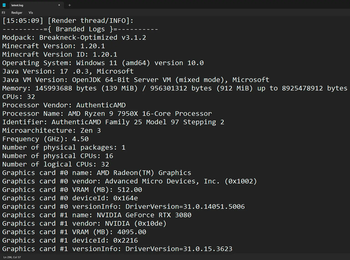
This is a simple mod that allows modpack creators to print additional information about their modpack into the game's logs. This includes the name of the modpack and its version, as well as information about the user's machine, operating system, Java version, and RAM allocation.
This mod was greatly inspired by [](https://github.com/FederAndInk/log_more_info).*
!(https://cdn.jsdelivr.net/npm/@intergrav/devins-badges@3/assets/cozy/supported/fabric_vector.svg) !(https://raw.githubusercontent.com/thomasglasser/thomasglasser/refs/heads/main/files/badges/cozy/supported/neoforge_vector.svg) !(https://cdn.jsdelivr.net/npm/@intergrav/devins-badges@3/assets/cozy/supported/forge_vector.svg)
## Why would anyone need this?
As a modpack author, you may often receive logs from players asking for help with an issue or crash. With this mod, there will no longer be any confusion about which version of your modpack a log was generated from. You will also no longer have to ask them about the hardware or Java configuration of their system, as that can easily be deduced from the logs!
## How to use it
The mod will automatically parse modpack information from supported launchers right out of the box. However, if a configuration file from (https://www.curseforge.com/minecraft/mc-mods/better-compatibility-checker)* (bcc.json) is present, it will always take priority.
#### Supported Launchers:
✅ CurseForge App (minecraftinstance.json) ✅ Prism Launcher (instance.cfg) ✅ ATLauncher (instance.json) ✅ GDLauncher (instance.json) ❌ Modrinth App (No longer uses profile.json file)
To enable the mod to retrieve the version number and name of your modpack in an unsupported launcher, you need to include a configuration file from Better Compatibility Checker in your pack. You can either use the (https://www.curseforge.com/minecraft/mc-mods/better-compatibility-checker)* mod to generate the config file, or create one manually using the template below:
#### `./config/bcc.json` ```json {"modpackName": "INSERT_MODPACK_NAME_HERE", "modpackVersion": "INSERT_MODPACK_VERSION_HERE"} ```
## Dependencies
[!(https://cdn.jsdelivr.net/npm/@intergrav/devins-badges@3/assets/cozy/requires/cloth-config-api_vector.svg)](https://modrinth.com/mod/cloth-config)
Optional: *(https://www.curseforge.com/minecraft/mc-mods/better-compatibility-checker)*
## Links
[!(https://cdn.jsdelivr.net/npm/@intergrav/devins-badges@3/assets/cozy/available/curseforge_vector.svg)](https://www.curseforge.com/minecraft/mc-mods/branded-logs) [!(https://cdn.jsdelivr.net/npm/@intergrav/devins-badges@3/assets/cozy/available/modrinth_vector.svg)](https://modrinth.com/mod/branded-logs) [!(https://cdn.jsdelivr.net/npm/@intergrav/devins-badges@3/assets/cozy/social/discord-singular_vector.svg)](https://discord.gg/Kss5gBgeDA)
📊 Mod Details
- Game
- Minecraft Mods
- Author
- HaXr
- Version
- 2.2.0
- Downloads
- 48,894
- Endorsements
- 5
- Category
- fabric
- Created
- 9/7/2023
- Updated
- 12/2/2024
- Game Versions
- 1.21.2, 1.21.3
- Tags
- management, utility
🔧 How to Install Minecraft Mods Mods
Download from Modrinth. Use Prism Launcher or drop into your mods folder.
📖 Full step-by-step install guide for Minecraft Mods →
Visit the official mod page for specific installation instructions for this mod.
🎮 Need cheat codes or console commands? Check ur gaming wiki for Minecraft Mods commands, item IDs, and more.
❓ Frequently Asked Questions
Which Minecraft Mods versions does Branded Logs support?
The author lists 1.21.2, 1.21.3. Other versions may work but are untested by the author.
What is the latest version of Branded Logs?
Version 2.2.0, published 2024-12-02 with 48,894 downloads recorded at the source.
Keep browsing — more Minecraft Mods mods await