Brainrot Pet
🟡 Updated this year⚠️ Install Order · 2 steps
Install in this order, then this mod last — most mods fail to load without their framework and dependencies in place.
🖼️ Gallery (2 images)
🔍 Analysis
- 🏆 #184 of 216 cursed mods in this game by downloads
📋 About This Mod
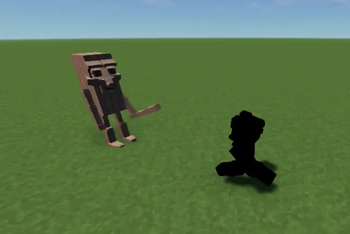
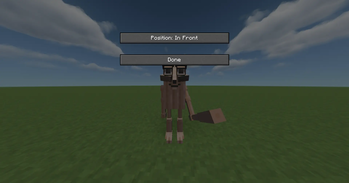
# Brainrot Pet --- ## Key Features * **Dynamic Movement Physics**: The pet is fully animated. When you walk, run, or strafe sideways/backward, the pet calculates its own movement direction and dynamically rotates its body to look exactly in the direction it is moving. When you stand still, it smoothly rotates back to face the same way you are looking. * **Vanilla Lighting Integration**: Using native Minecraft rendering APIs, the pet is correctly lit depending on the light levels of the blocks and sky around it, blending perfectly into daylight, caves, or torchlit rooms. * **ModMenu Configuration**: If you have ModMenu installed, you can access an in-game settings screen to customize your pet. * **Toggle Keybinding**: You can easily show or hide your companion at any time. The default toggle key is **G**, which can be customized in the standard Minecraft controls settings under the "Brainrot Pet" category. --- ## Configuration Settings You can adjust the following options in-game: * **Follow Position**: Choose where your pet stands relative to you. You can set it to follow **Behind**, in **Front**, to your **Left**, or to your **Right**. * **Visibility**: Toggle whether the pet is visible in the world or hidden. ---
# Brainrot Pet --- ## Key Features Dynamic Movement Physics: The pet is fully animated. When you walk, run, or strafe sideways/backward, the pet calculates its own movement direction and dynamically rotates its body to look exactly in the direction it is moving. When you stand still, it smoothly rotates back to face the same way you are looking. Vanilla Lighting Integration: Using native Minecraft rendering APIs, the pet is correctly lit depending on the light levels of the blocks and sky around it, blending perfectly into daylight, caves, or torchlit rooms. ModMenu Configuration: If you have ModMenu installed, you can access an in-game settings screen to customize your pet. Toggle Keybinding: You can easily show or hide your companion at any time. The default toggle key is G, which can be customized in the standard Minecraft controls settings under the "Brainrot Pet" category. --- ## Configuration Settings You can adjust the following options in-game: Follow Position: Choose where your pet stands relative to you. You can set it to follow Behind, in Front, to your Left, or to your Right. Visibility: Toggle whether the pet is visible in the world or hidden. ---
📊 Mod Details
- Game
- Minecraft Mods
- Author
- PrIyme
- Version
- 2.0.0
- Downloads
- 309
- Endorsements
- 1
- Category
- cursed
- Created
- 6/12/2026
- Updated
- 6/12/2026
- Game Versions
- 1.21, 1.21.1, 1.21.2, 1.21.3, 1.21.4
- Tags
- cursed, decoration
🔧 How to Install Minecraft Mods Mods
Download from Modrinth. Use Prism Launcher or drop into your mods folder.
📖 Full step-by-step install guide for Minecraft Mods →
Visit the official mod page for specific installation instructions for this mod.
🎮 Need cheat codes or console commands? Check ur gaming wiki for Minecraft Mods commands, item IDs, and more.
❓ Frequently Asked Questions
Which Minecraft Mods versions does Brainrot Pet support?
The author lists 1.21, 1.21.1, 1.21.2, 1.21.3, 1.21.4, 1.21.5. Other versions may work but are untested by the author.
What is the latest version of Brainrot Pet?
Version 2.0.0, published 2026-06-12 with 309 downloads recorded at the source.
Keep browsing — more Minecraft Mods mods await