BowCharge
🟡 Updated this year⚠️ Install Order · 2 steps
Install in this order, then this mod last — most mods fail to load without their framework and dependencies in place.
🖼️ Gallery (2 images)
🔍 Analysis
- 👍 0.2% endorsement rate
- 🏆 #43 of 892 fabric mods in this game by downloads
📋 About This Mod
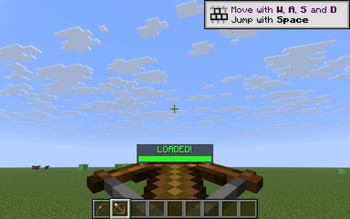
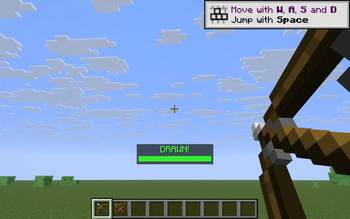
**BowCharge** answers a question vanilla never quite does: *"is my bow ready yet?"* When you start drawing a bow — or charging a crossbow — a thin progress bar fades in above your hotbar showing the exact charge percentage. A red->yellow->green gradient tracks the pull, and the moment you hit full draw the bar locks green and the label flips to **DRAWN!** (or **LOADED!** for crossbows). Release; bar disappears. No fluff, no config screens, just the one number you actually want to see while aiming. ### What it shows While drawing a bow the bar shows `Draw: 73%`; at full draw it locks green and reads **DRAWN!**. For a crossbow being cranked it shows `Load: 60%`, flipping to **LOADED!** when it locks in. ### How it works - Bow draw progress uses vanilla's own pull curve `(t^2 + 2t) / 3`, so the bar lines up *exactly* with when your shot becomes a power-3 arrow. - Crossbow progress is a straight 25-tick charge (the vanilla unenchanted load time). - The HUD is drawn through Fabric's `HudRenderCallback`, so it respects **F1** (hide HUD) automatically and never overlaps the hotbar. - Everything is read-only — no mixins, no input interception, no movement changes. Drop it on any server. ### Controls - **B** — toggle the bar on / off (default: on) The key is read via raw GLFW polling so it works identically on every supported Minecraft version without a separate rebind screen. ### Compatibility Works on **Minecraft 1.21.8, 1.21.9, 1.21.10, and 1.21.11** (Fabric Loader 0.16+). One JAR for all four versions — install with Fabric API and drop into your `mods/` folder. - Pure client-side — install on the client only, works on any server, no anti-cheat impact. - Hides automatically when you press **F1** to hide the rest of the HUD. - Zero config files; nothing to set up. ### Why Vanilla gives you a hand-animation hint that the bow is drawn, but no precise feedback — and crossbows give you almost nothing until the click. BowCharge turns "feel" into a number you can read at a glance, which matters in PvP, long-shot archery, and anywhere you want to time a max-power release.
BowCharge answers a question vanilla never quite does: "is my bow ready yet?" When you start drawing a bow — or charging a crossbow — a thin progress bar fades in above your hotbar showing the exact charge percentage. A red->yellow->green gradient tracks the pull, and the moment you hit full draw the bar locks green and the label flips to DRAWN! (or LOADED! for crossbows). Release; bar disappears. No fluff, no config screens, just the one number you actually want to see while aiming.
### What it shows While drawing a bow the bar shows `Draw: 73%`; at full draw it locks green and reads DRAWN!. For a crossbow being cranked it shows `Load: 60%`, flipping to LOADED! when it locks in.
### How it works - Bow draw progress uses vanilla's own pull curve `(t^2 + 2t) / 3`, so the bar lines up exactly with when your shot becomes a power-3 arrow. - Crossbow progress is a straight 25-tick charge (the vanilla unenchanted load time). - The HUD is drawn through Fabric's `HudRenderCallback`, so it respects F1 (hide HUD) automatically and never overlaps the hotbar. - Everything is read-only — no mixins, no input interception, no movement changes. Drop it on any server.
### Controls - B — toggle the bar on / off (default: on)
The key is read via raw GLFW polling so it works identically on every supported Minecraft version without a separate rebind screen.
### Compatibility Works on Minecraft 1. 21. 8, 1. 21. 9, 1. 21. 10, and 1. 21. 11 (Fabric Loader 0. 16+). One JAR for all four versions — install with Fabric API and drop into your `mods/` folder.
- Pure client-side — install on the client only, works on any server, no anti-cheat impact.
- Hides automatically when you press F1 to hide the rest of the HUD.
- Zero config files; nothing to set up.
### Why Vanilla gives you a hand-animation hint that the bow is drawn, but no precise feedback — and crossbows give you almost nothing until the click. BowCharge turns "feel" into a number you can read at a glance, which matters in PvP, long-shot archery, and anywhere you want to time a max-power release.
📊 Mod Details
- Game
- Minecraft Mods
- Author
- kvapilvaclav0
- Version
- 1.0.0
- Downloads
- 1,573
- Endorsements
- 3
- Category
- fabric
- Created
- 6/7/2026
- Updated
- 6/5/2026
- Game Versions
- 1.21.8, 1.21.9, 1.21.10, 1.21.11
- Tags
- utility
🔧 How to Install Minecraft Mods Mods
Download from Modrinth. Use Prism Launcher or drop into your mods folder.
📖 Full step-by-step install guide for Minecraft Mods →
Visit the official mod page for specific installation instructions for this mod.
🎮 Need cheat codes or console commands? Check ur gaming wiki for Minecraft Mods commands, item IDs, and more.
❓ Frequently Asked Questions
Which Minecraft Mods versions does BowCharge support?
The author lists 1.21.8, 1.21.9, 1.21.10, 1.21.11. Other versions may work but are untested by the author.
What is the latest version of BowCharge?
Version 1.0.0, published 2026-06-05 with 1,573 downloads recorded at the source.
Keep browsing — more Minecraft Mods mods await