Boring Default Game Rules
🟠 Updated over a year ago⚠️ Install Order · 2 steps
Install in this order, then this mod last — most mods fail to load without their framework and dependencies in place.
🖼️ Gallery (3 images)
🔍 Analysis
- 👍 0.1% endorsement rate
- 🏆 #623 of 940 fabric mods in this game by downloads
📋 About This Mod
# Boring Default Game Rules !(https://mod-assets.upcraft.dev/promo/boring-default-game-rules/modpange_banner.png) Boring Default Game Rules is a simple mod that allows for changing the default values of all games rules. This mod aims to be the most convenient way to edit the default values of a game rule by not only offering a config screen, but also easy off-game configuration by generating a JSON Schema! Part of the Boring series. Don't forget to check out (https://modrinth.com/mod/boring-backgrounds) and (https://modrinth.com/mod/damage-incorporated)! ## Dependencies As of Minecraft 1.20.6+, this mod requires (https://modrinth.com/mod/fabric-api) and either Fabric Loader or (https://quiltmc.org). This mod also has optional support with (https://modrinth.com/mod/modmenu). ## Configuration With this mod, there are two main methods in which you can edit the default game rules. The main way to edit the defaults is through the "Edit Default Game Rules" screen, which can be opened either thanks to a button at the bottom of Vanilla's "Game Rules" screen or through the mod's config button on (https://modrinth.com/mod/modmenu). On this screen, you can change the defaults like you would change the game rule values on a regular world, with a "Reset Defaults" button being available at the bottom of the list if needed. However, If you aren't in-game and have at least started it once, don't worry! There is a config file is located at `.minecraft/config/boring_default_game_rules/config.json`, and if you have a (https://json-schema.org/tools?toolingTypes=editor) ((https://code.visualstudio.com/) is recommended if you have none), it will make use of the automatically-generated (https://json-schema.org/) in order to enhance your editing experience! The generated JSON Schema contains not only documentation on the config itself, but also provides suggestions for all game rules detected on the game. Below here is the commented format (if you are offline, the JSON Schema also contains information about the options): ```jsonc { // The file path of this mod's JSON schema. Don't worry about changing this value! "$schema": "config.schema.json", // A map of game rules and the new default value that will override the original "default_game_rules": { // This will set "keepInventory" to true as the default value // Autocompletions are provided by the JSON schema, so don't worry about having to memorize all game rule options "keepInventory": true }, // Defines if a JSON schema should be generated or not. Only disable this if you know what you are doing "generate_json_schema": true } ```
# Boring Default Game Rules !(https://mod-assets.upcraft.dev/promo/boring-default-game-rules/modpange_banner.png)
Boring Default Game Rules is a simple mod that allows for changing the default values of all games rules. This mod aims to be the most convenient way to edit the default values of a game rule by not only offering a config screen, but also easy off-game configuration by generating a JSON Schema!
Part of the Boring series. Don't forget to check out (https://modrinth.com/mod/boring-backgrounds) and (https://modrinth.com/mod/damage-incorporated)!
## Dependencies
As of Minecraft 1. 20. 6+, this mod requires (https://modrinth.com/mod/fabric-api) and either Fabric Loader or (https://quiltmc.org).
This mod also has optional support with (https://modrinth.com/mod/modmenu).
## Configuration
With this mod, there are two main methods in which you can edit the default game rules.
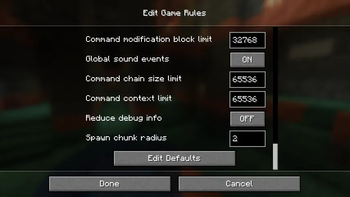
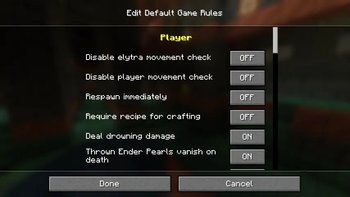
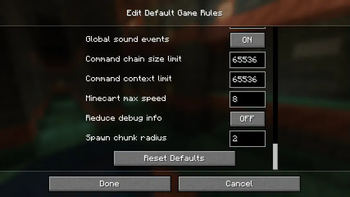
The main way to edit the defaults is through the "Edit Default Game Rules" screen, which can be opened either thanks to a button at the bottom of Vanilla's "Game Rules" screen or through the mod's config button on (https://modrinth.com/mod/modmenu). On this screen, you can change the defaults like you would change the game rule values on a regular world, with a "Reset Defaults" button being available at the bottom of the list if needed.
However, If you aren't in-game and have at least started it once, don't worry! There is a config file is located at `.minecraft/config/boring_default_game_rules/config.json`, and if you have a (https://json-schema.org/tools?toolingTypes=editor) ((https://code.visualstudio.com/) is recommended if you have none), it will make use of the automatically-generated (https://json-schema.org/) in order to enhance your editing experience! The generated JSON Schema contains not only documentation on the config itself, but also provides suggestions for all game rules detected on the game.
Below here is the commented format (if you are offline, the JSON Schema also contains information about the options):
```jsonc { // The file path of this mod's JSON schema. Don't worry about changing this value! "$schema": "config.schema.json", // A map of game rules and the new default value that will override the original "default_game_rules": { // This will set "keepInventory" to true as the default value // Autocompletions are provided by the JSON schema, so don't worry about having to memorize all game rule options "keepInventory": true }, // Defines if a JSON schema should be generated or not. Only disable this if you know what you are doing "generate_json_schema": true } ```
📊 Mod Details
- Game
- Minecraft Mods
- Author
- Ennui
- Version
- 2.0.0+1.21.5
- Downloads
- 21,617
- Endorsements
- 22
- Category
- fabric
- Created
- 9/7/2021
- Updated
- 6/14/2025
- Game Versions
- 1.21.2, 1.21.3, 1.21.4, 1.21.5, 1.21.6
- Tags
- game-mechanics, management, utility
🔧 How to Install Minecraft Mods Mods
Download from Modrinth. Use Prism Launcher or drop into your mods folder.
📖 Full step-by-step install guide for Minecraft Mods →
Visit the official mod page for specific installation instructions for this mod.
🎮 Need cheat codes or console commands? Check ur gaming wiki for Minecraft Mods commands, item IDs, and more.
❓ Frequently Asked Questions
Which Minecraft Mods versions does Boring Default Game Rules support?
The author lists 1.21.2, 1.21.3, 1.21.4, 1.21.5, 1.21.6, 1.21.7. Other versions may work but are untested by the author.
What is the latest version of Boring Default Game Rules?
Version 2.0.0+1.21.5, published 2025-06-14 with 21,617 downloads recorded at the source.
Keep browsing — more Minecraft Mods mods await