BlockTuner-forge
⚪ Last updated 2024⚠️ Install Order · 2 steps
Install in this order, then this mod last — most mods fail to load without their framework and dependencies in place.
Preview

🔍 Analysis
- 👍 0.1% endorsement rate
- 🏆 #328 of 401 forge mods in this game by downloads
📋 About This Mod
# BlockTuner (Forge Mod) ## About This is the forge version of BlockTuner. If you want a fabric version, please visit (https://modrinth.com/mod/blocktuner). If you want the data pack for older versions of Minecraft, please visit (https://github.com/xwjcool123/blocktuner). ## Instructions ### Installation Put this mod in your `mods` folder. You also need to install (https://files.minecraftforge.net/net/minecraftforge/forge/) if you haven't installed it yet. Server need to install the mod for it working. ### How to Use BlockTuner `Ctrl` + Right clock on a note block to open up tuning UI. Placing a note block while holding `Ctrl` also opens the UI automatically. `Ctrl` to show the note of the note block at crosshair. `Ctrl` + middle click on note blocks to pick up readily tuned note blocks. Right click note blocks with blaze rods to play with right clicks without tuning. ### Tuning UI Top-right corner (from left to right) * !(https://xwj.cool/img/blocktuner/btWidget1.png) Play mode - toggle whether the GUI will turn off immediately upon clicking a note on the piano keyboard. * !(https://xwj.cool/img/blocktuner/btWidget2.png) Typing keyboard to piano keyboard - toggle whether you want to play the piano keyboard using your computer keyboard. * !(https://xwj.cool/img/blocktuner/btWidget3.png) MIDI Device - Click to cycle through available MIDI input devices. The icon shows red if the device is currently unavailable. This usually means it is being used by another program. ### Keyboard Mapping: !(https://xwj.cool/img/blocktuner/keymap.png) ## Credits ### Original author * Fabric version original author - (https://github.com/xwjcool123) ### Localization * Russian - (https://github.com/Felix14-v2) (Currently outdated) * Japanese - (https://github.com/misaka10843) & (https://note.com/hakukak/)
# BlockTuner (Forge Mod)
This is the forge version of BlockTuner.
If you want a fabric version, please visit (https://modrinth.com/mod/blocktuner).
If you want the data pack for older versions of Minecraft, please visit (https://github.com/xwjcool123/blocktuner).
## Instructions
### Installation
Put this mod in your `mods` folder. You also need to install (https://files.minecraftforge.net/net/minecraftforge/forge/) if you haven't installed it yet.
Server need to install the mod for it working.
### How to Use BlockTuner
`Ctrl` + Right clock on a note block to open up tuning UI. Placing a note block while holding `Ctrl` also opens the UI automatically.
`Ctrl` to show the note of the note block at crosshair.
`Ctrl` + middle click on note blocks to pick up readily tuned note blocks.
Right click note blocks with blaze rods to play with right clicks without tuning.
### Tuning UI
Top-right corner (from left to right)
 Play mode - toggle whether the GUI will turn off immediately upon clicking a note on the piano keyboard.  Typing keyboard to piano keyboard - toggle whether you want to play the piano keyboard using your computer keyboard.  MIDI Device - Click to cycle through available MIDI input devices. The icon shows red if the device is currently unavailable. This usually means it is being used by another program.
### Keyboard Mapping:
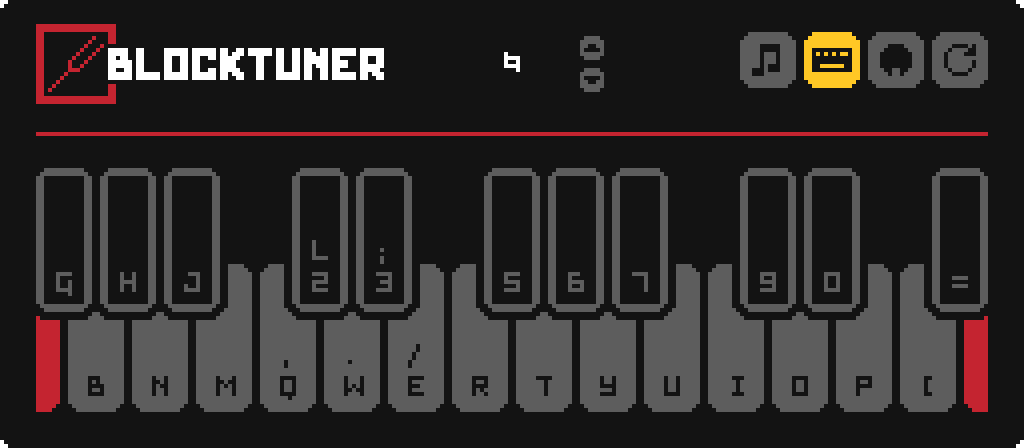
### Original author
Fabric version original author - (https://github.com/xwjcool123)
### Localization
Russian - (https://github.com/Felix14-v2) (Currently outdated) Japanese - (https://github.com/misaka10843) & (https://note.com/hakukak/)
📊 Mod Details
- Game
- Minecraft Mods
- Author
- APeng215
- Version
- 1.1.2
- Downloads
- 1,672
- Endorsements
- 1
- Category
- forge
- Created
- 10/16/2023
- Updated
- 4/12/2024
- Game Versions
- 1.20.4
- Tags
- utility
🔧 How to Install Minecraft Mods Mods
Download from Modrinth. Use Prism Launcher or drop into your mods folder.
📖 Full step-by-step install guide for Minecraft Mods →
Visit the official mod page for specific installation instructions for this mod.
🎮 Need cheat codes or console commands? Check ur gaming wiki for Minecraft Mods commands, item IDs, and more.
❓ Frequently Asked Questions
Which Minecraft Mods versions does BlockTuner-forge support?
The author lists 1.20.4. Other versions may work but are untested by the author.
What is the latest version of BlockTuner-forge?
Version 1.1.2, published 2024-04-12 with 1,672 downloads recorded at the source.
Keep browsing — more Minecraft Mods mods await