BlockTuner_Continue
🟡 Updated this year⚠️ Install Order · 2 steps
Install in this order, then this mod last — most mods fail to load without their framework and dependencies in place.
Preview

🔍 Analysis
- 👍 0.1% endorsement rate
- 🏆 #94 of 874 fabric mods in this game by downloads
📋 About This Mod
# BlockTuner (Fabric Mod) ## About This is the fabric version of BlockTuner *and* requires fabric API. If you are using forge, you can check out the (https://github.com/APeng215/BlockTuner-forge) by A_Peng215. If you want the data pack for older versions of Minecraft, please visit (https://github.com/xwjcool123/blocktuner). ## Instructions ### Installation Put this mod in your `mods` folder. You also need to install (https://modrinth.com/mod/fabric-api) if you haven't installed it yet. This mod also works on servers and require no client installation. You can get the latest version (https://github.com/xwjcool123/BlockTunerMod/releases/latest) or find a specific release (https://github.com/xwjcool123/BlockTunerMod/releases) ### How to Use BlockTuner `Ctrl` + `Right click` on a note block to open up tuning UI. Placing a note block while holding `Ctrl` also opens the UI automatically. `Ctrl` to show the note of the note block at crosshair. `Ctrl` + `Middle click` on note blocks to pick up readily tuned note blocks. Right click note blocks with blaze rods to play with right clicks without tuning. > > - If you are using BlockTuner 1.0.0 (Minecraft 1.18.2) or lower, you don't need to hold `Ctrl` to open up the tuning UI. Instead, use `/blocktuner` to toggle this. > - If you have Tweakeroo installed and have no access to the `Ctrl` key, please go to Tweakaroo configs, find `flexibleBlockPlacementOffset` under `Hot Keys` and set it to something else. e.g. `Right Alt`. Sorry for the inconvenience. ### Tuning UI Top-right corner (from left to right) * !(https://xwj.cool/img/blocktuner/btWidget1.png) Play mode - toggle whether the GUI will turn off immediately upon clicking a note on the piano keyboard. * !(https://xwj.cool/img/blocktuner/btWidget2.png) Typing keyboard to piano keyboard - toggle whether you want to play the piano keyboard using your computer keyboard. * !(https://xwj.cool/img/blocktuner/btWidget3.png) MIDI Device - Click to cycle through available MIDI input devices. The icon shows red if the device is currently unavailable. This usually means it is being used by another program. ### Keyboard Mapping: !(https://xwj.cool/img/blocktuner/keymap.png) ## Credits ### Localization * Russian - (https://github.com/Felix14-v2) (Currently outdated) * Japanese - (https://github.com/misaka10843) & (https://note.com/hakukak/) ### Forge Port * (https://github.com/APeng215) ## License Copyright (C) 2021, xwjcool; Copyright (C) 2025, Lumine1909; This program is free software: you can redistribute it and/or modify it under the terms of the GNU General Public License as published by the Free Software Foundation, either version 3 of the License, or (at your option) any later version. This program is distributed in the hospe that it will be useful, but WITHOUT ANY WARRANTY; without even the implied warranty of MERCHANTABILITY or FITNESS FOR A PARTICULAR PURPOSE. See the GNU General Public License for more details. You should have received a copy of the GNU General Public License along with this program. If not, see <https://www.gnu.org/licenses/>.
# BlockTuner (Fabric Mod)
This is the fabric version of BlockTuner and requires fabric API.
If you are using forge, you can check out the (https://github.com/APeng215/BlockTuner-forge) by A_Peng215.
If you want the data pack for older versions of Minecraft, please visit (https://github.com/xwjcool123/blocktuner).
## Instructions
### Installation
Put this mod in your `mods` folder. You also need to install (https://modrinth.com/mod/fabric-api) if you haven't installed it yet.
This mod also works on servers and require no client installation.
You can get the latest version (https://github.com/xwjcool123/BlockTunerMod/releases/latest) or find a specific release (https://github.com/xwjcool123/BlockTunerMod/releases)
### How to Use BlockTuner
`Ctrl` + `Right click` on a note block to open up tuning UI. Placing a note block while holding `Ctrl` also opens the UI automatically.
`Ctrl` to show the note of the note block at crosshair.
`Ctrl` + `Middle click` on note blocks to pick up readily tuned note blocks.
Right click note blocks with blaze rods to play with right clicks without tuning.
> [!NOTE] > - If you are using BlockTuner 1. 0. 0 (Minecraft 1. 18. 2) or lower, you don't need to hold `Ctrl` to open up the tuning UI. Instead, use `/blocktuner` to toggle this. > - If you have Tweakeroo installed and have no access to the `Ctrl` key, please go to Tweakaroo configs, find `flexibleBlockPlacementOffset` under `Hot Keys` and set it to something else. e.g. `Right Alt`. Sorry for the inconvenience.
### Tuning UI
Top-right corner (from left to right)
 Play mode - toggle whether the GUI will turn off immediately upon clicking a note on the piano keyboard.  Typing keyboard to piano keyboard - toggle whether you want to play the piano keyboard using your computer keyboard.  MIDI Device - Click to cycle through available MIDI input devices. The icon shows red if the device is currently unavailable. This usually means it is being used by another program.
### Keyboard Mapping: 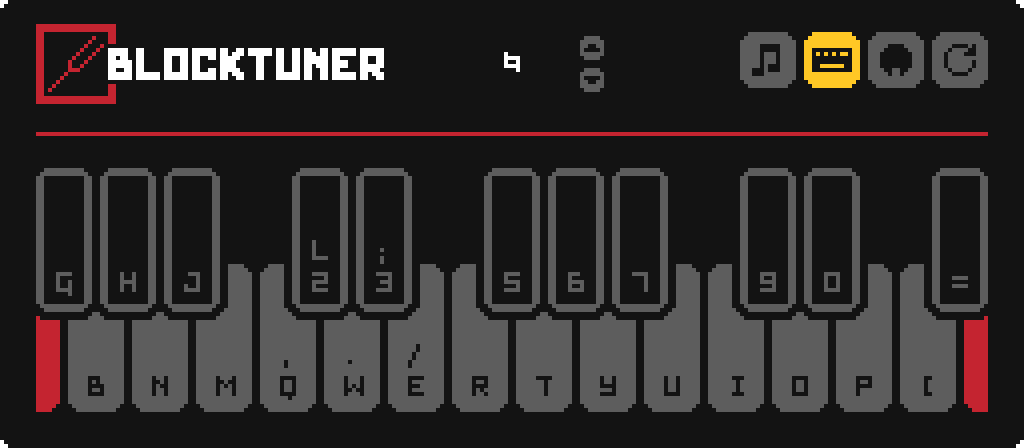
## Credits ### Localization Russian - (https://github.com/Felix14-v2) (Currently outdated) Japanese - (https://github.com/misaka10843) & (https://note.com/hakukak/)
### Forge Port (https://github.com/APeng215)
Copyright (C) 2021, xwjcool; Copyright (C) 2025, Lumine1909;
This program is free software: you can redistribute it and/or modify it under the terms of the GNU General Public License as published by the Free Software Foundation, either version 3 of the License, or (at your option) any later version.
This program is distributed in the hospe that it will be useful, but WITHOUT ANY WARRANTY; without even the implied warranty of MERCHANTABILITY or FITNESS FOR A PARTICULAR PURPOSE. See the GNU General Public License for more details.
You should have received a copy of the GNU General Public License along with this program. If not, see
📊 Mod Details
- Game
- Minecraft Mods
- Author
- Lumine1909
- Version
- 1.6.1
- Downloads
- 2,043
- Endorsements
- 2
- Category
- fabric
- Created
- 4/15/2025
- Updated
- 8/14/2026
- Game Versions
- 26.1, 26.1.1, 26.1.2, 26.2
- Tags
- utility
🔧 How to Install Minecraft Mods Mods
Download from Modrinth. Use Prism Launcher or drop into your mods folder.
📖 Full step-by-step install guide for Minecraft Mods →
Visit the official mod page for specific installation instructions for this mod.
🎮 Need cheat codes or console commands? Check ur gaming wiki for Minecraft Mods commands, item IDs, and more.
❓ Frequently Asked Questions
Which Minecraft Mods versions does BlockTuner_Continue support?
The author lists 26.1, 26.1.1, 26.1.2, 26.2. Other versions may work but are untested by the author.
What is the latest version of BlockTuner_Continue?
Version 1.6.1, published 2026-08-14 with 2,043 downloads recorded at the source.
Keep browsing — more Minecraft Mods mods await