BlockPrintr
🟠 Updated over a year ago⚠️ Install Order · 2 steps
Install in this order, then this mod last — most mods fail to load without their framework and dependencies in place.
🖼️ Gallery (1 images)
🔍 Analysis
- 👍 1.1% endorsement rate — high engagement, a strong quality signal
- 🏆 #181 of 343 decoration mods in this game by downloads
📋 About This Mod
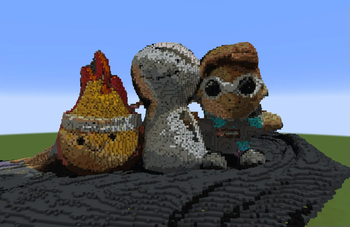
<iframe width="560" height="315" src="https://www.youtube-nocookie.com/embed/m8cF4Uo2tRE" title="YouTube video player" frameborder="0" allow="accelerometer; autoplay; clipboard-write; encrypted-media; gyroscope; picture-in-picture; web-share" allowfullscreen></iframe> # **BlockPrintr** converts 3D scan files into your Minecraft world in a few simple clicks. It supports various file formats, allowing you to bring the real world into the game. There's other ways to put 3D objects into Minecraft, but our goal is to make it **SIMPLE** and **FREE**! We simplify the process by doing all the work for you, so without changing any settings you can already have a clean looking Minecraft representation. Supported File Types: - .glb - .gltf - .obj - .laz - .las - .dxf - .xyz - .pts - .ply There's lots of customization features so that you can easily change how your structure looks in game. From different block palettes, to more advanced settings like shading and brightness adjustments. The default hotkey to open the menu is "**ENTER**" Simply drag a compatible scan file into the inputs folder, and then either click "Quick Place" or the "Edit" button to change block and color settings.
BlockPrintr converts 3D scan files into your Minecraft world in a few simple clicks. It supports various file formats, allowing you to bring the real world into the game.
There's other ways to put 3D objects into Minecraft, but our goal is to make it SIMPLE and FREE! We simplify the process by doing all the work for you, so without changing any settings you can already have a clean looking Minecraft representation.
Supported File Types: - .glb - .gltf - .obj - .laz - .las - .dxf - .xyz - .pts - .ply
There's lots of customization features so that you can easily change how your structure looks in game. From different block palettes, to more advanced settings like shading and brightness adjustments.
The default hotkey to open the menu is "ENTER"
Simply drag a compatible scan file into the inputs folder, and then either click "Quick Place" or the "Edit" button to change block and color settings.
📊 Mod Details
- Game
- Minecraft Mods
- Author
- Dream
- Version
- 0.2
- Downloads
- 12,418
- Endorsements
- 134
- Category
- decoration
- Created
- 2/4/2025
- Updated
- 2/19/2025
- Game Versions
- 1.21, 1.21.1
- Tags
- decoration, technology, utility
🔧 How to Install Minecraft Mods Mods
Download from Modrinth. Use Prism Launcher or drop into your mods folder.
📖 Full step-by-step install guide for Minecraft Mods →
Visit the official mod page for specific installation instructions for this mod.
🎮 Need cheat codes or console commands? Check ur gaming wiki for Minecraft Mods commands, item IDs, and more.
❓ Frequently Asked Questions
Which Minecraft Mods versions does BlockPrintr support?
The author lists 1.21, 1.21.1. Other versions may work but are untested by the author.
What is the latest version of BlockPrintr?
Version 0.2, published 2025-02-19 with 12,418 downloads recorded at the source.
Keep browsing — more Minecraft Mods mods await