Blockify
🟡 Updated this year⚠️ Install Order · 2 steps
Install in this order, then this mod last — most mods fail to load without their framework and dependencies in place.
🖼️ Gallery (2 images)
🔍 Analysis
- 👍 0.7% endorsement rate
- 🏆 #308 of 343 decoration mods in this game by downloads
📋 About This Mod
<img src="https://github.com/clownless/Blockify/raw/main/src/main/resources/assets/blockify/icon.png" width="150" align="left"/> ## Blockify Mod (https://img.shields.io/github/license/clownless/blockify?style=flat-square)](https://github.com/clownless/Blockify/blob/main/LICENSE) (https://img.shields.io/badge/modloader-Fabric%2C%20Quilt-1976d2?style=flat-square)](https://fabricmc.net/) (https://img.shields.io/badge/minecraft-26.1.2-1976d2?style=flat-square)](https://www.minecraft.net/) (https://img.shields.io/badge/java-25%20(or%20above)-1976d2?style=flat-square)](https://adoptium.net/releases.html) !(https://img.shields.io/badge/environment-client-1976d2?style=flat-square) (https://img.shields.io/discord/837540892411691008?label=discord&style=flat-square)](https://discord.gg/bSgZxY3rQm) Fork of the original (https://github.com/BuffMage/Blockify) — overlays your Spotify playback on the Minecraft HUD: track title, artist, album art, progress bar, and volume. ### Requirements - Minecraft **26.1.2** with **Fabric Loader** 0.19.2+ and **Fabric API** - Java **25** or newer - (https://modrinth.com/mod/midnightlib) 1.9.3+ (for the in-game config screen) - A **Spotify Premium** account (the Web API endpoints used for playback control are Premium-only) ## How to use Press `Play/Pause` once to open the Spotify authorization page in your browser. Blockify runs a temporary local server on port `8001` to receive the OAuth callback; tokens are stored in `config/blockifyTokens.json`. ### Default key bindings | Action | Key | | --- | --- | | Play/Pause (or Authorize on first run) | `Num 5` | | Previous Song | `Num 4` | | Next Song | `Num 6` | | Save current track to your library | `L` | | Force Update | `Num 8` | | Hide Blockify HUD | `Num 9` | | Increase Volume | `Num +` | | Decrease Volume | `Num -` | | Toggle In-Game Music | `Num 1` | All bindings can be remapped from the standard Minecraft Controls screen under the **Blockify** category. ### Commands - `/sharetrack` — sends a link to the currently playing track into chat (visible only to you). ### Configuration Open the in-game config screen via Mod Menu → Blockify. Available options include HUD scale, position, anchor corner, album-art toggle, custom colors for title/artist/time/progress bar/background, background transparency, in-game music volume, and volume step. ## Screenshots !(https://i.imgur.com/5gebkFC.jpeg) !(https://i.imgur.com/J74wZr8.jpeg) !(https://i.imgur.com/c9Lajim.png) ## Building from source ```bash ./gradlew build # build the mod JAR (output in build/libs/) ./gradlew runClient # launch a dev Minecraft client with the mod ``` ## Contributing Contributions are **greatly appreciated**. 1. Fork the project 2. Create your feature branch (`git checkout -b feature/AmazingFeature`) 3. Commit your changes (`git commit -m 'Add some AmazingFeature'`) 4. Push to the branch (`git push origin feature/AmazingFeature`) 5. Open a Pull Request ## Localisation Translations are managed through Crowdin — please don't open PRs that hardcode translated strings. (https://is.gd/TfsUVl)](https://www.crowdin.com/project/blockify)

## Blockify Mod [!(https://img.shields.io/github/license/clownless/blockify?style=flat-square)](https://github.com/clownless/Blockify/blob/main/LICENSE) [!(https://img.shields.io/badge/modloader-Fabric%2C%20Quilt-1976d2?style=flat-square)](https://fabricmc.net/) [!(https://img.shields.io/badge/minecraft-26. 1. 2-1976d2?style=flat-square)](https://www.minecraft.net/) [!(https://img.shields.io/badge/java-25%20(or%20above)-1976d2?style=flat-square)](https://adoptium.net/releases.html) !(https://img.shields.io/badge/environment-client-1976d2?style=flat-square) [!(https://img.shields.io/discord/837540892411691008?label=discord&style=flat-square)](https://discord.gg/bSgZxY3rQm)
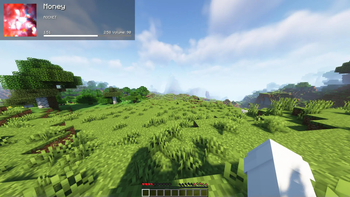
Fork of the original (https://github.com/BuffMage/Blockify) — overlays your Spotify playback on the Minecraft HUD: track title, artist, album art, progress bar, and volume.
### Requirements
- Minecraft 26. 1. 2 with Fabric Loader 0. 19. 2+ and Fabric API
- Java 25 or newer
- (https://modrinth.com/mod/midnightlib) 1. 9. 3+ (for the in-game config screen)
- A Spotify Premium account (the Web API endpoints used for playback control are Premium-only)
## How to use
Press `Play/Pause` once to open the Spotify authorization page in your browser. Blockify runs a temporary local server on port `8001` to receive the OAuth callback; tokens are stored in `config/blockifyTokens.json`.
### Default key bindings
| Action | Key | | --- | --- | | Play/Pause (or Authorize on first run) | `Num 5` | | Previous Song | `Num 4` | | Next Song | `Num 6` | | Save current track to your library | `L` | | Force Update | `Num 8` | | Hide Blockify HUD | `Num 9` | | Increase Volume | `Num +` | | Decrease Volume | `Num -` | | Toggle In-Game Music | `Num 1` |
All bindings can be remapped from the standard Minecraft Controls screen under the Blockify category.
### Commands
- `/sharetrack` — sends a link to the currently playing track into chat (visible only to you).
### Configuration
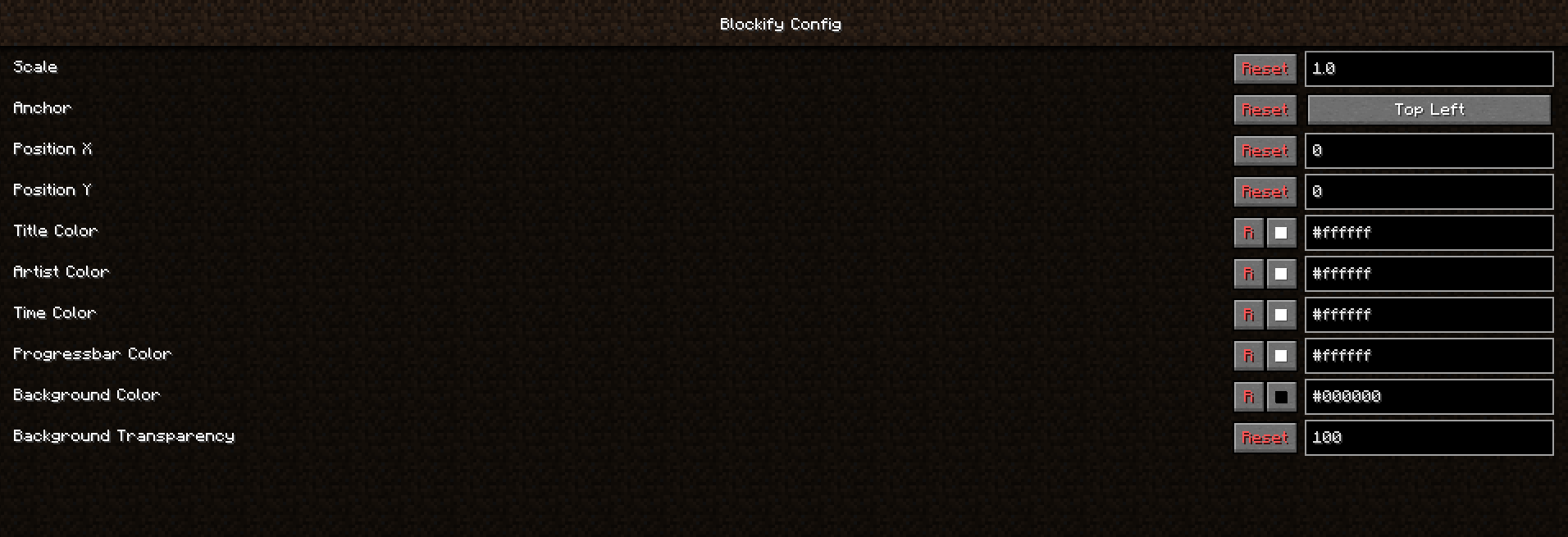
Open the in-game config screen via Mod Menu → Blockify. Available options include HUD scale, position, anchor corner, album-art toggle, custom colors for title/artist/time/progress bar/background, background transparency, in-game music volume, and volume step.
## Screenshots
!(https://i.imgur.com/5gebkFC.jpeg) !(https://i.imgur.com/J74wZr8.jpeg) !(https://i.imgur.com/c9Lajim.png)
## Building from source
```bash ./gradlew build # build the mod JAR (output in build/libs/) ./gradlew runClient # launch a dev Minecraft client with the mod ```
## Contributing
Contributions are greatly appreciated.
1. Fork the project 2. Create your feature branch (`git checkout -b feature/AmazingFeature`) 3. Commit your changes (`git commit -m 'Add some AmazingFeature'`) 4. Push to the branch (`git push origin feature/AmazingFeature`) 5. Open a Pull Request
## Localisation
Translations are managed through Crowdin — please don't open PRs that hardcode translated strings.
[!(https://is.gd/TfsUVl)](https://www.crowdin.com/project/blockify)
📊 Mod Details
- Game
- Minecraft Mods
- Author
- erruqie
- Version
- 1.3.0-alpha
- Downloads
- 10,360
- Endorsements
- 76
- Category
- decoration
- Created
- 2/11/2022
- Updated
- 5/17/2026
- Game Versions
- 26.1.2
- Tags
- decoration, technology, utility
🔧 How to Install Minecraft Mods Mods
Download from Modrinth. Use Prism Launcher or drop into your mods folder.
📖 Full step-by-step install guide for Minecraft Mods →
Visit the official mod page for specific installation instructions for this mod.
🎮 Need cheat codes or console commands? Check ur gaming wiki for Minecraft Mods commands, item IDs, and more.
❓ Frequently Asked Questions
Which Minecraft Mods versions does Blockify support?
The author lists 26.1.2. Other versions may work but are untested by the author.
What is the latest version of Blockify?
Version 1.3.0-alpha, published 2026-05-17 with 10,360 downloads recorded at the source.
Keep browsing — more Minecraft Mods mods await