Blocketing
🟡 Updated this year⚠️ Install Order · 2 steps
Install in this order, then this mod last — most mods fail to load without their framework and dependencies in place.
🖼️ Gallery (3 images)

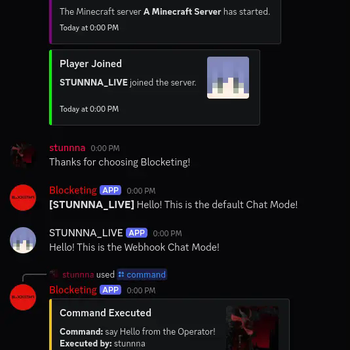

🔍 Analysis
- 🏆 #466 of 907 fabric mods in this game by downloads
📋 About This Mod
<div align="center"><center> <img alt="Icon" width="300" height="300" src="https://raw.githubusercontent.com/crunnna/blocketing-fabric-mod/main/src\main\resources\assets\blocketing\icon.png"> <h1>Blocketing</h1> <h3>Blocketing is a Fabric mod for seamless communication between a Discord channel and a Minecraft server, enabling bidirectional message synchronization and command execution.</h3> (https://img.shields.io/badge/Environment-Server-blue?logo=data:image/png;base64,iVBORw0KGgoAAAANSUhEUgAAAEAAAABACAYAAACqaXHeAAABhWlDQ1BJQ0MgcHJvZmlsZQAAKJF9kT1Iw0AYht+malUqDnYQEclQneyiIo6likWwUNoKrTqYXPoHTRqSFBdHwbXg4M9i1cHFWVcHV0EQ/AFxdnBSdJESv0sKLWI8uLuH97735e47QGhUmGp2RQFVs4xUPCZmc6ti4BU9CKCP1jGJmXoivZiB5/i6h4/vdxGe5V335xhQ8iYDfCJxlOmGRbxBPLtp6Zz3iUOsJCnE58STBl2Q+JHrsstvnIsOCzwzZGRS88QhYrHYwXIHs5KhEs8QhxVVo3wh67LCeYuzWqmx1j35C4N5bSXNdZqjiGMJCSQhQkYNZVRgIUK7RoqJFJ3HPPwjjj9JLplcZTByLKAKFZLjB/+D3701C9NTblIwBnS/2PbHOBDYBZp12/4+tu3mCeB/Bq60tr/aAOY+Sa+3tfARMLgNXFy3NXkPuNwBhp90yZAcyU9TKBSA9zP6phwwdAv0r7l9a53j9AHIUK+Wb4CDQ2CiSNnrHu/u7ezbvzWt/v0ATphymIBZ6aQAAAAGYktHRAAKAAwAGd6C8noAAAAJcEhZcwAADdcAAA3XAUIom3gAAAAHdElNRQfoBgcOHRYlcgoRAAABRklEQVR42u2YMUoDQRRAX0axUzCteIZ4hKn0FDmFhalSWKkgnkHt9AQWwhzBNr2tBGNno82ACwm6EZvxvwdTzP8s7P8zu8w8EJHIDABKKfvAFXAIbP/zmt+AR2CSc54NavFPwDDY4s+BUaorPwy4+3eBy1S3fVSOUoBv/jt2UmMv/A6cAHt1TGqsb36JzcYaMM05X3Tm56UUgLOe+SVa2wE3K2LXa+Sbb8BgRWxjjXzzDRj/EBv3fOarY6WUj8Z+glPgtlPcKbDVM998A/6cVM/GUXlN9WIQlYdUDwvzgMW/AMcp5zwDRsA9sAhQ+AK4Aw5yzs8aEZHY6AR1gjpBnaBOsLHrsE6wM9cJohPUCeoE0Qn+Hp0gOkGdoE5QRMKiE9QJ6gR1gjrBxq7DOsHOXCeITlAnqBNEJ/h7dILoBHWCOkERCcsncuextWq5TzoAAAAASUVORK5CYII=)]() (https://img.shields.io/badge/Available%20for-Fabric-dbd0b4?logo=data:image/png;base64,iVBORw0KGgoAAAANSUhEUgAAABoAAAAcBAMAAACNPbLgAAABhGlDQ1BJQ0MgcHJvZmlsZQAAKJF9kT1Iw0AcxV9TpX5UHMwgIpihOtlFRRxLFYtgobQVWnUwufQLmjQkKS6OgmvBwY/FqoOLs64OroIg+AHi6uKk6CIl/i8ptIj14Lgf7+497t4BQr3MNKsrAmi6bSZjUSmTXZUCr+iHiADG0Cszy4inFtPoOL7u4ePrXZhndT735xhQcxYDfBJxhBmmTbxBPLtpG5z3iUVWlFXic+JJky5I/Mh1xeM3zgWXBZ4pmunkPLFILBXaWGljVjQ14hnikKrplC9kPFY5b3HWylXWvCd/YTCnr6S4TnMUMSwhjgQkKKiihDJshGnVSbGQpP1oB/+I60+QSyFXCYwcC6hAg+z6wf/gd7dWfnrKSwpGge4Xx/kYBwK7QKPmON/HjtM4AfzPwJXe8lfqwNwn6bWWFjoCBreBi+uWpuwBlzvA8JMhm7Ir+WkK+TzwfkbflAWGboG+Na+35j5OH4A0dbV8AxwcAhMFyl7v8O6e9t7+PdPs7wd+dXKrd9SjeQAAAAlwSFlzAAAuIwAALiMBeKU/dgAAAAd0SU1FB+cLFAcgIbOcUjoAAAAbUExURQAAAB0tQTg0KoB6bZqSfq6mlLyynMa8pdvQtJRJT6UAAAABdFJOUwBA5thmAAAAAWJLR0QB/wIt3gAAAF5JREFUGNN10FENwCAMhOFqOQuzMAtYOAtYqGw6mkEvhL59yR9Ca5YDqyOC465eKYqQm6LoCkVwnwQOBYKdeA5l51zhFtrsnPmg6m3Z2akk15dFH1lWFQVxlUFv+2sAJlA9O7NwQRQAAAAASUVORK5CYII=)](https://fabricmc.net/) (https://img.shields.io/modrinth/dt/WQAfq7OC?label=Modrinth%20downloads&logo=modrinth)](https://modrinth.com/mod/blocketing) (https://img.shields.io/github/downloads/crunnna/blocketing-fabric-mod/total?label=Github%20downloads&logo=github)](https://github.com/crunnna/blocketing-fabric-mod/releases) </center></div> --- ## ✨ Features - ✅ Syncs Minecraft and Discord messages in both directions 💬 - ✅ Join/Leave notifications with player avatars 🖼️ - ✅ Server start/stop announcements 🚀 - ✅ Toggle sending advancement and death messages to Discord 🏆 - ✅ Run Minecraft commands from Discord (permission-based) 🛠️ - ✅ Player chat webhook mode (with avatar & name) 👨 - ✅ In-game configuration via commands 🎮 - ✅ Update notifications for new mod versions 🔔 - ✅ Paginated player list and server status via Discord slash commands 📊 - ✅ Multi-server support to run multiple Minecraft server instances using the same Discord bot token (per-server channel filtering) ♾️ --- ## 🚀 Installation ### 🔨 1. Install the Mod 1. **Download the latest .jar** from the (https://github.com/crunnna/blocketing-fabric-mod/releases). 2. **Place the `.jar` file in your server’s `mods/` folder**. 3. **Start the Minecraft server** with **Fabric**. 4. **Configure the bot** using the in-game commands (see below). ### 🤖 2. Set up the Discord Bot - **Create a new Discord bot application** in the **(https://discord.com/developers/applications)**. - **Add** the bot to your Discord server. - **Copy** the **`bot token`** for later configuration. --- ## 🛡️ Permissions - **Minecraft**: `/blocketing` commands require permission **level 4 (OP)**. - **Discord**: For `/console` via Discord, the user must have the configured **OP role** (if set). --- ## ⚙️ Configuration Commands All configuration is done in-game using `/blocketing` commands (OP only): ### Setup Discord Integration - `/blocketing setup token <token>` Set the Discord bot token. - `/blocketing setup guild <guild_id>` Set the Discord server (guild) ID. - `/blocketing setup channel <channel_id>` Set the Discord channel ID for message sync. - `/blocketing setup op_role <role_id>` Set the Discord role ID required to run `/console` from Discord. - `/blocketing setup webhook_url <url>` Set the Discord webh
Blocketing
Blocketing is a Fabric mod for seamless communication between a Discord channel and a Minecraft server, enabling bidirectional message synchronization and command execution.
[!(https://img.shields.io/badge/Environment-Server-blue?logo=data:image/png;base64,iVBORw0KGgoAAAANSUhEUgAAAEAAAABACAYAAACqaXHeAAABhWlDQ1BJQ0MgcHJvZmlsZQAAKJF9kT1Iw0AYht+malUqDnYQEclQneyiIo6likWwUNoKrTqYXPoHTRqSFBdHwbXg4M9i1cHFWVcHV0EQ/AFxdnBSdJESv0sKLWI8uLuH97735e47QGhUmGp2RQFVs4xUPCZmc6ti4BU9CKCP1jGJmXoivZiB5/i6h4/vdxGe5V335xhQ8iYDfCJxlOmGRbxBPLtp6Zz3iUOsJCnE58STBl2Q+JHrsstvnIsOCzwzZGRS88QhYrHYwXIHs5KhEs8QhxVVo3wh67LCeYuzWqmx1j35C4N5bSXNdZqjiGMJCSQhQkYNZVRgIUK7RoqJFJ3HPPwjjj9JLplcZTByLKAKFZLjB/+D3701C9NTblIwBnS/2PbHOBDYBZp12/4+tu3mCeB/Bq60tr/aAOY+Sa+3tfARMLgNXFy3NXkPuNwBhp90yZAcyU9TKBSA9zP6phwwdAv0r7l9a53j9AHIUK+Wb4CDQ2CiSNnrHu/u7ezbvzWt/v0ATphymIBZ6aQAAAAGYktHRAAKAAwAGd6C8noAAAAJcEhZcwAADdcAAA3XAUIom3gAAAAHdElNRQfoBgcOHRYlcgoRAAABRklEQVR42u2YMUoDQRRAX0axUzCteIZ4hKn0FDmFhalSWKkgnkHt9AQWwhzBNr2tBGNno82ACwm6EZvxvwdTzP8s7P8zu8w8EJHIDABKKfvAFXAIbP/zmt+AR2CSc54NavFPwDDY4s+BUaorPwy4+3eBy1S3fVSOUoBv/jt2UmMv/A6cAHt1TGqsb36JzcYaMM05X3Tm56UUgLOe+SVa2wE3K2LXa+Sbb8BgRWxjjXzzDRj/EBv3fOarY6WUj8Z+glPgtlPcKbDVM998A/6cVM/GUXlN9WIQlYdUDwvzgMW/AMcp5zwDRsA9sAhQ+AK4Aw5yzs8aEZHY6AR1gjpBnaBOsLHrsE6wM9cJohPUCeoE0Qn+Hp0gOkGdoE5QRMKiE9QJ6gR1gjrBxq7DOsHOXCeITlAnqBNEJ/h7dILoBHWCOkERCcsncuextWq5TzoAAAAASUVORK5CYII=)]() [!(https://img.shields.io/badge/Available%20for-Fabric-dbd0b4?logo=data:image/png;base64,iVBORw0KGgoAAAANSUhEUgAAABoAAAAcBAMAAACNPbLgAAABhGlDQ1BJQ0MgcHJvZmlsZQAAKJF9kT1Iw0AcxV9TpX5UHMwgIpihOtlFRRxLFYtgobQVWnUwufQLmjQkKS6OgmvBwY/FqoOLs64OroIg+AHi6uKk6CIl/i8ptIj14Lgf7+497t4BQr3MNKsrAmi6bSZjUSmTXZUCr+iHiADG0Cszy4inFtPoOL7u4ePrXZhndT735xhQcxYDfBJxhBmmTbxBPLtpG5z3iUVWlFXic+JJky5I/Mh1xeM3zgWXBZ4pmunkPLFILBXaWGljVjQ14hnikKrplC9kPFY5b3HWylXWvCd/YTCnr6S4TnMUMSwhjgQkKKiihDJshGnVSbGQpP1oB/+I60+QSyFXCYwcC6hAg+z6wf/gd7dWfnrKSwpGge4Xx/kYBwK7QKPmON/HjtM4AfzPwJXe8lfqwNwn6bWWFjoCBreBi+uWpuwBlzvA8JMhm7Ir+WkK+TzwfkbflAWGboG+Na+35j5OH4A0dbV8AxwcAhMFyl7v8O6e9t7+PdPs7wd+dXKrd9SjeQAAAAlwSFlzAAAuIwAALiMBeKU/dgAAAAd0SU1FB+cLFAcgIbOcUjoAAAAbUExURQAAAB0tQTg0KoB6bZqSfq6mlLyynMa8pdvQtJRJT6UAAAABdFJOUwBA5thmAAAAAWJLR0QB/wIt3gAAAF5JREFUGNN10FENwCAMhOFqOQuzMAtYOAtYqGw6mkEvhL59yR9Ca5YDqyOC465eKYqQm6LoCkVwnwQOBYKdeA5l51zhFtrsnPmg6m3Z2akk15dFH1lWFQVxlUFv+2sAJlA9O7NwQRQAAAAASUVORK5CYII=)](https://fabricmc.net/)
[!(https://img.shields.io/modrinth/dt/WQAfq7OC?label=Modrinth%20downloads&logo=modrinth)](https://modrinth.com/mod/blocketing) [!(https://img.shields.io/github/downloads/crunnna/blocketing-fabric-mod/total?label=Github%20downloads&logo=github)](https://github.com/crunnna/blocketing-fabric-mod/releases)
## ✨ Features - ✅ Syncs Minecraft and Discord messages in both directions 💬 - ✅ Join/Leave notifications with player avatars 🖼️ - ✅ Server start/stop announcements 🚀 - ✅ Toggle sending advancement and death messages to Discord 🏆 - ✅ Run Minecraft commands from Discord (permission-based) 🛠️ - ✅ Player chat webhook mode (with avatar & name) 👨 - ✅ In-game configuration via commands 🎮 - ✅ Update notifications for new mod versions 🔔 - ✅ Paginated player list and server status via Discord slash commands 📊 - ✅ Multi-server support to run multiple Minecraft server instances using the same Discord bot token (per-server channel filtering) ♾️
## 🚀 Installation ### 🔨 1. Install the Mod 1. Download the latest .jar from the (https://github.com/crunnna/blocketing-fabric-mod/releases). 2. Place the `.jar` file in your server’s `mods/` folder. 3. Start the Minecraft server with Fabric. 4. Configure the bot using the in-game commands (see below).
### 🤖 2. Set up the Discord Bot - Create a new Discord bot application in the (https://discord.com/developers/applications)**. - Add the bot to your Discord server. - Copy the `bot token` for later configuration.
## 🛡️ Permissions - Minecraft: `/blocketing` commands require permission level 4 (OP). - Discord: For `/console` via Discord, the user must have the configured OP role** (if set).
## ⚙️ Configuration Commands
All configuration is done in-game using `/blocketing` commands (OP only):
### Setup Discord Integration
- `/blocketing setup token
` - Set the Discord bot token.
- `/blocketing setup guild
` - Set the Discord server (guild) ID.
- `/blocketing setup channel
` - Set the Discord channel ID for message sync.
- `/blocketing setup op_role
` - Set the Discord role ID required to run `/console` from Discord.
- `/blocketing setup webhook_url
` - Set the Discord webh
📊 Mod Details
- Game
- Minecraft Mods
- Author
- crunnna
- Version
- 2.6.0
- Downloads
- 419
- Endorsements
- 6
- Category
- fabric
- Created
- 2/14/2025
- Updated
- 10/25/2025
- Game Versions
- 1.21.9, 1.21.10
- Tags
- management, social, utility
🔧 How to Install Minecraft Mods Mods
Download from Modrinth. Use Prism Launcher or drop into your mods folder.
📖 Full step-by-step install guide for Minecraft Mods →
Visit the official mod page for specific installation instructions for this mod.
🎮 Need cheat codes or console commands? Check ur gaming wiki for Minecraft Mods commands, item IDs, and more.
❓ Frequently Asked Questions
Which Minecraft Mods versions does Blocketing support?
The author lists 1.21.9, 1.21.10. Other versions may work but are untested by the author.
What is the latest version of Blocketing?
Version 2.6.0, published 2025-10-25 with 419 downloads recorded at the source.
Keep browsing — more Minecraft Mods mods await