Block Finder
🟡 Updated this year⚠️ Install Order · 2 steps
Install in this order, then this mod last — most mods fail to load without their framework and dependencies in place.
🖼️ Gallery (4 images)
🔍 Analysis
- 🏆 #417 of 909 fabric mods in this game by downloads
📋 About This Mod
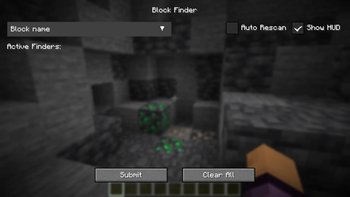
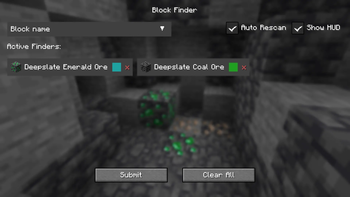
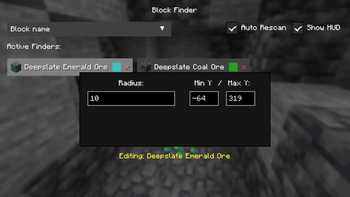
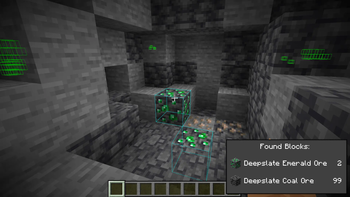
### **IMPORTANT:** This mod only works in singleplayer only and cannot and will not be used on multiplayer servers. ## Overview Block Finder (Locator) is a Minecraft mod that lets you quickly find blocks in both singleplayer or multiplayer worlds. It comes with a custom menu that is easy to use and has many features to help you find what you need. ## Usage * Open menu: Press **'V'** to open the Block Finder menu. If key is taken up, check your keybinds and assign a new one for this menu. * Add blocks: Click on the dropdown widget and search for your wanted block. Select it to add to the active pool. Many can be added at a time. * Configure scan settings: Click on one of your blocks and it should bring up a menu to edit scan radius from yourself, color, minimum Y-level, and maximum Y-level. * Clear block: Click the red 'x' to remove that block from the active pool. * Toggle Auto Scan: Updates the scanned blocks when the player starts moving. * Toggle HUD: Shows a live update GUI of the amount of found blocks. * Submit button: Click to start the scan. * Clear All button: Click to remove all active pool blocks. * Load/Save buttons: Import or export JSON for scan configurations. !(https://cdn.modrinth.com/data/cached_images/eaf3c0ead61365d56c3f9cc0efd8dfb122d267cc_0.webp) ## Dependencies Make sure to install Fabric API valid for the Fabric mod. ## Features * Highlights matching blocks with x-ray outlines visible through walls. * Search for multiple block types in a single scan. * Customize scan radius and minimum/maximum Y-level for each tracked block. * Assign a unique outline color to every tracked block. * Quickly find blocks with block icons and friendly searchable dropdown. * Performs scans on a separate thread to reduce gameplay stuttering. * Has a live HUD giving counts of found blocks. * Saves and loads configurations through JSON **Note to player:** If you want to request me to make a release for a different Minecraft version, or if there are any issues, suggestions, please add them to the GitHub (https://github.com/echen0719/block-finder/issues) so I can improve this mod (with a label please). ## Credits Author: (https://github.com/echen0719) ((https://www.github.com/echen0719))
### IMPORTANT: This mod only works in singleplayer only and cannot and will not be used on multiplayer servers.
## Overview
Block Finder (Locator) is a Minecraft mod that lets you quickly find blocks in both singleplayer or multiplayer worlds. It comes with a custom menu that is easy to use and has many features to help you find what you need.
Open menu: Press 'V' to open the Block Finder menu. If key is taken up, check your keybinds and assign a new one for this menu. Add blocks: Click on the dropdown widget and search for your wanted block. Select it to add to the active pool. Many can be added at a time. Configure scan settings: Click on one of your blocks and it should bring up a menu to edit scan radius from yourself, color, minimum Y-level, and maximum Y-level. Clear block: Click the red 'x' to remove that block from the active pool. Toggle Auto Scan: Updates the scanned blocks when the player starts moving. Toggle HUD: Shows a live update GUI of the amount of found blocks. Submit button: Click to start the scan. Clear All button: Click to remove all active pool blocks. Load/Save buttons: Import or export JSON for scan configurations.
!(https://cdn.modrinth.com/data/cached_images/eaf3c0ead61365d56c3f9cc0efd8dfb122d267cc_0.webp)
## Dependencies
Make sure to install Fabric API valid for the Fabric mod.
## Features
Highlights matching blocks with x-ray outlines visible through walls. Search for multiple block types in a single scan. Customize scan radius and minimum/maximum Y-level for each tracked block. Assign a unique outline color to every tracked block. Quickly find blocks with block icons and friendly searchable dropdown. Performs scans on a separate thread to reduce gameplay stuttering. Has a live HUD giving counts of found blocks. * Saves and loads configurations through JSON
Note to player: If you want to request me to make a release for a different Minecraft version, or if there are any issues, suggestions, please add them to the GitHub (https://github.com/echen0719/block-finder/issues) so I can improve this mod (with a label please).
Author: [@echen0719](https://github.com/echen0719) ((https://www.github.com/echen0719))
📊 Mod Details
- Game
- Minecraft Mods
- Author
- echen0719
- Version
- 1.2.0.nc
- Downloads
- 271
- Endorsements
- 0
- Category
- fabric
- Created
- 8/10/2026
- Updated
- 7/24/2026
- Game Versions
- 26.2
- Tags
- utility
🔧 How to Install Minecraft Mods Mods
Download from Modrinth. Use Prism Launcher or drop into your mods folder.
📖 Full step-by-step install guide for Minecraft Mods →
Visit the official mod page for specific installation instructions for this mod.
🎮 Need cheat codes or console commands? Check ur gaming wiki for Minecraft Mods commands, item IDs, and more.
❓ Frequently Asked Questions
Which Minecraft Mods versions does Block Finder support?
The author lists 26.2. Other versions may work but are untested by the author.
What is the latest version of Block Finder?
Version 1.2.0.nc, published 2026-07-24 with 271 downloads recorded at the source.
Keep browsing — more Minecraft Mods mods await