Biome-colored flowers & plants
⚪ Last updated 2024⚠️ Install Order · 2 steps
Install in this order, then this mod last — most mods fail to load without their framework and dependencies in place.
🖼️ Gallery (3 images)
🔍 Analysis
- 👍 0.3% endorsement rate
- 🏆 #86 of 282 decoration mods in this game by downloads
📋 About This Mod
<p><img style="display: block; margin-left: auto; margin-right: auto;" src="https://i.imgur.com/3cwKTgv.jpg" alt="Header" width="608" height="152" /></p> <p>This is a mod that allows resource packs to add biome tint colors/indexes, basically biome coloring for grass, leaves and water, and give transparent biome-overlay textures to pretty much any* block. *(see notes for 1.18.2 and below)<br />This mod also includes a few resource packs for vanilla that are extracted to the resource pack folder & enabled at startup.</p> <p>For other resource packs that I didn't include by default I should have a page up in some time.</p> <h1>Requirements / Compatibility</h1> <p>See table below.<br /><img src="https://i.imgur.com/BrYYNuj.png" alt="Compatability" width="575" height="542" /></p> <p>1.12.2 & 1.16.5 - Suffers in vanilla from visual layering glitches with translucent textures<br />1.18.2 and above - These versions implement the tripwire shader properly so one can have translucent textures for things like flowers that are not 6-sided blocks.</p> <p>If you want/have to use a shader pack that fix the translucency issue, I tested a few and these work on 1.16.5:</p> <ul> <li>AstraLex v90.0</li> <li>BSL v8.2.02</li> <li>Complementary Shaders v4.7.1</li> <li>Complementary Reimagined r2.03<br />For 1.12.2 & Optifine you can also just use the included "(internal)" shaderpack, as this looks exactly like normal MC, but also fixes translucent textures with a small performance hit.</li> </ul> <h1><br />Notes - What does "pretty much any* block" mean?</h1> <div class="spoiler"> <p><strong>1.19.2 and above</strong><br />Should actually be all blocks.</p> <p><strong>1.18.2</strong><br />It means all blocks that are allowed to use Forge's ItemBlockRenderTypes.setRenderLayer() method.</p> <p><strong>1.16.5</strong><br />It means all blocks that are allowed to use Forge's RenderTypeLookup.setRenderType() method.</p> <p><strong>1.12.2</strong><br />It means all blocks from vanilla and all modded blocks that don't override the getRenderLayer() method.</p> </div> <h1>How do I make a resource pack that uses this?</h1> <div class="spoiler"> <p>I won't get into how to generally make a resource pack, please go somewhere else for that and then come back.</p> <p>Please also read the first point in the short term to do list.</p> <p><br />In general there are two ways to add tint colors (and in 1.18.2 and below RenderTypes/BlockRenderTypes) to blocks.<br /><strong>editing *.json model files</strong><br />This method just uses the already existing foundation of the .json model files. I extended the functionality of these to include being able to add color tints (and in 1.18.2 and below specify the render type).<br /><strong>bcfp.ini file in the root of the resource pack</strong><br />This should only be used as a backup method, if the model really doesn't want to accept being edited by the .json method. Usually should only be applicable to older versions of MC.<br />You can create a file called bcfp.ini in the root of the resource pack and define what tint colors (or render type for 1.18.2 and below) a block is supposed to have.<br />These are only applied at startup and are not reloaded dynamically.</p> <h3><strong>What you have to do with both methods</strong></h3> <p>In both cases we do have to edit the .json model file.</p> <h5><strong>"Parent" tag</strong></h5> <p>We have to actually point towards an existing parent model file with the "parent" tag or make our own model.<br />I included a bunch of altered parents model files for the already existing model files in minecraft. The easiest way to edit your .json file is to take what is in the "Original parent" column and replace it with the "Parent w/ overlay" column. The "block/" or "minecraft:block/" part should be kept.<br /><img src="https://i.imgur.com/9syPUP8.png" alt="parent tag" width="653" height="402" /></p> <p><strong>Example:</strong></p> <p>"parent": "block/crop_with_biome_overlay_modern"</p> <p> </p> <p>In the case of 1.12.2 there is also "crop_with_biome_overlay_modern". This just ports back a fix from newer version where the texture of the opposing sides of a texture are actually mirrored, so that it looks like that pixels are physically in the same place for the opposing sides. The included vanilla resource packs use this.</p> <p> </p> <p>For all the above you also have to specify a new overlay texture. Usually the overlay texture name is just "overlay".<br />In the case that a model may have multiple overlay textures, e.g. "cube_with_biome_overlay", there is a copy of every texture name with "-overlay" appended.<br />In exception to that is the flower pot model, since we only care about the plant in the pot anyway.</p> <p>There is also a version for every one of these altered model files with a second overlay that is just the same name with a "2" appended at the end and another overlay texture with also "2" appended. I admittedly did not test these as I

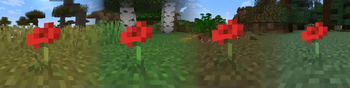
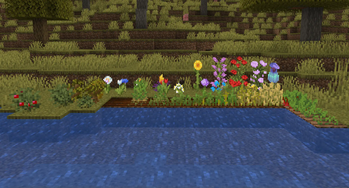
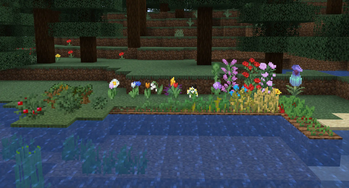
This is a mod that allows resource packs to add biome tint colors/indexes, basically biome coloring for grass, leaves and water, and give transparent biome-overlay textures to pretty much any block. (see notes for 1. 18. 2 and below) This mod also includes a few resource packs for vanilla that are extracted to the resource pack folder & enabled at startup.
For other resource packs that I didn't include by default I should have a page up in some time.
Requirements / Compatibility
See table below.

1. 12. 2 & 1. 16. 5 - Suffers in vanilla from visual layering glitches with translucent textures 1. 18. 2 and above - These versions implement the tripwire shader properly so one can have translucent textures for things like flowers that are not 6-sided blocks.
If you want/have to use a shader pack that fix the translucency issue, I tested a few and these work on 1. 16. 5:
- AstraLex v90. 0
- BSL v8. 2. 02
- Complementary Shaders v4. 7. 1
- Complementary Reimagined r2. 03 For 1. 12. 2 & Optifine you can also just use the included "(internal)" shaderpack, as this looks exactly like normal MC, but also fixes translucent textures with a small performance hit.
Notes - What does "pretty much any block" mean?
1. 19. 2 and above Should actually be all blocks.
1. 18. 2 It means all blocks that are allowed to use Forge's ItemBlockRenderTypes.setRenderLayer() method.
1. 16. 5 It means all blocks that are allowed to use Forge's RenderTypeLookup.setRenderType() method.
1. 12. 2 It means all blocks from vanilla and all modded blocks that don't override the getRenderLayer() method.
How do I make a resource pack that uses this?
I won't get into how to generally make a resource pack, please go somewhere else for that and then come back.
Please also read the first point in the short term to do list.
In general there are two ways to add tint colors (and in 1. 18. 2 and below RenderTypes/BlockRenderTypes) to blocks. editing .json model files This method just uses the already existing foundation of the .json model files. I extended the functionality of these to include being able to add color tints (and in 1. 18. 2 and below specify the render type). bcfp.ini file in the root of the resource pack This should only be used as a backup method, if the model really doesn't want to accept being edited by the .json method. Usually should only be applicable to older versions of MC. You can create a file called bcfp.ini in the root of the resource pack and define what tint colors (or render type for 1. 18. 2 and below) a block is supposed to have. These are only applied at startup and are not reloaded dynamically.
What you have to do with both methods
In both cases we do have to edit the .json model file.
"Parent" tag
We have to actually point towards an existing parent model file with the "parent" tag or make our own model.
I included a bunch of altered parents model files for the already existing model files in minecraft. The easiest way to edit your .json file is to take what is in the "Original parent" column and replace it with the "Parent w/ overlay" column. The "block/" or "minecraft:block/" part should be kept.

Example:
"parent": "block/crop_with_biome_overlay_modern"
In the case of 1. 12. 2 there is also "crop_with_biome_overlay_modern". This just ports back a fix from newer version where the texture of the opposing sides of a texture are actually mirrored, so that it looks like that pixels are physically in the same place for the opposing sides. The included vanilla resource packs use this.
For all the above you also have to specify a new overlay texture. Usually the overlay texture name is just "overlay". In the case that a model may have multiple overlay textures, e.g. "cube_with_biome_overlay", there is a copy of every texture name with "-overlay" appended. In exception to that is the flower pot model, since we only care about the plant in the pot anyway.
There is also a version for every one of these altered model files with a second overlay that is just the same name with a "2" appended at the end and another overlay texture with also "2" appended. I admittedly did not test these as I
📊 Mod Details
- Game
- Minecraft Mods
- Author
- JohnBaccarat
- Version
- 1.0.1
- Downloads
- 5,430
- Endorsements
- 19
- Category
- decoration
- Created
- 10/24/2023
- Updated
- 3/11/2024
- Game Versions
- 1.20, 1.20.1
- Tags
- decoration
🔧 How to Install Minecraft Mods Mods
Download from Modrinth. Use Prism Launcher or drop into your mods folder.
📖 Full step-by-step install guide for Minecraft Mods →
Visit the official mod page for specific installation instructions for this mod.
🎮 Need cheat codes or console commands? Check ur gaming wiki for Minecraft Mods commands, item IDs, and more.
❓ Frequently Asked Questions
Which Minecraft Mods versions does Biome-colored flowers & plants support?
The author lists 1.20, 1.20.1. Other versions may work but are untested by the author.
What is the latest version of Biome-colored flowers & plants?
Version 1.0.1, published 2024-03-11 with 5,430 downloads recorded at the source.
Keep browsing — more Minecraft Mods mods await