Better Revive
🟡 Updated this year⚠️ Install Order · 2 steps
Install in this order, then this mod last — most mods fail to load without their framework and dependencies in place.
🖼️ Gallery (5 images)


🔍 Analysis
- 👍 0.4% endorsement rate
- 🏆 #530 of 538 adventure mods in this game by downloads
📋 About This Mod
# Better Revive **Death doesn't always have to mean an instant respawn.** Better Revive changes the normal Minecraft death system and gives players a chance to bring each other back. When a player dies from a revivable cause, they don't immediately get sent to the respawn screen. Instead, they enter a downed state and their inventory, equipment and experience are stored inside a protected grave. From there, the player can wait for someone to revive them or simply choose to respawn normally and return to the grave later. There are different ways to revive someone. You can use one of the three Revive Potions, or try to bring them back without a potion by completing the Life Pulse minigame. I wanted the mod to work just as well in a normal survival world as it does on multiplayer servers or in larger modpacks, so most of the important mechanics can be configured by the server owner. ## Main Features * Downed state instead of immediately dying * Graves that store inventory, armor, offhand items, experience and supported add-on inventories * Three different tiers of throwable Revive Potions * Manual reviving without a potion through the Life Pulse minigame * The downed player has to accept revival attempts * Configurable revive timers and revive locks * Configurable Life Pulse difficulty * Configurable health, food and debuffs after being revived * Grave Compass for finding and managing your grave * Revive Scroll for returning to distant graves * Public Collection Crates after grave protection expires * Configurable final-death damage types and dimensions * Cross-dimension grave recovery * Multiple and temporary grave support * Optional grave chunk loading * Graves and downed players survive server restarts * Administration menu and useful server commands * Support for singleplayer, multiplayer and dedicated servers ## How Death Works If you die from something that allows revival, Better Revive first stores your items and experience inside a grave. Instead of respawning immediately, you enter the downed state. You can still see what is happening around your grave while waiting for another player to help you. The downed screen shows how much revival time you have left and whether you currently have an active revive lock. You don't have to wait for someone. If you want to continue playing normally, you can always select: **Respawn now (no revival)** This ends the current revival opportunity, but your grave stays in the world so you can recover your items later. If another player successfully revives you, the grave contents are restored and you are returned to a safe position near the grave. If the revival timer runs out, the death becomes final and the grave eventually moves into its public collection phase. ## Revive Potions Better Revive has three Revive Potion tiers. To use one, simply throw it near the grave of a downed player. The potion searches for the nearest valid grave and sends a revival request to its owner. The downed player can see who is trying to revive them, which potion is being used and how long the offer will remain available. Nothing happens automatically. The player has to accept the revival first. | Potion | Brewing Recipe | Revive Health | After-Effects | | --------------------- | ---------------------------- | ------------- | -------------------------------------------- | | **Revive Potion I** | Splash Potion + Golden Apple | 1 heart | Slowness, Hunger and Weakness for 30 seconds | | **Revive Potion II** | Revive Potion I + Honeycomb | 3 hearts | Slowness, Hunger and Weakness for 15 seconds | | **Revive Potion III** | Revive Potion II + Blaze Rod | 5 hearts | No negative effects | Potion revivals also restore the player's food level. After a successful revival, the configured revive lock is applied so players can't simply be revived over and over without any downtime. ### Brewing the Potions All Revive Potions are made in a normal Brewing Stand. 1. Brew a **Splash Potion** together with a **Golden Apple** to create **Revive Potion I**. 2. Brew **Revive Potion I** with a **Honeycomb** to create **Revive Potion II**. 3. Brew **Revive Potion II** with a **Blaze Rod** to create **Revive Potion III**. | Input | Ingredient | Result | | ---------------- | ------------ | ----------------- | | Splash Potion | Golden Apple | Revive Potion I | | Revive Potion I | Honeycomb | Revive Potion II | | Revive Potion II | Blaze Rod | Revive Potion III | Just like normal Minecraft brewing, you can brew up to three potions at the same time. ## Manual Revival and Life Pulse Revive Potions aren't the only way to save someone. If you interact with another player's grave without holding a Revive Potion, you can request a manual revival. The downed player still has to accept your request. After that, the **Life Pulse** minigame starts for the
# Better Revive
Death doesn't always have to mean an instant respawn.
Better Revive changes the normal Minecraft death system and gives players a chance to bring each other back.
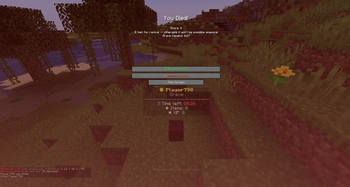
When a player dies from a revivable cause, they don't immediately get sent to the respawn screen. Instead, they enter a downed state and their inventory, equipment and experience are stored inside a protected grave.
From there, the player can wait for someone to revive them or simply choose to respawn normally and return to the grave later.
There are different ways to revive someone. You can use one of the three Revive Potions, or try to bring them back without a potion by completing the Life Pulse minigame.
I wanted the mod to work just as well in a normal survival world as it does on multiplayer servers or in larger modpacks, so most of the important mechanics can be configured by the server owner.
## Main Features
Downed state instead of immediately dying Graves that store inventory, armor, offhand items, experience and supported add-on inventories Three different tiers of throwable Revive Potions Manual reviving without a potion through the Life Pulse minigame The downed player has to accept revival attempts Configurable revive timers and revive locks Configurable Life Pulse difficulty Configurable health, food and debuffs after being revived Grave Compass for finding and managing your grave Revive Scroll for returning to distant graves Public Collection Crates after grave protection expires Configurable final-death damage types and dimensions Cross-dimension grave recovery Multiple and temporary grave support Optional grave chunk loading Graves and downed players survive server restarts Administration menu and useful server commands Support for singleplayer, multiplayer and dedicated servers
## How Death Works
If you die from something that allows revival, Better Revive first stores your items and experience inside a grave.
Instead of respawning immediately, you enter the downed state. You can still see what is happening around your grave while waiting for another player to help you.
The downed screen shows how much revival time you have left and whether you currently have an active revive lock.
You don't have to wait for someone. If you want to continue playing normally, you can always select:
Respawn now (no revival)
This ends the current revival opportunity, but your grave stays in the world so you can recover your items later.
If another player successfully revives you, the grave contents are restored and you are returned to a safe position near the grave.
If the revival timer runs out, the death becomes final and the grave eventually moves into its public collection phase.
## Revive Potions
Better Revive has three Revive Potion tiers.
To use one, simply throw it near the grave of a downed player. The potion searches for the nearest valid grave and sends a revival request to its owner.
The downed player can see who is trying to revive them, which potion is being used and how long the offer will remain available.
Nothing happens automatically. The player has to accept the revival first.
| Potion | Brewing Recipe | Revive Health | After-Effects | | --------------------- | ---------------------------- | ------------- | -------------------------------------------- | | Revive Potion I | Splash Potion + Golden Apple | 1 heart | Slowness, Hunger and Weakness for 30 seconds | | Revive Potion II | Revive Potion I + Honeycomb | 3 hearts | Slowness, Hunger and Weakness for 15 seconds | | Revive Potion III | Revive Potion II + Blaze Rod | 5 hearts | No negative effects |
Potion revivals also restore the player's food level.
After a successful revival, the configured revive lock is applied so players can't simply be revived over and over without any downtime.
### Brewing the Potions
All Revive Potions are made in a normal Brewing Stand.
1. Brew a Splash Potion together with a Golden Apple to create Revive Potion I. 2. Brew Revive Potion I with a Honeycomb to create Revive Potion II. 3. Brew Revive Potion II with a Blaze Rod to create Revive Potion III.
| Input | Ingredient | Result | | ---------------- | ------------ | ----------------- | | Splash Potion | Golden Apple | Revive Potion I | | Revive Potion I | Honeycomb | Revive Potion II | | Revive Potion II | Blaze Rod | Revive Potion III |
Just like normal Minecraft brewing, you can brew up to three potions at the same time.
## Manual Revival and Life Pulse
Revive Potions aren't the only way to save someone.
If you interact with another player's grave without holding a Revive Potion, you can request a manual revival.
The downed player still has to accept your request. After that, the Life Pulse minigame starts for the
📊 Mod Details
- Game
- Minecraft Mods
- Author
- MrStilu2k6
- Version
- 2.2.0
- Downloads
- 1,595
- Endorsements
- 7
- Category
- adventure
- Created
- 4/9/2026
- Updated
- 8/11/2026
- Game Versions
- 1.21.1
- Tags
- adventure, game-mechanics
🔧 How to Install Minecraft Mods Mods
Download from Modrinth. Use Prism Launcher or drop into your mods folder.
📖 Full step-by-step install guide for Minecraft Mods →
Visit the official mod page for specific installation instructions for this mod.
🎮 Need cheat codes or console commands? Check ur gaming wiki for Minecraft Mods commands, item IDs, and more.
❓ Frequently Asked Questions
Which Minecraft Mods versions does Better Revive support?
The author lists 1.21.1. Other versions may work but are untested by the author.
What is the latest version of Better Revive?
Version 2.2.0, published 2026-08-11 with 1,595 downloads recorded at the source.
Keep browsing — more Minecraft Mods mods await