Better-PvP
🟡 Updated this year⚠️ Install Order · 2 steps
Install in this order, then this mod last — most mods fail to load without their framework and dependencies in place.
🖼️ Gallery (3 images)

🔍 Analysis
- 👍 0.0% endorsement rate
- 🏆 #128 of 263 equipment mods in this game by downloads
📋 About This Mod
# Better PvP Better PvP is a Fabric client-side modification that allows you to create and organize players into custom teams. This provides the opportunity to colorize player names in chat and even adds a nice outline of the specific team color to each individual player's armor. Every feature is toggleable and designed to be as flexible as possible. Overall, this mod enhances your in-game experience and significantly improves team-based PvP.!(https://cdn.modrinth.com/data/cached_images/4d07e1d3dcd155016776c7dbab39e7eb1583906f.png) ## Functions **1. Team-Based Chat Colorization** When the setting to colorize players based on their team is enabled, each player's messages in the chat will be displayed in their team's color. This feature is especially useful when playing on multiplayer servers with prominent team dynamics, as it makes it easier to differentiate players by their team affiliation. !(https://cdn.modrinth.com/data/cached_images/6909ab78bca7beb95c379ff206c235567d387b35.png) **2. Team-Based Armor Colorization** With the setting enabled to colorize player armor based on their team, vanilla armor pieces will display an outline in the team's color. This feature helps distinguish players more easily in-game, even when they are wearing the same type of armor. Please note that this only works with vanilla armor and not with modded armor. **3. Team-Based Skin Colorization** Enabling the setting to colorize player skins based on their team changes the entire skin to match the team’s color. This feature is useful if the team-based armor colorization is insufficient or cannot be applied due to the use of non-vanilla armor. By default, this setting is turned off. !(https://cdn.modrinth.com/data/cached_images/791e1363d36a4c2ef6cd789caab03a9aa4acc366.gif) ## Teams and Settings Managing teams in this mod is simple with a custom GUI. You can access the GUI using a customizable keybind (set to "G" by default). Once inside, you’ll find various options to get started: **1. Team Manager Panel** - Navigate to the Team Manager Panel to create your first team. - Use the buttons on the right side to modify the team's name, color, or members. - Clicking the third button takes you to the individual team page, where you can add specific players to the team. !(https://cdn.modrinth.com/data/cached_images/51132114b43fe58cafdce2894e5ca75fbd81239e.png) **2. Settings Panel** - Open the Settings Panel to configure which features of the mod you want to enable. - Use the checkboxes to easily activate or deactivate individual features based on your preferences. !(https://cdn.modrinth.com/data/cached_images/5aa227aaf1fbaaac29b4871d2ec6529f64aab425.png) ## Tutorials and Showcase ### How to create your first Team <iframe width="560" height="315" src="https://www.youtube-nocookie.com/embed/9pStwK2Vhdc?autoplay=1&loop=1&playlist=9pStwK2Vhdc" title="YouTube video player" frameborder="0" allow="accelerometer; autoplay; clipboard-write; encrypted-media; gyroscope; picture-in-picture; web-share" allowfullscreen style="pointer-events: none;"> </iframe> ### How to change the color of the Team <iframe width="560" height="315" src="https://www.youtube-nocookie.com/embed/BGN4QNz-vq8?autoplay=1&loop=1&playlist=BGN4QNz-vq8" title="YouTube video player" frameborder="0" allow="accelerometer; autoplay; clipboard-write; encrypted-media; gyroscope; picture-in-picture; web-share" allowfullscreen style="pointer-events: none;"> </iframe> ### How to change the Settings <iframe width="560" height="315" src="https://www.youtube-nocookie.com/embed/bc2jysijj_w?autoplay=1&loop=1&playlist=bc2jysijj_w" title="YouTube video player" frameborder="0" allow="accelerometer; autoplay; clipboard-write; encrypted-media; gyroscope; picture-in-picture; web-share" allowfullscreen style="pointer-events: none;"> </iframe>
# Better PvP Better PvP is a Fabric client-side modification that allows you to create and organize players into custom teams. This provides the opportunity to colorize player names in chat and even adds a nice outline of the specific team color to each individual player's armor. Every feature is toggleable and designed to be as flexible as possible. Overall, this mod enhances your in-game experience and significantly improves team-based PvP.!(https://cdn.modrinth.com/data/cached_images/4d07e1d3dcd155016776c7dbab39e7eb1583906f.png)
## Functions 1. Team-Based Chat Colorization
When the setting to colorize players based on their team is enabled, each player's messages in the chat will be displayed in their team's color. This feature is especially useful when playing on multiplayer servers with prominent team dynamics, as it makes it easier to differentiate players by their team affiliation.
!(https://cdn.modrinth.com/data/cached_images/6909ab78bca7beb95c379ff206c235567d387b35.png)
2. Team-Based Armor Colorization
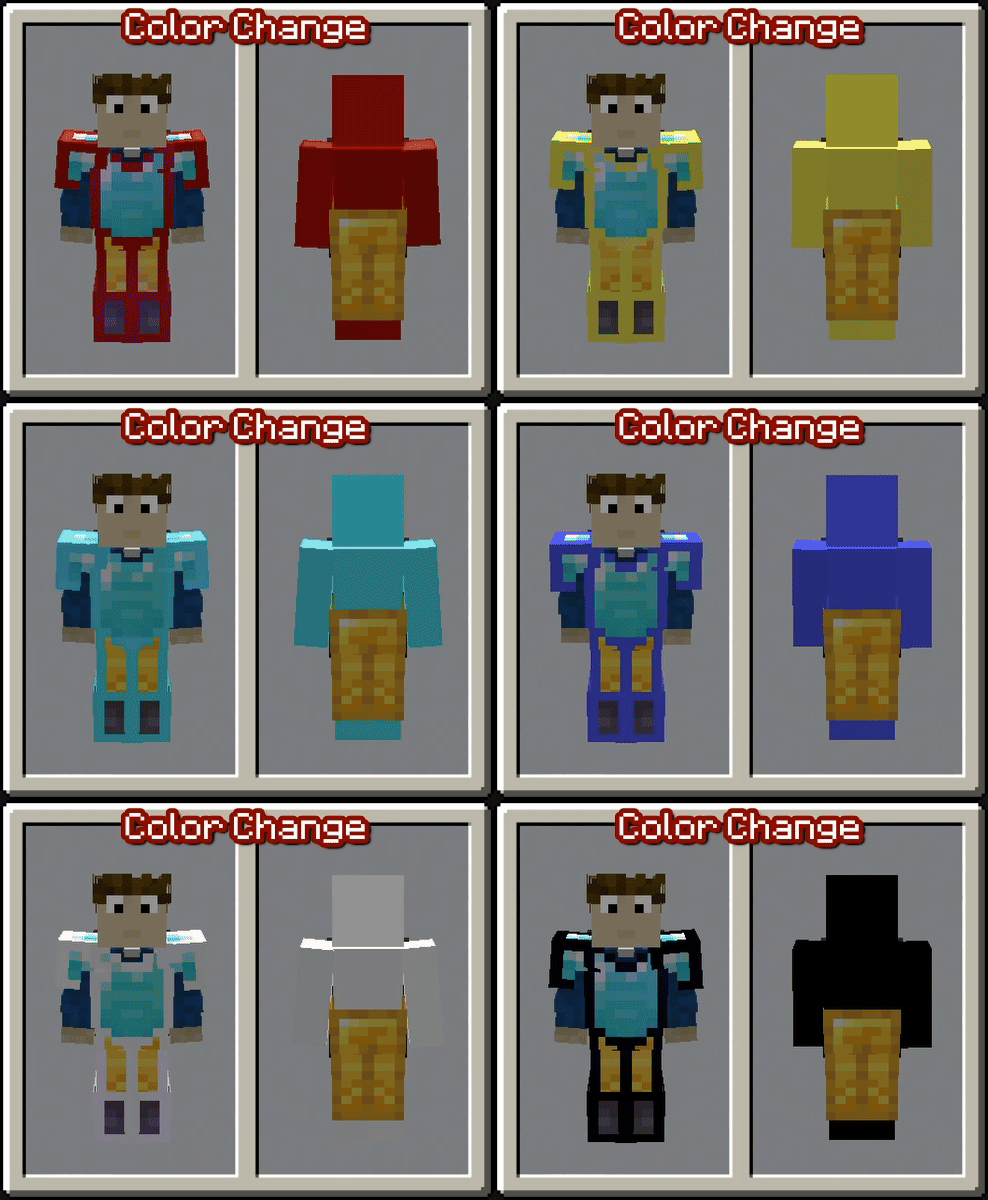
With the setting enabled to colorize player armor based on their team, vanilla armor pieces will display an outline in the team's color. This feature helps distinguish players more easily in-game, even when they are wearing the same type of armor. Please note that this only works with vanilla armor and not with modded armor.
3. Team-Based Skin Colorization
Enabling the setting to colorize player skins based on their team changes the entire skin to match the team’s color. This feature is useful if the team-based armor colorization is insufficient or cannot be applied due to the use of non-vanilla armor. By default, this setting is turned off.
!(https://cdn.modrinth.com/data/cached_images/791e1363d36a4c2ef6cd789caab03a9aa4acc366.gif)
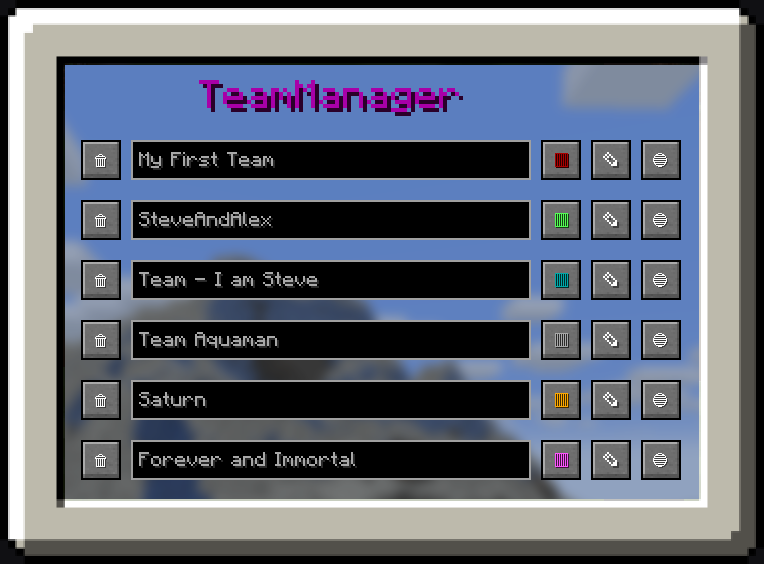
## Teams and Settings Managing teams in this mod is simple with a custom GUI. You can access the GUI using a customizable keybind (set to "G" by default). Once inside, you’ll find various options to get started:
1. Team Manager Panel - Navigate to the Team Manager Panel to create your first team. - Use the buttons on the right side to modify the team's name, color, or members. - Clicking the third button takes you to the individual team page, where you can add specific players to the team.
!(https://cdn.modrinth.com/data/cached_images/51132114b43fe58cafdce2894e5ca75fbd81239e.png)
2. Settings Panel - Open the Settings Panel to configure which features of the mod you want to enable. - Use the checkboxes to easily activate or deactivate individual features based on your preferences.
!(https://cdn.modrinth.com/data/cached_images/5aa227aaf1fbaaac29b4871d2ec6529f64aab425.png)
## Tutorials and Showcase ### How to create your first Team
### How to change the color of the Team
### How to change the Settings
📊 Mod Details
- Game
- Minecraft Mods
- Author
- Bergbauer
- Version
- 1.1.1
- Downloads
- 54,870
- Endorsements
- 23
- Category
- equipment
- Created
- 1/1/2025
- Updated
- 4/26/2026
- Game Versions
- 1.21.11
- Tags
- equipment, utility
🔧 How to Install Minecraft Mods Mods
Download from Modrinth. Use Prism Launcher or drop into your mods folder.
📖 Full step-by-step install guide for Minecraft Mods →
Visit the official mod page for specific installation instructions for this mod.
🎮 Need cheat codes or console commands? Check ur gaming wiki for Minecraft Mods commands, item IDs, and more.
❓ Frequently Asked Questions
Which Minecraft Mods versions does Better-PvP support?
The author lists 1.21.11. Other versions may work but are untested by the author.
What is the latest version of Better-PvP?
Version 1.1.1, published 2026-04-26 with 54,870 downloads recorded at the source.
Keep browsing — more Minecraft Mods mods await