Better Carpet Bots
🟡 Updated this year⚠️ Install Order · 2 steps
Install in this order, then this mod last — most mods fail to load without their framework and dependencies in place.
🖼️ Gallery (1 images)
🔍 Analysis
- 🏆 #93 of 909 fabric mods in this game by downloads
📋 About This Mod
<img src="https://github.com/matejstastny/better-carpet-bots/blob/main/src/main/resources/icon.png?raw=true" alt="Modpack icon" width="25%" align="right"> # Better Carpet Bots A (https://github.com/gnembon/fabric-carpet) extension that adds better bot management commands to your Minecraft server. ### Requirements - (https://fabricmc.net/) ≥ 0.15.0 - (https://modrinth.com/mod/carpet) ## Commands ### `/bot spawn ` Spawns a bot at your position in survival mode. If no name is given, one is auto-generated (`Bot1`, `Bot2`, …). Names must be 1–16 characters, letters/digits/underscores only. Names that belong to real players who have ever joined the server cannot be used. ### `/bot <name> <action>` Controls a bot (or yourself - targeting your own name works too). | Action | Description | |---|---| | `attack` | Attack continuously | | `attack continuous` | Same as above | | `attack interval <ticks>` | Attack every N ticks | | `attack stop` | Stop attacking | | `use` | Right-click / use continuously | | `use continuous` | Same as above | | `use interval <ticks>` | Use every N ticks | | `use stop` | Stop using | | `jump` / `jump stop` | Start / stop jumping | | `sneak` / `sneak stop` | Start / stop sneaking | | `sprint` / `sprint stop` | Start / stop sprinting | | `stop` | Stop all actions | | `look <north\|south\|east\|west\|up\|down>` | Look in a cardinal direction | | `look <yaw> <pitch>` | Look at an exact angle | | `drop` | Drop current hotbar item (single) | | `dropstack` | Drop current hotbar item (full stack) | | `swaphands` | Swap main hand and off hand | | `inventory` | Open bot inventory (must be within 10 blocks) | | `kill` | Remove the bot from the server | ### `/bots <action>` Requires game-master permission (level 2). | Action | Description | |---|---| | `list` | List all active bots | | `stop` | Stop all bots | | `kill` | Kill all bots | | `permissionLevel <0–4>` | Set who can use `/bot` (0 = everyone, 4 = operators only) | | `skin all <url>` | Apply a skin to every bot (persists across respawns) | | `skin <name> <url>` | Apply a skin to one specific bot | ## Bot Inventory `/bot <name> inventory` opens a 5-row screen showing the bot's full inventory: - Rows 0–3: main inventory and hotbar - Row 4: armor slots (only accept the correct armor type), off-hand, and locked filler slots - Empty armor/off-hand slots show colored glass pane labels The screen stays live - items the bot picks up appear immediately. The screen closes automatically if you move more than 10 blocks away. ## Real Player Protection When a player authenticated via Mojang joins for the first time, their name is permanently locked. `/bot spawn <thatName>` will be rejected from that point on. Any existing offline-UUID bot data for that name is backed up to `world/bot-backup/<name>.bak` before being cleaned up, so nothing is lost.

# Better Carpet Bots
A (https://github.com/gnembon/fabric-carpet) extension that adds better bot management commands to your Minecraft server.
### Requirements
- (https://fabricmc.net/) ≥ 0. 15. 0
- (https://modrinth.com/mod/carpet)
## Commands
### `/bot spawn [
Spawns a bot at your position in survival mode. If no name is given, one is auto-generated (`Bot1`, `Bot2`, …). Names must be 1–16 characters, letters/digits/underscores only.
Names that belong to real players who have ever joined the server cannot be used.
### `/bot
Controls a bot (or yourself - targeting your own name works too).
| Action | Description |
|---|---|
| `attack` | Attack continuously |
| `attack continuous` | Same as above |
| `attack interval
### `/bots
Requires game-master permission (level 2).
| Action | Description |
|---|---|
| `list` | List all active bots |
| `stop` | Stop all bots |
| `kill` | Kill all bots |
| `permissionLevel <0–4>` | Set who can use `/bot` (0 = everyone, 4 = operators only) |
| `skin all
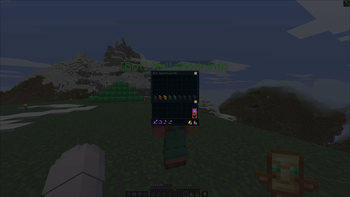
## Bot Inventory
`/bot
- Rows 0–3: main inventory and hotbar
- Row 4: armor slots (only accept the correct armor type), off-hand, and locked filler slots
- Empty armor/off-hand slots show colored glass pane labels
The screen stays live - items the bot picks up appear immediately. The screen closes automatically if you move more than 10 blocks away.
## Real Player Protection
When a player authenticated via Mojang joins for the first time, their name is permanently locked. `/bot spawn
📊 Mod Details
- Game
- Minecraft Mods
- Author
- my-daarlin
- Version
- 1.1.0
- Downloads
- 294
- Endorsements
- 1
- Category
- fabric
- Created
- 7/17/2026
- Updated
- 7/12/2026
- Game Versions
- 1.21.11
- Tags
- utility
🔧 How to Install Minecraft Mods Mods
Download from Modrinth. Use Prism Launcher or drop into your mods folder.
📖 Full step-by-step install guide for Minecraft Mods →
Visit the official mod page for specific installation instructions for this mod.
🎮 Need cheat codes or console commands? Check ur gaming wiki for Minecraft Mods commands, item IDs, and more.
❓ Frequently Asked Questions
Which Minecraft Mods versions does Better Carpet Bots support?
The author lists 1.21.11. Other versions may work but are untested by the author.
What is the latest version of Better Carpet Bots?
Version 1.1.0, published 2026-07-12 with 294 downloads recorded at the source.
Keep browsing — more Minecraft Mods mods await