Better Advanced Tooltips
🟡 Updated this year⚠️ Install Order · 2 steps
Install in this order, then this mod last — most mods fail to load without their framework and dependencies in place.
🖼️ Gallery (1 images)
🔍 Analysis
- 👍 0.0% endorsement rate
📋 About This Mod
Adds tag, component and other tooltips to items in F3+H mode.
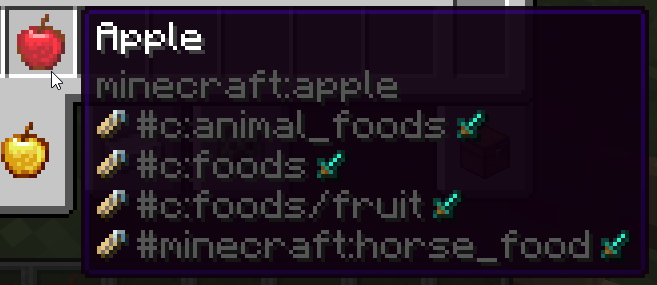
Hold Shift key hovering an item to see its tags:
!(https://raw.githubusercontent.com/latvian-dev/media/refs/heads/main/mods/better-advanced-tooltips/tags.png)
Hovering over some items have special extra tag handling: - Sword icon: Item tags - Grass block icon: Block tags (Any block item) - Pig icon: Entity tags (Spawn Eggs) - Bucket icon: Fluid tags (Buckets/fluid containers) - Painting icon: Painting tags (Paintings) - Enchantment icon: Enchantment tags (Enchanted Books) - Piano icon: Instrument tags (Goat Horns/other instrument items) - Banner icon: Banner Pattern tags (Banner Patterns)
Example - enchanted book showing all enchantment tags:
!(https://raw.githubusercontent.com/latvian-dev/media/refs/heads/main/mods/better-advanced-tooltips/enchantment_tags.png)
If multiple tag types have the same name, they will be merged into the same line, to not clutter screen.
Example - many blocks will have the same block and item tags:
!(https://raw.githubusercontent.com/latvian-dev/media/refs/heads/main/mods/better-advanced-tooltips/block_tags.png)
Hold Alt key hovering an item to see its component patch (items that by default don't have this component set, previously called "Custom NBT"):
!(https://raw.githubusercontent.com/latvian-dev/media/refs/heads/main/mods/better-advanced-tooltips/component_patch.png)
Hold Alt + Shift keys hovering an item to see its full component map (custom ones will be highlighted yellow):
!(https://raw.githubusercontent.com/latvian-dev/media/refs/heads/main/mods/better-advanced-tooltips/component_map.png)
Hold Shift over fuel items to see their fuel values:
!(https://raw.githubusercontent.com/latvian-dev/media/refs/heads/main/mods/better-advanced-tooltips/fuel.png)
This mod also contains a bunch of chat component icons (see its font/icons.json file for more info):
!(https://raw.githubusercontent.com/latvian-dev/media/refs/heads/main/mods/better-advanced-tooltips/icons.png)
This mod used to be bundled with KubeJS but now has been moved to being a dependency, planned to be a soft dependency in future.
[!(https://links.latvian.dev/links.png?mr=better-advanced-tooltips)](https://links.latvian.dev/)
[!(https://links.latvian.dev/partner.png)](https://links.latvian.dev/partner)
📊 Mod Details
- Game
- Minecraft Mods
- Author
- Lat
- Version
- 2101.1.0-build.5
- Downloads
- 5,777
- Endorsements
- 2
- Category
- library
- Created
- 8/18/2026
- Updated
- 8/4/2026
- Game Versions
- 1.21.1
- Tags
- library
🔧 How to Install Minecraft Mods Mods
Download from Modrinth. Use Prism Launcher or drop into your mods folder.
📖 Full step-by-step install guide for Minecraft Mods →
Visit the official mod page for specific installation instructions for this mod.
🎮 Need cheat codes or console commands? Check ur gaming wiki for Minecraft Mods commands, item IDs, and more.
❓ Frequently Asked Questions
Which Minecraft Mods versions does Better Advanced Tooltips support?
The author lists 1.21.1. Other versions may work but are untested by the author.
What is the latest version of Better Advanced Tooltips?
Version 2101.1.0-build.5, published 2026-08-04 with 5,777 downloads recorded at the source.
Keep browsing — more Minecraft Mods mods await