Block Entity Extended Rendering

⭐ ⭐ (166 endorsements) 📥 48,989 downloads 📌 v3.1.0 📅 6/5/2022
⚪ Last updated 2024

By jhalfsharp · decoration

⬇ Download Mod Source: Modrinth ↗ 📅 Updated: 8/4/2024 📅 Created: 6/5/2022
⚠️ Install Order · 2 steps
1🛠️ Forge — Minecraft Forge (mod loader) Download ↗
2🛠️ Fabric — Fabric Loader Download ↗

Install in this order, then this mod last — most mods fail to load without their framework and dependencies in place.

🔍 Analysis

  • 👍 0.3% endorsement rate
  • 🏆 #221 of 354 decoration mods in this game by downloads

📋 About This Mod

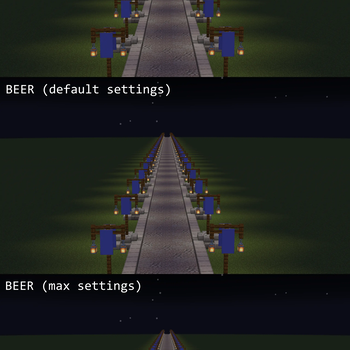
Block Entity Extended Rendering (or BEER for short) is a small mod to make block entities render from further away. Ever been irritated that chests, banners, signs, etc. stop rendering once you get far enough away? I was, too. Though there is an entity render distance setting in vanilla Minecraft, block entities are unaffected by this setting, instead using a hard-coded 64 blocks. BEER, however, overrides this. It provides a separate block entity render distance so that, for example, builds requiring banners are visible as intended from further away. FoundationGames's Enhanced Block Entities mod is highly recommended as well. Note that in most cases, EBE supercedes BEER due to it baking most (but not all) block entity models into regular blocks. I mainly made this mod for banners, as well as for compatibility with mods that add new block entities.

Note: This plugin was created via request here What does it do? Beer! Is a fun plugin that allows two commands, /beer and /bier. Both do the same thing, just ones in German and ones in English (this is because the requester runs a German server. What /beer does is triggers the Nausea and Strength potion effects for a configurable amount of time, to make the effect of being drunk. /bier does the same, just displays the messages in German. You can also configure what those messages are and you can toggle if German is on or off. Features: Triggers nausea and strength potion effects when command is typed. Fully configurable! German, as well as English! Easy to configure! Configuration: Save Beer.jar inside your plugins directory, start the server, then stop the server. It will create a folder named "Beer" double click that folder and there will be a file called "config.yml". Open that in your a text editor (notepad) then for "English Message" that will be the message when a user types /beer. And German Message is the message displayed when the command /bier is typed. "Time" is how long the nausea effect lasts for. Very simple! To Do: To be honest, this is a very small plugin. So probably won't do an update unless the API or something changes. Please Note: If you execute the command /beer or /bier via the console, it will crash the server ;) Source: https://github.com/Musicguy/Beer Kindly translated to German by MojoBlaster: Hinweis: Dieses Plugin wurde aufgrund der Anfrage hier erstellt. Was macht es? Beer! ist ein Spaß-plugin mit 2 Befehlen, /beer und /bier. Beide bewirken das gleiche, jedoch einmal auf English und einmal auf Deutsch (da der Anfragestellende für dieses Plugin einen deutschen Server hat). "/beer" löst die Effekte Übelkeit und Stärke für eine konfigurierbare Zeitspanne aus, um den Effekt der Trunkenheit zu simulieren. "/bier" macht das gleiche, gibt die Nachrichten aber auf Deutsch aus. Des weiteren können die Nachrichten eingestellt und Deutsch ausgestellt werden. Features: Löst auf Befehl die Trankwirkungen Übelkeit und Stärke aus. Vollständig konfigurierbar! Zweisprachig: Deutsch und Englisch Einfach einzustellen! Konfiguration: Speicher die Beer.jar in deinem Plugins-ordner, starte den Server, dann beende ihn wieder. Das Plugin wird einen Ordner namens "Beer" erstellt haben. Geh in den Ordner und öffne die Datei "config.yml" in einem Texteditor (Notepad). "English Message" ist die Nachricht, die beim Befehl "/beer" ausgegeben wird und "German Message" definiert das gleiche für den Befehl "/bier". "Time" gibt an, wie lange der Übelkeitseffekt anhält. Ganz einfach! To-Do: Um ehrlich zu sein, ist dies ein sehr kleines Plugin, also wird es wahrscheinlich kein Update geben, bis sich die API oder irgendetwas anderes ändert. Wichtiger Hinweis: Wenn du die Befehle "/beer" oder "/bier" in der Konsole ausführst, wird der Server abstürzen
🤖 AI-enhanced — based on mod data

📊 Mod Details

Game
Minecraft Mods
Author
jhalfsharp
Version
3.1.0
Downloads
48,989
Endorsements
166
Category
decoration
Created
6/5/2022
Updated
8/4/2024
Game Versions
1.20, 1.20.1, 1.20.2, 1.20.3, 1.20.4
Tags
decoration, utility

🔧 How to Install Minecraft Mods Mods

Download from Modrinth. Use Prism Launcher or drop into your mods folder.

📖 Full step-by-step install guide for Minecraft Mods →

Visit the official mod page for specific installation instructions for this mod.

🎮 Need cheat codes or console commands? Check ur gaming wiki for Minecraft Mods commands, item IDs, and more.

❓ Frequently Asked Questions

Which Minecraft Mods versions does Block Entity Extended Rendering support?

The author lists 1.20, 1.20.1, 1.20.2, 1.20.3, 1.20.4, 1.20.5. Other versions may work but are untested by the author.

What is the latest version of Block Entity Extended Rendering?

Version 3.1.0, published 2024-08-04 with 48,989 downloads recorded at the source.

Keep browsing — more Minecraft Mods mods await

📋 All Minecraft Mods Mods 🏆 Top 25 📂 More decoration 👤 More by jhalfsharp 🔎 Similar Mods 🌐 Best decoration (All Games) 🔀 Check Compatibility ⚖️ Compare Mods 🆕 New Mods