Backslot Mod
🟢 Updated this month⚠️ Install Order · 2 steps
Install in this order, then this mod last — most mods fail to load without their framework and dependencies in place.
🖼️ Gallery (4 images)

🔍 Analysis
- 👍 0.3% endorsement rate
- 🏆 #734 of 940 fabric mods in this game by downloads
📋 About This Mod
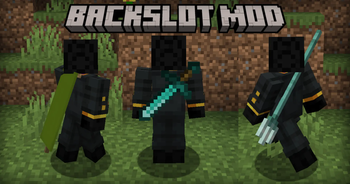
# Backslot Mod ### This mod adds Another inventory Slot: The Backslot!
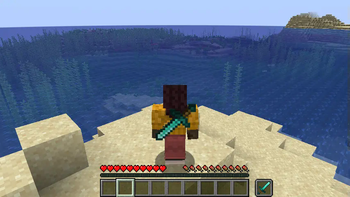
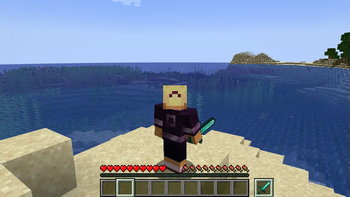
Okay, But how does it work? ## The Backslot The backslot is a hotbar slot-like slot that stores one stack of items, can be selected and doesnt drop on death. There are also two keybinds to acces it, more on those later.
## Keybinds This mod adds 2 keybinds: - Swap With Backslot: Swaps the item you are currently holding with the item in the backslot! - Select Backslot Item: will make the item in the backslot act as if in the main hand,\ allowing full usage of the item!
## Commands
If you are worried about players hiding items from admins in theire backslot, worry no more!\
This mod also adds 2 new admin commands:
- "/backslot_clear
## Configuration This mod also includes configuration options: - Blacklisted items and blocks: For items and blocks that should not be in the backslot. - Large Items: For items that use a larger model and thus need to be scaled up in the backslot. - Should Drop Backslot Item On Death: For changing if items on your backslot items drop after dying. ## Mod Compatibility You can now add Compatibility for this mod using texturepacks or your mods assets folder!\ If you are making a item with a custom model, but it doesnt look good on the backslot, you can change that!\ Simply go under your namespace inside the assets folder then add a folder called "back_transforms" \ and inside there add a .json file named after your item's ID.
Example: "assets/your_mod_id/back_transforms/your_item.json"
Inside this json file you can edit how the item is shown, here you see the default settings:
!(https://cdn.modrinth.com/data/cached_images/678a494f20b7dc03af6eadabb90cf13640a2cee7.png)
Here is an Example Pack called (https://modrinth.com/resourcepack/belt-bundles) ## Preview Picture (More in Gallery) !(https://cdn.modrinth.com/data/cached_images/a20e7ed3a08638836b9a29376e179c7aaf3d4ab1_0.webp)
📊 Mod Details
- Game
- Minecraft Mods
- Author
- medecoole
- Version
- 26.2
- Downloads
- 19,708
- Endorsements
- 50
- Category
- fabric
- Created
- 7/16/2025
- Updated
- 9/5/2026
- Game Versions
- 1.21.11
- Tags
- game-mechanics, storage, utility
🔧 How to Install Minecraft Mods Mods
Download from Modrinth. Use Prism Launcher or drop into your mods folder.
📖 Full step-by-step install guide for Minecraft Mods →
Visit the official mod page for specific installation instructions for this mod.
🎮 Need cheat codes or console commands? Check ur gaming wiki for Minecraft Mods commands, item IDs, and more.
❓ Frequently Asked Questions
Which Minecraft Mods versions does Backslot Mod support?
The author lists 1.21.11. Other versions may work but are untested by the author.
What is the latest version of Backslot Mod?
Version 26.2, published 2026-09-05 with 19,708 downloads recorded at the source.
Keep browsing — more Minecraft Mods mods await