Backpack Display
🟠 Updated over a year ago⚠️ Install Order · 2 steps
Install in this order, then this mod last — most mods fail to load without their framework and dependencies in place.
🖼️ Gallery (2 images)
🔍 Analysis
- 👍 0.1% endorsement rate
- 🏆 #884 of 901 fabric mods in this game by downloads
📋 About This Mod
# BackpackDisplay Adds a tooltip to show what's in your backpack, shulker box or other container item. Configurable of how to get contents for the container item. The mod has out-of-the-box support for vanilla shulker boxes, storage drawers drawers, and forestry backpacks. You can add support to more items by writing custom rules in the mod's config. Configurable options(See the mod's config): - The items that the mod's tooltip should be shown for - Position and color of the tooltip - Optional hold or release a keybind to show the tooltip ## Config Format `displayRules` is the main config of the mod. It lets you to add new container items to display the backpack tooltip, with the following format: Format: `<modID>:<itemID>#<rule type>#<rule definition>` meta is a comma-separated list for meta-values to match. For example,`1,2,5-8` allows tooltip to show on the item with metadata 1,2,5,6,7,8. When meta is absent, tooltip to show on the item ignoring meta. Rule definition is according to the rule type selected. ### Paths Path is commonly used in the rules, and have a format like `path.to.the.item`. For example, in this NBT structure: ``` {"list":} ``` The path `list.1.key2` will get the tag "item" from it. ### List rule Rule type: `list` In this rule, items are all under a NBTTagList or a NBTTagCompound. Rule definition:`path.to.the.list]` The last 2 paths is relative to the tag item in the list. If the counts is absent, the count in the itemstack is used instead. Example: Show contents when hovering a purple shulker box ``` minecraft:purple_shulker_box#list#BlockEntityTag.Items ``` ### Single rule Rule type: `single` In this rule, an item is under a fixed path, with an optional external count value. Rule definition:`path.to.the.itemstack]` If the counts is absent, the count in the itemstack is used instead. Example: Show content for every basic drawers in storage drawers mod ``` storagedrawers:basicdrawers:0#single#BlockEntityTag.Drawers.0.Item;BlockEntityTag.Drawers.0.Count storagedrawers:basicdrawers:1,3#single#BlockEntityTag.Drawers.0.Item;BlockEntityTag.Drawers.0.Count storagedrawers:basicdrawers:1,3#single#BlockEntityTag.Drawers.1.Item;BlockEntityTag.Drawers.1.Count storagedrawers:basicdrawers:2,4#single#BlockEntityTag.Drawers.0.Item;BlockEntityTag.Drawers.0.Count storagedrawers:basicdrawers:2,4#single#BlockEntityTag.Drawers.1.Item;BlockEntityTag.Drawers.1.Count storagedrawers:basicdrawers:2,4#single#BlockEntityTag.Drawers.2.Item;BlockEntityTag.Drawers.2.Count storagedrawers:basicdrawers:2,4#single#BlockEntityTag.Drawers.3.Item;BlockEntityTag.Drawers.3.Count ``` This rule supports further calculation to get the real item count if it's not in the tag directly but can be calculated from the values in the tag. Calculations are a string starting with a operator in `+-*/^%` and followed by a path. The order of calculation is like that on a basic calculator that cannot input expressions. All calculations is done in integer. Example: Show content for compact drawers in storage drawers mod ``` storagedrawers:compdrawers#single#BlockEntityTag.Drawers.Items.0.Item;BlockEntityTag.Drawers.Count;/BlockEntityTag.Drawers.Items.0.Conv storagedrawers:compdrawers#single#BlockEntityTag.Drawers.Items.1.Item;BlockEntityTag.Drawers.Count;/BlockEntityTag.Drawers.Items.1.Conv storagedrawers:compdrawers#single#BlockEntityTag.Drawers.Items.2.Item;BlockEntityTag.Drawers.Count;/BlockEntityTag.Drawers.Items.2.Conv ``` ###
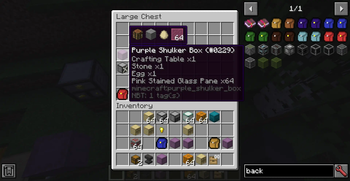
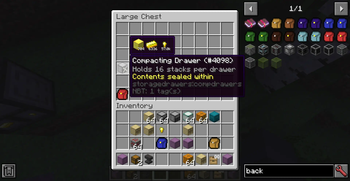
# BackpackDisplay Adds a tooltip to show what's in your backpack, shulker box or other container item. Configurable of how to get contents for the container item. The mod has out-of-the-box support for vanilla shulker boxes, storage drawers drawers, and forestry backpacks. You can add support to more items by writing custom rules in the mod's config.
Configurable options(See the mod's config): - The items that the mod's tooltip should be shown for - Position and color of the tooltip - Optional hold or release a keybind to show the tooltip
## Config Format
`displayRules` is the main config of the mod. It lets you to add new container items to display the backpack tooltip, with the following format:
Format: `
meta is a comma-separated list for meta-values to match. For example,`1,2,5-8` allows tooltip to show on the item with metadata 1,2,5,6,7,8. When meta is absent, tooltip to show on the item ignoring meta.
Rule definition is according to the rule type selected.
### Paths Path is commonly used in the rules, and have a format like `path.to.the.item`. For example, in this NBT structure: ``` {"list":[{"key1":"value"},{"key2":"item"}]} ``` The path `list. 1.key2` will get the tag "item" from it.
### List rule Rule type: `list`
In this rule, items are all under a NBTTagList or a NBTTagCompound.
Rule definition:`path.to.the.list[;path.to.the.itemstack[;path.to.the.counts]]` The last 2 paths is relative to the tag item in the list. If the counts is absent, the count in the itemstack is used instead.
Example: Show contents when hovering a purple shulker box ``` minecraft:purple_shulker_box#list#BlockEntityTag. Items ``` ### Single rule Rule type: `single`
In this rule, an item is under a fixed path, with an optional external count value.
Rule definition:`path.to.the.itemstack[;path.to.the.counts[;calculations for the counts]]` If the counts is absent, the count in the itemstack is used instead.
Example: Show content for every basic drawers in storage drawers mod ``` storagedrawers:basicdrawers:0#single#BlockEntityTag. Drawers. 0. Item;BlockEntityTag. Drawers. 0. Count storagedrawers:basicdrawers:1,3#single#BlockEntityTag. Drawers. 0. Item;BlockEntityTag. Drawers. 0. Count storagedrawers:basicdrawers:1,3#single#BlockEntityTag. Drawers. 1. Item;BlockEntityTag. Drawers. 1. Count storagedrawers:basicdrawers:2,4#single#BlockEntityTag. Drawers. 0. Item;BlockEntityTag. Drawers. 0. Count storagedrawers:basicdrawers:2,4#single#BlockEntityTag. Drawers. 1. Item;BlockEntityTag. Drawers. 1. Count storagedrawers:basicdrawers:2,4#single#BlockEntityTag. Drawers. 2. Item;BlockEntityTag. Drawers. 2. Count storagedrawers:basicdrawers:2,4#single#BlockEntityTag. Drawers. 3. Item;BlockEntityTag. Drawers. 3. Count ```
This rule supports further calculation to get the real item count if it's not in the tag directly but can be calculated from the values in the tag. Calculations are a string starting with a operator in `+-*/^%` and followed by a path. The order of calculation is like that on a basic calculator that cannot input expressions. All calculations is done in integer.
Example: Show content for compact drawers in storage drawers mod ``` storagedrawers:compdrawers#single#BlockEntityTag. Drawers. Items. 0. Item;BlockEntityTag. Drawers. Count;/BlockEntityTag. Drawers. Items. 0. Conv storagedrawers:compdrawers#single#BlockEntityTag. Drawers. Items. 1. Item;BlockEntityTag. Drawers. Count;/BlockEntityTag. Drawers. Items. 1. Conv storagedrawers:compdrawers#single#BlockEntityTag. Drawers. Items. 2. Item;BlockEntityTag. Drawers. Count;/BlockEntityTag. Drawers. Items. 2. Conv ```
📊 Mod Details
- Game
- Minecraft Mods
- Author
- Blue-Beaker
- Version
- 2.0.1
- Downloads
- 9,775
- Endorsements
- 8
- Category
- fabric
- Created
- 11/4/2024
- Updated
- 5/11/2025
- Game Versions
- 1.20.1
- Tags
- utility
🔧 How to Install Minecraft Mods Mods
Download from Modrinth. Use Prism Launcher or drop into your mods folder.
📖 Full step-by-step install guide for Minecraft Mods →
Visit the official mod page for specific installation instructions for this mod.
🎮 Need cheat codes or console commands? Check ur gaming wiki for Minecraft Mods commands, item IDs, and more.
❓ Frequently Asked Questions
Which Minecraft Mods versions does Backpack Display support?
The author lists 1.20.1. Other versions may work but are untested by the author.
What is the latest version of Backpack Display?
Version 2.0.1, published 2025-05-11 with 9,775 downloads recorded at the source.
Keep browsing — more Minecraft Mods mods await