BackInv
🟠 Updated over a year ago⚠️ Install Order · 2 steps
Install in this order, then this mod last — most mods fail to load without their framework and dependencies in place.
🖼️ Gallery (3 images)
🔍 Analysis
- 👍 0.1% endorsement rate
- 🏆 #765 of 893 fabric mods in this game by downloads
📋 About This Mod
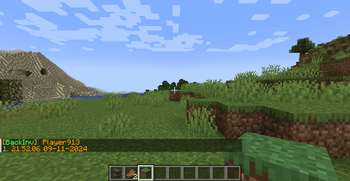
# BackInv 1.1 !(https://img.shields.io/modrinth/dt/V9bB5izm) !(https://img.shields.io/modrinth/game-versions/V9bB5izm) !(https://img.shields.io/badge/java-21+-orange?logo=java) *A simple player backup mod for your server.* Work in single player. I am a technical administrator of the server and encountered the problem that on Fabric 1.21, there is only (https://modrinth.com/mod/death-backup), which is not very server-friendly. ## Commands: - `/backinv <target>` - Opens a graphical interface listing the player's backups (Recommended). - `/backinv reload` - Reloads the configuration file (`config/backinv/config.json`) without restarting the server. - `/backinv list <target>` - Displays a text-based list of the player's backups (No GUI). - `/backinv load <target> <index>` - Loads a specific backup into the player's inventory. - `/backinv inv <target> <index>` - Opens a GUI preview of a specific backup for the player. ## Configuration The configuration is located in `<game or server directory>/config/backinv/config.json`. | Name | Description | Type | |-|-|-| | enabled | Enables (true) or disables (false) the BackInv mod. | boolean | | prefix | The prefix text displayed in messages. | String | | suffix | The suffix text displayed in messages. | String | | re_join_message | The message displayed when a player reconnects. | String | | load_player_message | The message displayed when a player’s inventory is loaded from a file. Supports placeholders: `{player}`, `{file}`. | String | | error_load_player_message | The message displayed when loading a player’s inventory fails. Supports placeholders: `{player}`, `{file}`, `{e}`. | String | | item_prefix | Prefix applied to items displayed in backups. | String | | item_suffix | Suffix applied to items displayed in backups. | String | | no_saves_found | The message displayed when no backups are found for a player. Supports placeholder: `{player}`. | String | | invalid_index | The message displayed when an invalid backup index is provided. Supports placeholder: `{index}`. | String | | save_not_found | The message displayed when a specified backup cannot be found. Supports placeholder: `{save}`. | String | | error_occurred | The generic error message displayed when an action fails. Supports placeholder: `{action}`. | String | ```json { "enabled":true, "prefix":"§6 ", "suffix":"§7", "re_join_message":"Sorry come back again", "load_player_message":"Player {player} inventory is loaded from file {file}.", "error_load_player_message":"Failed to save inventory for player {player} file {file} - Error- {e}", "item_prefix":"§7", "item_suffix":"§6", "no_saves_found":"§cNo saved inventories found for player {player}", "invalid_index":"§cInvalid save index- {index}", "save_not_found":"§cSave not found- {save}", "error_occurred":"§cAn error occurred while {action}" } ``` This is my first mod, and I was learning as I went along, so I made many mistakes and not everything is tested (but I will fix all the bugs!).
# BackInv 1. 1
!(https://img.shields.io/modrinth/dt/V9bB5izm) !(https://img.shields.io/modrinth/game-versions/V9bB5izm) !(https://img.shields.io/badge/java-21+-orange?logo=java)
A simple player backup mod for your server.
Work in single player.
I am a technical administrator of the server and encountered the problem that on Fabric 1. 21, there is only (https://modrinth.com/mod/death-backup), which is not very server-friendly.
## Commands:
- `/backinv
## Configuration
The configuration is located in `
| Name | Description | Type | |-|-|-| | enabled | Enables (true) or disables (false) the BackInv mod. | boolean | | prefix | The prefix text displayed in messages. | String | | suffix | The suffix text displayed in messages. | String | | re_join_message | The message displayed when a player reconnects. | String | | load_player_message | The message displayed when a player’s inventory is loaded from a file. Supports placeholders: `{player}`, `{file}`. | String | | error_load_player_message | The message displayed when loading a player’s inventory fails. Supports placeholders: `{player}`, `{file}`, `{e}`. | String | | item_prefix | Prefix applied to items displayed in backups. | String | | item_suffix | Suffix applied to items displayed in backups. | String | | no_saves_found | The message displayed when no backups are found for a player. Supports placeholder: `{player}`. | String | | invalid_index | The message displayed when an invalid backup index is provided. Supports placeholder: `{index}`. | String | | save_not_found | The message displayed when a specified backup cannot be found. Supports placeholder: `{save}`. | String | | error_occurred | The generic error message displayed when an action fails. Supports placeholder: `{action}`. | String | ```json { "enabled":true, "prefix":"§6[§aBackInv§6] ", "suffix":"§7", "re_join_message":"Sorry come back again", "load_player_message":"Player {player} inventory is loaded from file {file}.", "error_load_player_message":"Failed to save inventory for player {player} file {file} - Error- {e}", "item_prefix":"§7", "item_suffix":"§6", "no_saves_found":"§cNo saved inventories found for player {player}", "invalid_index":"§cInvalid save index- {index}", "save_not_found":"§cSave not found- {save}", "error_occurred":"§cAn error occurred while {action}" } ```
This is my first mod, and I was learning as I went along, so I made many mistakes and not everything is tested (but I will fix all the bugs!).
📊 Mod Details
- Game
- Minecraft Mods
- Author
- UserLog
- Version
- 1.1.6
- Downloads
- 6,487
- Endorsements
- 9
- Category
- fabric
- Created
- 11/11/2024
- Updated
- 11/24/2024
- Game Versions
- 1.20, 1.20.1, 1.20.2, 1.20.3, 1.20.4
- Tags
- management, utility
🔧 How to Install Minecraft Mods Mods
Download from Modrinth. Use Prism Launcher or drop into your mods folder.
📖 Full step-by-step install guide for Minecraft Mods →
Visit the official mod page for specific installation instructions for this mod.
🎮 Need cheat codes or console commands? Check ur gaming wiki for Minecraft Mods commands, item IDs, and more.
❓ Frequently Asked Questions
Which Minecraft Mods versions does BackInv support?
The author lists 1.20, 1.20.1, 1.20.2, 1.20.3, 1.20.4, 1.20.5. Other versions may work but are untested by the author.
What is the latest version of BackInv?
Version 1.1.6, published 2024-11-24 with 6,487 downloads recorded at the source.
Keep browsing — more Minecraft Mods mods await