Axis World Editor
🟡 Updated this year⚠️ Install Order · 2 steps
Install in this order, then this mod last — most mods fail to load without their framework and dependencies in place.
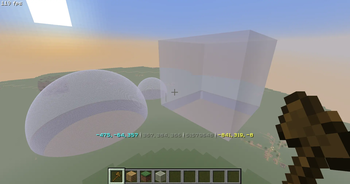
🖼️ Gallery (12 images)



🔍 Analysis
- 👍 0.1% endorsement rate
- 🏆 #72 of 169 datapack mods in this game by downloads
📋 About This Mod
<div align="center"> !(https://github.com/GamerGoBC/Hyper-Login/blob/main/axis_banner2.png?raw=true) <a href="https://discord.com/invite/YRd7ech9cN"> <img src="https://cdn.modrinth.com/data/cached_images/ed3dc867d812ba33c7752df3cfa179774acbfd1e.png" alt="Discord"> </a> <a href="https://www.youtube.com/playlist?list=PLPWM0ad9QsFM4O4r2ISmuTTJNVL6e_85u"> <img src="https://cdn.modrinth.com/data/cached_images/3cc9552fd90699bf84c75310fa20c19c5909ee9a.png" alt="Youtube"> </a> <a href=""> <img src="https://cdn.modrinth.com/data/cached_images/301ce031bc3cf7e5354304bb108d7fb8fe7dd8fd.png" alt="NoMods"> </a> </div> ## 💡 Features **Axis** - is all-in-one **vanilla toolset** for easy and convenient real-time world editing. ### ⚙️ Performance & Core Algorithms <details> <summary>🛠️ Tools and Commands</summary> **Tons of Tools and Commands** for speeding up your building process <br> **ℹ️ You will find a complete list of tools and commands, as well as their purposes, in the in-game wiki.** <details> <summary>🔧Tools</summary> !(https://cdn.modrinth.com/data/cached_images/efab988ace1b28749454378ffd47061df77a2a03.png) Automatically run functions based on your actions. Each tool has several modes. **Throw** (default:**Q**) to change **mode**, put in **offhand** (default:**F**) to change **tool**. **How to use (X) tool?** Look at the item tooltip, or open the detailed documentation using `/function we:help`. | Tool | Modes | Description | | :--- | :--- | :--- | | **Selector (Axe)** | **Raycast** **Mid air 15** **Mid air 10** **Mid air 5** | Left and Right-mouse clicks to set both region corners. | | **Resize** | **1** **10** **Double** **Lasso** | Left and Right-mouse clicks to resize region in the direction you are facing. | | **String** | **Raycast** **Mid air 30** **Mid air 20** **Mid air 10** | Use it to measure distance by clicking LMB and RMB. | | **Paste brush** | **Fill-paste (10/20/30/Ray)** **Replace-paste (10/20/30/Ray)** | Right-mouse click to paste (clone) selected region to any other place. | | **Block brush** | **Diameter 1** **Diameter 3** **Diameter 5** **Diameter 7** | Left-mouse click to pick block, Right-mouse click to paint. | | **Display Modification** | **Scale - 0.5, 0.125, 0.015625** **Move - 0.5, 0.125, 0.015625** **Rotate - 22.5, 5.625, 1.40625** | | ](https://modrinth.com/datapack/axis) </details> <details> <summary>💻 Commands</summary> !(https://cdn.modrinth.com/data/cached_images/a507da6232e31eb7300b8888b9911073d684ae9e_0.webp) Manual use. `/function we:help` for more info. **How to use (X) command?** All the user commands are available on the path `/function we:`. To view each command description, run `/function we:help`. You need OPerator rights in the world where you want to use the datapack. ### Basic | Command | Aliases | Description | | :--- | :--- | :--- | | **help** | **h** | Opens help page | | **settings** | **config** | Opens settings page | | **wand** | **w** **get** | Gives you tool for selecting regions. You can take wooden axe from your creative inventory and it will become wand. <br> Click left mouse button to set the first point of the region, Click right mouse button to set the second point of the region. Both points create a region between them. <br> Read tooltips for more info about using tools and modes. | | **uniwand** | | Opens UI with all the tools for you to choose | | **flight** | | Opens the flight settings menu | | **pin** | | Allows you to pin up to 10 custom commands above the Axis chat menu, and use them with a mouse click. Format: /function we:pin {slot:2,cmd:'say Hello World!'} <-- "cmd" without backslash (/) | | **uninstall** | **unins** | Opens the datapack uninstall menu | ### Regions | Command | Aliases | Description | | :--- | :--- | :--- | | **1** | | Set the first point of the region. Both points create a region between them | | **2** | | Set the second point of the region. Both points create a region between them | | **expand** | | Expands the region by 1 block in the direction you are facing. You can use resize tool unstead | | **contract** | | Expands the region by 1 block in the direction you are facing. You can use resize tool unstead | | **clear** | **c** | Clears all selected points and regions | ### Operations | Command | Aliases | Description | | :--- | :--- | :--- | | **forceid.from {id:*}** | | From = the block that is normally taken from the left hand. Allows you to force the block ID, including the blockstate, when executing all commands that require a block ID. | | **forceid.to {id:*}** | | To = the block that is normally taken from the right hand. Allows you to force the block ID, including the blockstate, when executing all commands that require a block ID. | | **forceid.clear** | | Clear = removes the Force ID from both storages. Allows you to force the block ID, including the blockstate, when executing all commands that require a block ID. | | **set** | | Rep
!(https://github.com/GamerGoBC/Hyper-Login/blob/main/axis_banner2.png?raw=true)


## 💡 Features Axis - is all-in-one vanilla toolset for easy and convenient real-time world editing.
### ⚙️ Performance & Core Algorithms
🛠️ Tools and Commands
Tons of Tools and Commands for speeding up your building process
ℹ️ You will find a complete list of tools and commands, as well as their purposes, in the in-game wiki.
🔧Tools
!(https://cdn.modrinth.com/data/cached_images/efab988ace1b28749454378ffd47061df77a2a03.png) Automatically run functions based on your actions. Each tool has several modes. Throw (default:Q) to change mode, put in offhand (default:F) to change tool. How to use (X) tool? Look at the item tooltip, or open the detailed documentation using `/function we:help`.
| Tool | Modes | Description | | :--- | :--- | :--- | | Selector (Axe) | Raycast Mid air 15 Mid air 10 Mid air 5 | Left and Right-mouse clicks to set both region corners. | | Resize | 1 10 Double Lasso | Left and Right-mouse clicks to resize region in the direction you are facing. | | String | Raycast Mid air 30 Mid air 20 Mid air 10 | Use it to measure distance by clicking LMB and RMB. | | Paste brush | Fill-paste (10/20/30/Ray) Replace-paste (10/20/30/Ray) | Right-mouse click to paste (clone) selected region to any other place. | | Block brush | Diameter 1 Diameter 3 Diameter 5 Diameter 7 | Left-mouse click to pick block, Right-mouse click to paint. | | Display Modification | Scale - 0. 5, 0. 125, 0. 015625 Move - 0. 5, 0. 125, 0. 015625 Rotate - 22. 5, 5. 625, 1. 40625 | |
[[↑Collapse all]](https://modrinth.com/datapack/axis)
💻 Commands
!(https://cdn.modrinth.com/data/cached_images/a507da6232e31eb7300b8888b9911073d684ae9e_0.webp) Manual use. `/function we:help` for more info. How to use (X) command? All the user commands are available on the path `/function we:`. To view each command description, run `/function we:help`. You need OPerator rights in the world where you want to use the datapack.
### Basic | Command | Aliases | Description | | :--- | :--- | :--- | | help | h | Opens help page | | settings | config | Opens settings page | | wand | w get | Gives you tool for selecting regions. You can take wooden axe from your creative inventory and it will become wand. Click left mouse button to set the first point of the region, Click right mouse button to set the second point of the region. Both points create a region between them. Read tooltips for more info about using tools and modes. | | uniwand | | Opens UI with all the tools for you to choose | | flight | | Opens the flight settings menu | | pin | | Allows you to pin up to 10 custom commands above the Axis chat menu, and use them with a mouse click. Format: /function we:pin {slot:2,cmd:'say Hello World!'} <-- "cmd" without backslash (/) | | uninstall | unins | Opens the datapack uninstall menu |
### Regions | Command | Aliases | Description | | :--- | :--- | :--- | | 1 | | Set the first point of the region. Both points create a region between them | | 2 | | Set the second point of the region. Both points create a region between them | | expand | | Expands the region by 1 block in the direction you are facing. You can use resize tool unstead | | contract | | Expands the region by 1 block in the direction you are facing. You can use resize tool unstead | | clear | c | Clears all selected points and regions |
### Operations | Command | Aliases | Description | | :--- | :--- | :--- | | *forceid.from {id:} | | From = the block that is normally taken from the left hand. Allows you to force the block ID, including the blockstate, when executing all commands that require a block ID. | | forceid.to {id:} | | To = the block that is normally taken from the right hand. Allows you to force the block ID, including the blockstate, when executing all commands that require a block ID. | | forceid.clear | | Clear = removes the Force ID from both storages. Allows you to force the block ID, including the blockstate, when executing all commands that require a block ID. | | set* | | Rep
📊 Mod Details
- Game
- Minecraft Mods
- Author
- Gm4
- Version
- 0.5.0-mod
- Downloads
- 55,465
- Endorsements
- 42
- Category
- datapack
- Created
- 11/28/2024
- Updated
- 7/20/2026
- Game Versions
- 26.2
- Tags
- game-mechanics, management, utility
🔧 How to Install Minecraft Mods Mods
Download from Modrinth. Use Prism Launcher or drop into your mods folder.
📖 Full step-by-step install guide for Minecraft Mods →
Visit the official mod page for specific installation instructions for this mod.
🎮 Need cheat codes or console commands? Check ur gaming wiki for Minecraft Mods commands, item IDs, and more.
❓ Frequently Asked Questions
Which Minecraft Mods versions does Axis World Editor support?
The author lists 26.2. Other versions may work but are untested by the author.
What is the latest version of Axis World Editor?
Version 0.5.0-mod, published 2026-07-20 with 55,465 downloads recorded at the source.
Keep browsing — more Minecraft Mods mods await