Avatar: Legend Reforged
🟡 Updated this year⚠️ Install Order · 2 steps
Install in this order, then this mod last — most mods fail to load without their framework and dependencies in place.
🖼️ Gallery (2 images)
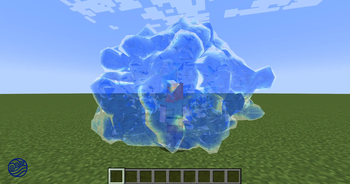
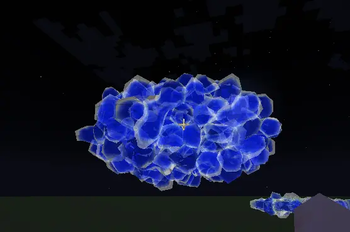
🔍 Analysis
- 👍 0.4% endorsement rate
- 🏆 #407 of 557 adventure mods in this game by downloads
📋 About This Mod
# Avatar: Legend Reforged This is an "Avatar: The Last Airbender" inspired Minecraft mod boasting versatile combat and ambitious dynamic bending. The goal of this project is to provide a more immersive bending experience than ever before. Bending the elements is based on mastering the basic Forms and learning to use them in combination to achieve a number of feats. <iframe width="560" height="315" src="https://www.youtube-nocookie.com/embed/wRIbGhQSLME" title="YouTube video player" frameborder="0" allow="accelerometer; autoplay; clipboard-write; encrypted-media; gyroscope; picture-in-picture; web-share" allowfullscreen></iframe> Video Clips: * (https://imgur.com/8QaPmq9) * (https://imgur.com/wmeeASO) *** ## Quick Start Guide ### Step 1: Select Your Element Press the **period (`.`)** key to open the Element Selection Screen. Choose from: * **Airbending** * **Waterbending** * **Earthbending** * **Firebending** Once selected, you become a Bender with access to that element's skills. ### Step 2: Toggle Bending On/Off Press **Period (`.`)** again to toggle bending mode on and off. When enabled, you can execute bending skills using the Bending Forms below. ### Step 3: Master the Bending Forms Bending Forms are the foundation of all bending skills. Each Form maps to a default key binding. Press or hold the corresponding key to execute a skill associated with that Form. | Form |Default Key |Action | | -------- |------------------ |------------------------------- | | <strong>STRIKE</strong> |<code>Left Mouse Button</code> |Primary offensive attack | | <strong>BLOCK</strong> |<code>Right Mouse Button</code> |Defensive barrier or protection | | <strong>PUSH</strong> |<code>W</code> |Forward directional force | | <strong>PULL</strong> |<code>S</code> |Backward/inward force | | <strong>LEFT</strong> |<code>A</code> |Left directional force | | <strong>RIGHT</strong> |<code>D</code> |Right directional force | | <strong>RAISE</strong> |<code>E</code> |Upward/elevating force | | <strong>LOWER</strong> |<code>Q</code> |Downward/descending force | | <strong>ROTATE</strong> |<code>R</code> |Rotational/circular motion | | <strong>EXPAND</strong> |<code>E</code> |Enlargement or spreading | | <strong>COMPRESS</strong> |<code>Q</code> |Compression or condensing | | <strong>SPLIT</strong> |<code>S</code> |Separation or division | | <strong>COMBINE</strong> |<code>W</code> |Merging or joining | | <strong>ARC</strong> |<code>Left Ctrl</code> |Curved trajectory | | <strong>SHAPE</strong> |<code>Left Alt</code> |Shaping or molding | | <strong>STEP</strong> |<code>W/A/S/D + Space (double tap)</code> |Dashing movement | ### Step 4: Execute Bending Skills To execute a bending skill, press the corresponding \*Bending Form key\* for the skill you want to use. For example, to use **Fire Strike**, simply press `Left Mouse Button` (STRIKE Form). Your character will launch a curvable fire projectile. ### Step 5: Combine Forms for Advanced Skills Some skills require multiple Forms in sequence. For example, **Flame Stream** requires: 1. Press `Left Alt` (SHAPE) 2. Then, press `E` (EXPAND) 3. Finally, hold `Right Mouse Button` (BLOCK) This combination allows you to continuously fire projectiles. *** ## 📚 Learn More See full list of Bending Skills and how to execute them here: (https://github.com/MorpheTech/AvatarModWiki/wiki/Bending-Skills) *** 💡 Pro Tip - **Master one element first** - Learn all skills of a single element before switching *** Please be aware this mod is a work in progress and we plan on adding more content like progression, NPCs, structure generation and more! Please provide feedback and join our (https://discord.gg/amuzil-avatar)!
# Avatar: Legend Reforged
This is an "Avatar: The Last Airbender" inspired Minecraft mod boasting versatile combat and ambitious dynamic bending.
The goal of this project is to provide a more immersive bending experience than ever before. Bending the elements is based on mastering the basic Forms and learning to use them in combination to achieve a number of feats.
Video Clips:
(https://imgur.com/8QaPmq9) (https://imgur.com/wmeeASO)
## Quick Start Guide
### Step 1: Select Your Element
Press the period (`.`) key to open the Element Selection Screen. Choose from:
Airbending Waterbending Earthbending Firebending
Once selected, you become a Bender with access to that element's skills.
### Step 2: Toggle Bending On/Off
Press Period (`.`) again to toggle bending mode on and off. When enabled, you can execute bending skills using the Bending Forms below.
### Step 3: Master the Bending Forms
Bending Forms are the foundation of all bending skills. Each Form maps to a default key binding. Press or hold the corresponding key to execute a skill associated with that Form.
| Form |Default Key |Action |
| -------- |------------------ |------------------------------- |
| STRIKE |Left Mouse Button |Primary offensive attack |
| BLOCK |Right Mouse Button |Defensive barrier or protection |
| PUSH |W |Forward directional force |
| PULL |S |Backward/inward force |
| LEFT |A |Left directional force |
| RIGHT |D |Right directional force |
| RAISE |E |Upward/elevating force |
| LOWER |Q |Downward/descending force |
| ROTATE |R |Rotational/circular motion |
| EXPAND |E |Enlargement or spreading |
| COMPRESS |Q |Compression or condensing |
| SPLIT |S |Separation or division |
| COMBINE |W |Merging or joining |
| ARC |Left Ctrl |Curved trajectory |
| SHAPE |Left Alt |Shaping or molding |
| STEP |W/A/S/D + Space (double tap) |Dashing movement |
### Step 4: Execute Bending Skills
To execute a bending skill, press the corresponding \Bending Form key\ for the skill you want to use.
For example, to use Fire Strike, simply press `Left Mouse Button` (STRIKE Form). Your character will launch a curvable fire projectile.
### Step 5: Combine Forms for Advanced Skills
Some skills require multiple Forms in sequence. For example, Flame Stream requires:
1. Press `Left Alt` (SHAPE) 2. Then, press `E` (EXPAND) 3. Finally, hold `Right Mouse Button` (BLOCK)
This combination allows you to continuously fire projectiles.
## 📚 Learn More
See full list of Bending Skills and how to execute them here: (https://github.com/MorpheTech/AvatarModWiki/wiki/Bending-Skills)
💡 Pro Tip - Master one element first - Learn all skills of a single element before switching
Please be aware this mod is a work in progress and we plan on adding more content like progression, NPCs, structure generation and more! Please provide feedback and join our (https://discord.gg/amuzil-avatar)!
📊 Mod Details
- Game
- Minecraft Mods
- Author
- Caliburs
- Version
- 1.1.1
- Downloads
- 3,145
- Endorsements
- 14
- Category
- adventure
- Created
- 4/1/2026
- Updated
- 5/25/2026
- Game Versions
- 1.21.1
- Tags
- adventure, magic, mobs
🔧 How to Install Minecraft Mods Mods
Download from Modrinth. Use Prism Launcher or drop into your mods folder.
📖 Full step-by-step install guide for Minecraft Mods →
Visit the official mod page for specific installation instructions for this mod.
🎮 Need cheat codes or console commands? Check ur gaming wiki for Minecraft Mods commands, item IDs, and more.
❓ Frequently Asked Questions
Which Minecraft Mods versions does Avatar: Legend Reforged support?
The author lists 1.21.1. Other versions may work but are untested by the author.
What is the latest version of Avatar: Legend Reforged?
Version 1.1.1, published 2026-05-25 with 3,145 downloads recorded at the source.
Keep browsing — more Minecraft Mods mods await