AutoJoinParty
🟡 Updated this year⚠️ Install Order · 2 steps
Install in this order, then this mod last — most mods fail to load without their framework and dependencies in place.
🖼️ Gallery (6 images)

🔍 Analysis
- 🏆 #495 of 909 fabric mods in this game by downloads
📋 About This Mod
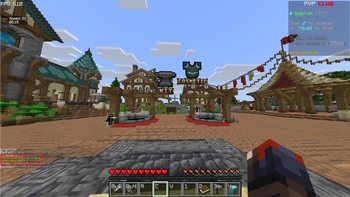
**AutoJoinParty** is a lightweight client-side Fabric mod for competitive PvP players. It automatically joins public parties and introduces real-time group coordination so your whole squad enters the same party at once. --- ## Features **Instant Auto-Join** — Automatically detects public party invitations in chat (e.g. `(1/32) Player is hosting a public party!`) and executes the join command immediately. **Friends & Group System** — Add friends, see which server they are on in real-time, and create groups. When the group leader joins a party, all group members are pulled in automatically. **Leader / Member Logic** — Group leaders have Auto Join enabled automatically. Members have it disabled by default and only get pulled in when the leader joins — preventing accidental party joins without the leader. **Toggle System** — Press **6** at any time to enable or disable Auto Join. A confirmation message appears in chat. **Friends GUI** — Press **N** to open the Friends & Group overlay with two tabs: - *Friends* — See who is online, invite them to a group, or remove them. - *Requests* — Accept or decline incoming friend requests; view sent requests. No commands required — everything can be done by clicking in the GUI. --- ## Supported Versions | Version | Notes | |---------|-------| | 1.21.1 – 1.21.4 | Stable | | 1.21.5 – 1.21.8 | Group auto-disable logic added | | 1.21.9 – 1.21.11 | Last obfuscated era — **main tested version** | | 26.1 / 26.1.1 / 26.1.2 | First deobfuscated versions | | 26.2 | Chaos Cubed update | This mod has been mainly tested on **1.21.11**. Other versions may contain bugs or compatibility issues. --- ## Installation 1. Install (https://fabricmc.net/use/) for your Minecraft version. 2. Install (https://modrinth.com/mod/fabric-api). 3. Download the correct JAR for your version from this page. 4. Place the JAR in your `.minecraft/mods` folder (or Lunar Client mods folder). 5. Launch Minecraft. --- ## Controls | Action | Default Keybind | |--------|-----------------| | Open Friends GUI | **N** | | Toggle Auto Join | **6** | Both keybinds can be changed in **Options → Controls → AutoJoinParty**. Everything can be done by clicking in the Friends GUI. For players who prefer typing, the following client-side commands are also available: - `/ajp accept <player>` — Accept a group invite from a player - `/ajp decline <player>` — Decline a group invite from a player - `/ajp invite <player>` — Invite a player to your group - `/ajp kick <player>` — Kick a player from your group - `/ajp leave <player>` — Dissolve your group (if you are the leader) or leave the group. These commands have no effect on your perfomance --- This is a **client-side only** mod — no server plugin required.
AutoJoinParty is a lightweight client-side Fabric mod for competitive PvP players. It automatically joins public parties and introduces real-time group coordination so your whole squad enters the same party at once.
## Features
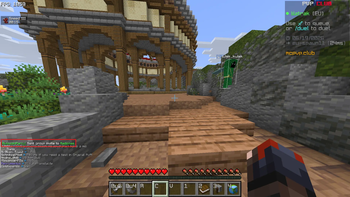
Instant Auto-Join — Automatically detects public party invitations in chat (e.g. `(1/32) Player is hosting a public party!`) and executes the join command immediately.
Friends & Group System — Add friends, see which server they are on in real-time, and create groups. When the group leader joins a party, all group members are pulled in automatically.
Leader / Member Logic — Group leaders have Auto Join enabled automatically. Members have it disabled by default and only get pulled in when the leader joins — preventing accidental party joins without the leader.
Toggle System — Press 6 at any time to enable or disable Auto Join. A confirmation message appears in chat.
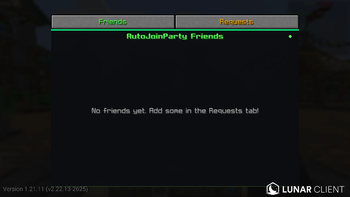
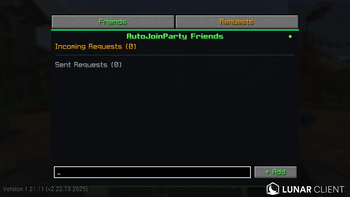
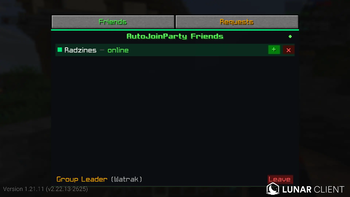
Friends GUI — Press N to open the Friends & Group overlay with two tabs: - Friends — See who is online, invite them to a group, or remove them. - Requests — Accept or decline incoming friend requests; view sent requests.
No commands required — everything can be done by clicking in the GUI.
## Supported Versions
| Version | Notes | |---------|-------| | 1. 21. 1 – 1. 21. 4 | Stable | | 1. 21. 5 – 1. 21. 8 | Group auto-disable logic added | | 1. 21. 9 – 1. 21. 11 | Last obfuscated era — main tested version | | 26. 1 / 26. 1. 1 / 26. 1. 2 | First deobfuscated versions | | 26. 2 | Chaos Cubed update |
This mod has been mainly tested on 1. 21. 11. Other versions may contain bugs or compatibility issues.
## Installation
1. Install (https://fabricmc.net/use/) for your Minecraft version. 2. Install (https://modrinth.com/mod/fabric-api). 3. Download the correct JAR for your version from this page. 4. Place the JAR in your `.minecraft/mods` folder (or Lunar Client mods folder). 5. Launch Minecraft.
## Controls
| Action | Default Keybind | |--------|-----------------| | Open Friends GUI | N | | Toggle Auto Join | 6 |
Both keybinds can be changed in Options → Controls → AutoJoinParty.
Everything can be done by clicking in the Friends GUI. For players who prefer typing, the following client-side commands are also available:
- `/ajp accept
` — Accept a group invite from a player - `/ajp decline
` — Decline a group invite from a player - `/ajp invite
` — Invite a player to your group - `/ajp kick
` — Kick a player from your group - `/ajp leave
` — Dissolve your group (if you are the leader) or leave the group. - These commands have no effect on your perfomance
This is a client-side only mod — no server plugin required.
📊 Mod Details
- Game
- Minecraft Mods
- Author
- Watrak
- Version
- 1.0.0
- Downloads
- 266
- Endorsements
- 2
- Category
- fabric
- Created
- 8/5/2026
- Updated
- 8/9/2026
- Game Versions
- 26.2
- Tags
- management, social, utility
🔧 How to Install Minecraft Mods Mods
Download from Modrinth. Use Prism Launcher or drop into your mods folder.
📖 Full step-by-step install guide for Minecraft Mods →
Visit the official mod page for specific installation instructions for this mod.
🎮 Need cheat codes or console commands? Check ur gaming wiki for Minecraft Mods commands, item IDs, and more.
❓ Frequently Asked Questions
Which Minecraft Mods versions does AutoJoinParty support?
The author lists 26.2. Other versions may work but are untested by the author.
What is the latest version of AutoJoinParty?
Version 1.0.0, published 2026-08-09 with 266 downloads recorded at the source.
Keep browsing — more Minecraft Mods mods await