Auto Lectern
🟡 Updated this year⚠️ Install Order · 2 steps
Install in this order, then this mod last — most mods fail to load without their framework and dependencies in place.
🖼️ Gallery (4 images)

🔍 Analysis
- 👍 0.2% endorsement rate
- 🏆 #378 of 983 fabric mods in this game by downloads
📋 About This Mod
# Auto Lectern (Fabric): <img src="https://raw.githubusercontent.com/capthehacker99/AutoLectern/master/src/main/resources/assets/pack.png" width="128" style="max-width: 100%;"></img><br> This mod basically breaks and places lecterns to cycle trades for you. ## Usage: Add a goal:<br> `/autolec add ? `<br> Look at a lectern<br> `/autolec start`<br> Stop:<br> `/autolec stop`<br> If there isn't any goal Auto Lectern will cycle forever.<br> If you wish to make Auto Lectern wait for the lectern item to be picked up first, do <br> `/autolec sync item`<br> # Quick Start ## Add a goal You may add a goal using the command `/autolec add` which has the following syntax: `/autolec add ? (( )|min|max|any) (( )|min|max|any)` Here's an example of adding mending at lowest price: `/autolec add minecraft:mending max min` Here's an example of adding mending at any price: `/autolec add minecraft:mending max any` Here's an example to add Sharpness V at any price: `/autolec add minecraft:sharpness 5 5 any` Here's an example to add Unbreaking of any level at the price of between 10-32 emeralds: `/autolec add minecraft:unbreaking any 10 32` Here's an example to add **ALL** enchantments at max level and minimum price. `/autolec add max min` ## List goals You may want to know which goals you have already added. You may do this using the `/autolec list` command. !(https://github.com/user-attachments/assets/ed2feb4c-968e-4d67-9490-7b1426f5769a) ## Prepare a suitable cycling area Here's an example of a suitable cycling area: !(https://github.com/user-attachments/assets/48d42de4-c5ac-4588-9348-735db1c3a9f0) ## Prepare lecterns and axe(s) For faster cycling speed, prepare many lecterns and put them in your offhand while putting the axe in your main hand. !(https://github.com/user-attachments/assets/25fe16c0-6aee-41e9-8be0-cc6ec06bbd43) ## Settings for consideration - Auto trade `/autolec autoTrade (CHEAPEST|ENCHANT|OFF)` - You may want to use auto trade to automatically trade the enchant or lock the enchant. To do this, you need to first put paper and or books and emeralds in your inventory as the mod with automatically trade those based on the settings: - CHEAPEST - this will trade paper first, if there's no such trade or you don't have enough paper in your inventory, it will try to trade the enchant instead otherwise it will fail and won't trade. - ENCHANT - this will attempt to trade the enchant book. If it can't it will fail and won't trade. - OFF - this means it won't automatically trade for you. - Break Cooldown `/autolec breakCooldown` - By default, Minecraft has a break cooldown. You may disable break cooldown while using AutoLectern by toggling **Break cooldown** to **OFF**. - Logging `/autolec log` - By toggling this on, it will display log of trades in chat. - Pre breaking `/autolec preBreak` - By toggling this on, it will make AutoLectern start breaking the lectern while waiting for villager trades, speeding up the cycling speed. - **IMPORTANT** if your tool is instant, you should turn pre breaking **OFF** since it will **CAUSE THE LECTERN TO BREAK WHILE WAITING FOR TRADES**. - Preserve tool `/autolec preserveTool` - By toggling this on, it will cause AutoLectern to stop if your tool is about to break. - Item sync `/autolec sync item` - By toggling this on, AutoLectern won't place a lectern until the broken lectern has been picked up, useful for when you don't have many lecterns. ## Start cycling You may start cycling by **LOOKING AT THE LECTERN** and run the following command: `/autolec start` !(https://github.com/user-attachments/assets/50cb4688-94ab-456d-8542-7d607267b618) ## Removing goals After you got your enchant, you may remove your goal by: - Clicking the **** button in chat where it says `Goal met:` - Clicking the **** button in chat when you do `/autolec list` - Using `/autolec remove ` where is obtained from the number on the left in `/autolec list`
# Auto Lectern (Fabric):
This mod basically breaks and places lecterns to cycle trades for you. ## Usage: Add a goal:
`/autolec add ? [(minLevel, maxLevel)/min/max/any] [(minPrice, maxPrice)/min/max/any]`
Look at a lectern
`/autolec start`
`/autolec stop`
If there isn't any goal Auto Lectern will cycle forever.
If you wish to make Auto Lectern wait for the lectern item to be picked up first, do
`/autolec sync item`
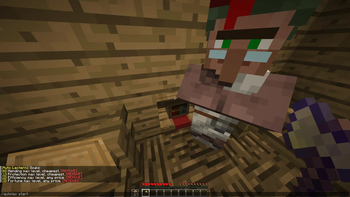
# Quick Start ## Add a goal You may add a goal using the command `/autolec add` which has the following syntax: `/autolec add ? (( )|min|max|any) (( )|min|max|any)` Here's an example of adding mending at lowest price: `/autolec add minecraft:mending max min` Here's an example of adding mending at any price: `/autolec add minecraft:mending max any` Here's an example to add Sharpness V at any price: `/autolec add minecraft:sharpness 5 5 any` Here's an example to add Unbreaking of any level at the price of between 10-32 emeralds: `/autolec add minecraft:unbreaking any 10 32` Here's an example to add ALL enchantments at max level and minimum price. `/autolec add max min` ## List goals You may want to know which goals you have already added. You may do this using the `/autolec list` command. !(https://github.com/user-attachments/assets/ed2feb4c-968e-4d67-9490-7b1426f5769a)
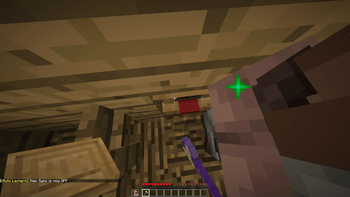
## Prepare a suitable cycling area Here's an example of a suitable cycling area: !(https://github.com/user-attachments/assets/48d42de4-c5ac-4588-9348-735db1c3a9f0)
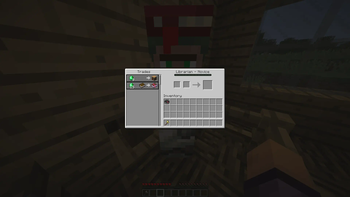
## Prepare lecterns and axe(s) For faster cycling speed, prepare many lecterns and put them in your offhand while putting the axe in your main hand. !(https://github.com/user-attachments/assets/25fe16c0-6aee-41e9-8be0-cc6ec06bbd43)
## Settings for consideration - Auto trade `/autolec autoTrade (CHEAPEST|ENCHANT|OFF)` - You may want to use auto trade to automatically trade the enchant or lock the enchant. To do this, you need to first put paper and or books and emeralds in your inventory as the mod with automatically trade those based on the settings: - CHEAPEST - this will trade paper first, if there's no such trade or you don't have enough paper in your inventory, it will try to trade the enchant instead otherwise it will fail and won't trade. - ENCHANT - this will attempt to trade the enchant book. If it can't it will fail and won't trade. - OFF - this means it won't automatically trade for you. - Break Cooldown `/autolec breakCooldown` - By default, Minecraft has a break cooldown. You may disable break cooldown while using AutoLectern by toggling Break cooldown to OFF. - Logging `/autolec log` - By toggling this on, it will display log of trades in chat. - Pre breaking `/autolec preBreak` - By toggling this on, it will make AutoLectern start breaking the lectern while waiting for villager trades, speeding up the cycling speed. - IMPORTANT if your tool is instant, you should turn pre breaking OFF since it will CAUSE THE LECTERN TO BREAK WHILE WAITING FOR TRADES. - Preserve tool `/autolec preserveTool` - By toggling this on, it will cause AutoLectern to stop if your tool is about to break. - Item sync `/autolec sync item` - By toggling this on, AutoLectern won't place a lectern until the broken lectern has been picked up, useful for when you don't have many lecterns.
## Start cycling You may start cycling by LOOKING AT THE LECTERN and run the following command: `/autolec start` !(https://github.com/user-attachments/assets/50cb4688-94ab-456d-8542-7d607267b618)
## Removing goals After you got your enchant, you may remove your goal by: - Clicking the button in chat where it says `Goal met:` - Clicking the button in chat when you do `/autolec list` - Using `/autolec remove ` where is obtained from the number on the left in `/autolec list`
📊 Mod Details
- Game
- Minecraft Mods
- Author
- capthehacker99
- Version
- 1.1.1
- Downloads
- 60,747
- Endorsements
- 114
- Category
- fabric
- Created
- 10/5/2023
- Updated
- 6/21/2026
- Game Versions
- 26.2
- Tags
- utility
🔧 How to Install Minecraft Mods Mods
Download from Modrinth. Use Prism Launcher or drop into your mods folder.
📖 Full step-by-step install guide for Minecraft Mods →
Visit the official mod page for specific installation instructions for this mod.
🎮 Need cheat codes or console commands? Check ur gaming wiki for Minecraft Mods commands, item IDs, and more.
❓ Frequently Asked Questions
Which Minecraft Mods versions does Auto Lectern support?
The author lists 26.2. Other versions may work but are untested by the author.
What is the latest version of Auto Lectern?
Version 1.1.1, published 2026-06-21 with 60,747 downloads recorded at the source.
Keep browsing — more Minecraft Mods mods await