AudioThrottle
🟡 Updated this year⚠️ Install Order · 2 steps
Install in this order, then this mod last — most mods fail to load without their framework and dependencies in place.
🖼️ Gallery (2 images)

🔍 Analysis
- 👍 0.0% endorsement rate
- 🏆 #580 of 1032 fabric mods in this game by downloads
📋 About This Mod
# AudioThrottle AudioThrottle is a lightweight client-side mod that improves the Minecraft sound engine. Instead of allowing hundreds of identical sounds to play simultaneously and clip into a deafening wall of digital noise, the mod dynamically limits sound saturation within a tight radius. The result is a clean, natural group sound that makes high-density areas feel more polished, while recovering lost performance. **Support developement❤️:** <p align="left"> <a href="https://ko-fi.com/noslow"> <img src="https://files.catbox.moe/lc2o7s.jpg" alt="Support Noslow" width="350"> </a> </p> ## Features - Prevents overlapping ambient sounds from clipping and distorting - Reclaims frame rate and smooths out micro-stutters around crowded farms - Adds a dynamic proximity cap for identical audio IDs - Reduces resource overhead by mitigating sound-linked particle floods - Operates silently with a zero-config setup out of the box - Works across all entities, block interactions, and environmental audio loops - Client-side only ## Why use it? Minecraft's default audio engine handles crowded spaces poorly, pushing every single cluck, moo, and piston click to the client even when the human ear can't distinguish them. In pure vanilla stress tests with hundreds of crowded entities, AudioThrottle increased average frame rates by 11% and boosted minimum frame stability by 14% simply by cutting out redundant audio processing at the root. It keeps your vanilla acoustic awareness while making crowded server spawns, villager trading hubs, and high-speed sorting rooms run noticeably smoother. ## Compatibility - Fabric - Client-side only - Compatible with (https://modrinth.com/mod/sound-physics-remastered) and (https://modrinth.com/mod/simple-voice-chat) This mod does not need to be installed on the server. ## Notes AudioThrottle focuses entirely on sound engine density management and client stability. It does not alter core server-side game logic, change mob AI behaviors, or add new audio tracks to the game. It is fully compatible with proximity voice chat mods like Simple Voice Chat and Plasmo Voice.
# AudioThrottle
AudioThrottle is a lightweight client-side mod that improves the Minecraft sound engine.
Instead of allowing hundreds of identical sounds to play simultaneously and clip into a deafening wall of digital noise, the mod dynamically limits sound saturation within a tight radius. The result is a clean, natural group sound that makes high-density areas feel more polished, while recovering lost performance.
Support developement❤️:

## Features
- Prevents overlapping ambient sounds from clipping and distorting
- Reclaims frame rate and smooths out micro-stutters around crowded farms
- Adds a dynamic proximity cap for identical audio IDs
- Reduces resource overhead by mitigating sound-linked particle floods
- Operates silently with a zero-config setup out of the box
- Works across all entities, block interactions, and environmental audio loops
- Client-side only
## Why use it?
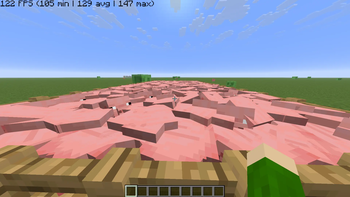
Minecraft's default audio engine handles crowded spaces poorly, pushing every single cluck, moo, and piston click to the client even when the human ear can't distinguish them. In pure vanilla stress tests with hundreds of crowded entities, AudioThrottle increased average frame rates by 11% and boosted minimum frame stability by 14% simply by cutting out redundant audio processing at the root. It keeps your vanilla acoustic awareness while making crowded server spawns, villager trading hubs, and high-speed sorting rooms run noticeably smoother.
## Compatibility
- Fabric
- Client-side only
- Compatible with (https://modrinth.com/mod/sound-physics-remastered) and (https://modrinth.com/mod/simple-voice-chat)
This mod does not need to be installed on the server.
AudioThrottle focuses entirely on sound engine density management and client stability. It does not alter core server-side game logic, change mob AI behaviors, or add new audio tracks to the game. It is fully compatible with proximity voice chat mods like Simple Voice Chat and Plasmo Voice.
📊 Mod Details
- Game
- Minecraft Mods
- Author
- Noslow
- Version
- 1.0.1
- Downloads
- 165,257
- Endorsements
- 15
- Category
- fabric
- Created
- 5/26/2026
- Updated
- 8/9/2026
- Game Versions
- 1.21.11
- Tags
- optimization, technology, utility
🔧 How to Install Minecraft Mods Mods
Download from Modrinth. Use Prism Launcher or drop into your mods folder.
📖 Full step-by-step install guide for Minecraft Mods →
Visit the official mod page for specific installation instructions for this mod.
🎮 Need cheat codes or console commands? Check ur gaming wiki for Minecraft Mods commands, item IDs, and more.
❓ Frequently Asked Questions
Which Minecraft Mods versions does AudioThrottle support?
The author lists 1.21.11. Other versions may work but are untested by the author.
What is the latest version of AudioThrottle?
Version 1.0.1, published 2026-08-09 with 165,257 downloads recorded at the source.
Keep browsing — more Minecraft Mods mods await