Auto Tool Switch
🟡 Updated this year⚠️ Install Order · 2 steps
Install in this order, then this mod last — most mods fail to load without their framework and dependencies in place.
🖼️ Gallery (1 images)
🔍 Analysis
- 👍 0.1% endorsement rate
- 🏆 #116 of 566 adventure mods in this game by downloads
📋 About This Mod
[!(https://cdn.modrinth.com/data/cached_images/5a02e1af5793448d84b2d629745ff5fd69ba462b_0.webp)](https://url-shortener.curseforge.com/QqVIA)
[!(https://media.forgecdn.net/attachments/description/1321365/description_19767e94-ef82-4569-92c6-b1e8b60e6e07.png)](https://discord.gg/XgH4EpyPD2)
> Automatically equips the right tool before every block break.
!(https://cdn.modrinth.com/data/UTN1BzXp/images/7f3a043f3892e7c2ac85d3717c422130ace385a4.png)
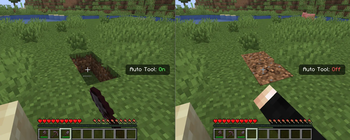
Auto Tool Switch is a lightweight quality-of-life mod that automatically selects the most effective tool from your hotbar whenever you begin breaking a block. Instead of manually changing between pickaxes, axes, shovels, or other specialized tools, the mod evaluates the available tools and switches to the fastest option instantly, keeping mining and building uninterrupted.
### ✨ Highlights
Automatic Tool Selection. Whenever a block is about to be mined, the mod compares every tool in the player's hotbar using Minecraft's block breaking speed and automatically equips the one with the highest destroy speed for that specific block.
Hotbar-Based Switching. Only the nine hotbar slots are scanned, ensuring predictable behavior while avoiding unnecessary inventory interaction. The selected tool is synchronized immediately so both client and server remain in sync.
Toggle Anytime. The entire system can be enabled or disabled with a dedicated keybind, making it easy to switch between automatic and manual tool selection whenever preferred.
Animated Status HUD. A compact on-screen notification appears after toggling the feature, displaying whether Auto Tool is currently enabled or disabled. The overlay uses smooth slide-in, hold, and fade-out animations without permanently occupying screen space.
Minimal Gameplay Impact. The mod only performs tool selection when a block is being broken, avoiding continuous inventory scans or background processing during normal gameplay.
### ⚙️ Compatibility
Minecraft 1. 21. 8- BEING EXPANDED Works in Survival and Adventure gameplay. Automatically ignores Creative and Spectator mode where tool switching is unnecessary.
### 🎛️ Configurable in-menu
Enable or disable Auto Tool functionality through the in-game keybind. Animated HUD status notification displaying the current state. Standard Minecraft keybinding menu integration for changing the toggle key.
📊 Mod Details
- Game
- Minecraft Mods
- Author
- xsoras
- Version
- 0.9.5
- Downloads
- 2,718
- Endorsements
- 2
- Category
- adventure
- Created
- 7/1/2026
- Updated
- 7/2/2026
- Game Versions
- 26.1, 26.1.1, 26.1.2, 26.2
- Tags
- adventure, game-mechanics, utility
🔧 How to Install Minecraft Mods Mods
Download from Modrinth. Use Prism Launcher or drop into your mods folder.
📖 Full step-by-step install guide for Minecraft Mods →
Visit the official mod page for specific installation instructions for this mod.
🎮 Need cheat codes or console commands? Check ur gaming wiki for Minecraft Mods commands, item IDs, and more.
❓ Frequently Asked Questions
Which Minecraft Mods versions does Auto Tool Switch support?
The author lists 26.1, 26.1.1, 26.1.2, 26.2. Other versions may work but are untested by the author.
What is the latest version of Auto Tool Switch?
Version 0.9.5, published 2026-07-02 with 2,718 downloads recorded at the source.
Keep browsing — more Minecraft Mods mods await