AstralBot
🟠 Updated over a year ago⚠️ Install Order · 2 steps
Install in this order, then this mod last — most mods fail to load without their framework and dependencies in place.
🖼️ Gallery (5 images)
🔍 Analysis
- 👍 0.1% endorsement rate
- 🏆 #219 of 920 fabric mods in this game by downloads
📋 About This Mod
# AstralBot (https://img.shields.io/github/actions/workflow/status/Erdragh/AstralBot/build.yml?style=for-the-badge)](https://github.com/Erdragh/AstralBot/actions/workflows/build.yml) (https://img.shields.io/github/license/Juuxel/Adorn.svg?style=for-the-badge)](LICENSE) !(https://img.shields.io/badge/environment-server-4caf50?style=for-the-badge) This is a Minecraft mod and Discord Bot in one package. It's intended for the (https://www.curseforge.com/minecraft/modpacks/create-astral) Modpack's official server, but it's implemented cross-platform to be usable by others too. The goal is to be easy-to-use and accessible for non-technical server admins, while allowing true complexity for power users. ## Features These features are the core of what this bot will do. See (#status) to see how much is already implemented. - Discord and Minecraft account linking, optionally requiring this to be whitelisted - Discord and Minecraft chat synchronization, optionally via webhook for improved readability - FAQ commands using Markdown files without needing to restart the server ## Dependencies This mod has a few dependencies, some of which are not specified directly as they're technically optional: - The Kotlin Implementation for the platform you're running. (e.g. (https://modrinth.com/mod/kotlin-for-forge) or (https://modrinth.com/mod/fabric-language-kotlin)) - The (Neo-)Forge Config API (Included in Neo/Forge, (https://modrinth.com/mod/forge-config-api-port)) ## Implementation - (https://jda.wiki) library to communicate with the Discord API. - Kotlin for the improved development experience over Java - (https://github.com/JetBrains/Exposed) to communicate with the Database ## Configuration The following things will be configurable: - Required linking to be whitelisted (default: `off`) - Chat synchronization with imitated Discord Users: 1. No user imitation (The bot will write the messages under its own name) 2. (If possible) Minecraft user imitation (The Minecraft usernames and heads will be used for messages) 3. (Only available if requiring linking for whitelist) Discord user imitation (The messages will be written under the linked Discord name) Default: Minecraft user imitation (if webhook available is set, otherwise no imitation) - Managing FAQs through a command interface (default: `off`) - Database connection. Uses an SQLite database by default ## Status - Whitelisting - FAQ Commands - Reading Markdown files - Updating suggestions without restart - Management/Creation via commands - Chat synchronization - Minecraft to Discord - Discord to Minecraft - User imitation on Discord. Either uses Minecraft avatars or Discord avatars ## Running There is no public instance of this bot/mod available. To use it, create a new Application on the (https://discord.com/developers/applications) and configure it to have the three privileged gateway intents: `PRESENCE`, `SERVER MEMBERS` and `MESSAGE CONTENT`. Copy the bot token and store it somewhere safe (like a Password Manager) and never show it to anybody else. To make sure the token gets read by the bot, it has to be in either an (https://en.wikipedia.org/wiki/Environment_variable) `DISCORD_TOKEN` where the running Minecraft server can access it or in the config file under the key `token`. You could for example modify a `start.sh` script on a Unix-like system to `export` it or start the shell script with it set directly: `startmc.sh`: ```shell export DISCORD_TOKEN=<place token here> java ... # java command that starts the server ``` or ```shell DISCORD_TOKEN=<place token here> startmc.sh # Start the script with the env variable set ``` After starting the server, you can go into the OAuth2 URL builder on the Discord Developer Portal and generate a URL with the `bot` and `applications.command` permissions. Use the generated URL to have the bot join your server. To be able to use user imitation, which makes the chat synchronization more readable, the bot will try and create a webhook in the configured chat synchronization channel. This means it will need to have the permission to manage webhooks. If you don't want that you can manually create a webhook in the channel where you want the messages synchronized and set it in the `webhook.url` option in the config for the mod.
# AstralBot [!(https://img.shields.io/github/actions/workflow/status/Erdragh/AstralBot/build.yml?style=for-the-badge)](https://github.com/Erdragh/AstralBot/actions/workflows/build.yml) [!(https://img.shields.io/github/license/Juuxel/Adorn.svg?style=for-the-badge)](LICENSE) !(https://img.shields.io/badge/environment-server-4caf50?style=for-the-badge)
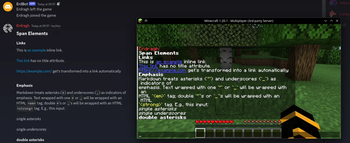
This is a Minecraft mod and Discord Bot in one package. It's intended for the (https://www.curseforge.com/minecraft/modpacks/create-astral) Modpack's official server, but it's implemented cross-platform to be usable by others too. The goal is to be easy-to-use and accessible for non-technical server admins, while allowing true complexity for power users.
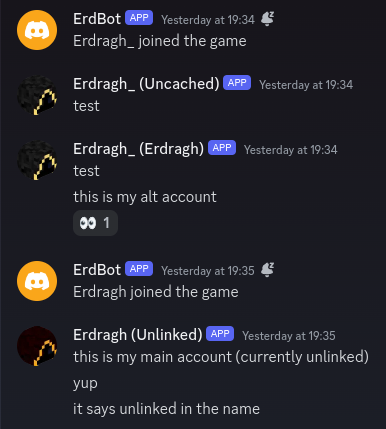
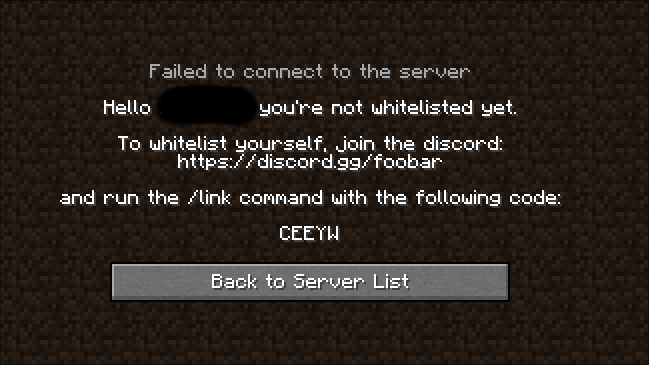
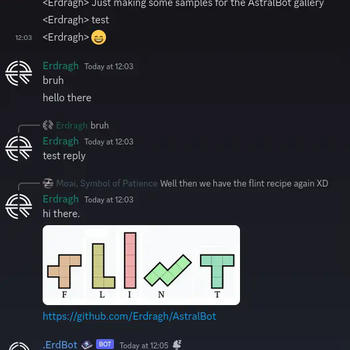
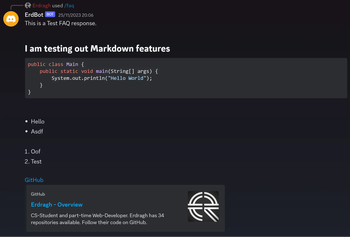
## Features These features are the core of what this bot will do. See (#status) to see how much is already implemented. - Discord and Minecraft account linking, optionally requiring this to be whitelisted - Discord and Minecraft chat synchronization, optionally via webhook for improved readability - FAQ commands using Markdown files without needing to restart the server
## Dependencies
This mod has a few dependencies, some of which are not specified directly as they're technically optional: - The Kotlin Implementation for the platform you're running. (e.g. (https://modrinth.com/mod/kotlin-for-forge) or (https://modrinth.com/mod/fabric-language-kotlin)) - The (Neo-)Forge Config API (Included in Neo/Forge, (https://modrinth.com/mod/forge-config-api-port))
## Implementation - (https://jda.wiki) library to communicate with the Discord API. - Kotlin for the improved development experience over Java - (https://github.com/JetBrains/Exposed) to communicate with the Database
## Configuration The following things will be configurable: - Required linking to be whitelisted (default: `off`) - Chat synchronization with imitated Discord Users: 1. No user imitation (The bot will write the messages under its own name) 2. (If possible) Minecraft user imitation (The Minecraft usernames and heads will be used for messages) 3. (Only available if requiring linking for whitelist) Discord user imitation (The messages will be written under the linked Discord name) Default: Minecraft user imitation (if webhook available is set, otherwise no imitation) - Managing FAQs through a command interface (default: `off`) - Database connection. Uses an SQLite database by default
## Status - Whitelisting - [ ] FAQ Commands - Reading Markdown files - Updating suggestions without restart - [ ] Management/Creation via commands - Chat synchronization - Minecraft to Discord - Discord to Minecraft - User imitation on Discord. Either uses Minecraft avatars or Discord avatars
## Running There is no public instance of this bot/mod available. To use it, create a new Application on the (https://discord.com/developers/applications) and configure it to have the three privileged gateway intents: `PRESENCE`, `SERVER MEMBERS` and `MESSAGE CONTENT`.
Copy the bot token and store it somewhere safe (like a Password Manager) and never show it to anybody else. To make sure the token gets read by the bot, it has to be in either an (https://en.wikipedia.org/wiki/Environment_variable) `DISCORD_TOKEN` where the running Minecraft server can access it or in the config file under the key `token`. You could for example modify a `start.sh` script on a Unix-like system to `export` it or start the shell script with it set directly:
`startmc.sh`:
```shell
export DISCORD_TOKEN=
java ... # java command that starts the server ```
```shell
DISCORD_TOKEN=
After starting the server, you can go into the OAuth2 URL builder on the Discord Developer Portal and generate a URL with the `bot` and `applications.command` permissions. Use the generated URL to have the bot join your server.
To be able to use user imitation, which makes the chat synchronization more readable, the bot will try and create a webhook in the configured chat synchronization channel. This means it will need to have the permission to manage webhooks. If you don't want that you can manually create a webhook in the channel where you want the messages synchronized and set it in the `webhook.url` option in the config for the mod.
📊 Mod Details
- Game
- Minecraft Mods
- Author
- Erdragh
- Version
- 1.5.5-mc1.18.2-fabric
- Downloads
- 5,520
- Endorsements
- 6
- Category
- fabric
- Created
- 12/19/2023
- Updated
- 2/8/2025
- Game Versions
- 1.18.2
- Tags
- management, social, utility
🔧 How to Install Minecraft Mods Mods
Download from Modrinth. Use Prism Launcher or drop into your mods folder.
📖 Full step-by-step install guide for Minecraft Mods →
Visit the official mod page for specific installation instructions for this mod.
🎮 Need cheat codes or console commands? Check ur gaming wiki for Minecraft Mods commands, item IDs, and more.
❓ Frequently Asked Questions
Which Minecraft Mods versions does AstralBot support?
The author lists 1.18.2. Other versions may work but are untested by the author.
What is the latest version of AstralBot?
Version 1.5.5-mc1.18.2-fabric, published 2025-02-08 with 5,520 downloads recorded at the source.
Keep browsing — more Minecraft Mods mods await