ArmorConfigs
🟡 Updated this year⚠️ Install Order · 2 steps
Install in this order, then this mod last — most mods fail to load without their framework and dependencies in place.
🖼️ Gallery (2 images)
🔍 Analysis
- 🏆 #155 of 329 equipment mods in this game by downloads
📋 About This Mod
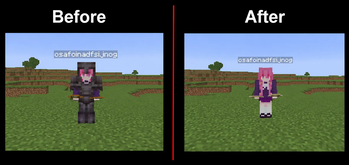
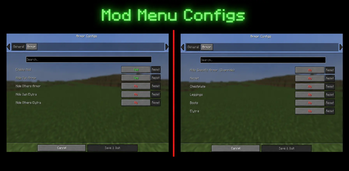
## Armor Configs Armor Configs is a lightweight client-side Fabric mod that gives you full control over how armor and elytra are rendered in Minecraft. Whether you want a cleaner look, better visibility in PvP, or just more control over your character’s appearance, this mod lets you customize armor rendering exactly the way you want. ### ✨ Features * **Hide your own armor** independently from other players * **Hide other players’ armor** without affecting your own * **Hide your own elytra** or only others’ elytra * Advanced **"Hide Specific Armor" override mode**: * Hide only selected armor pieces (helmet, chestplate, leggings, boots) * Works per-piece with accurate rendering (no full armor removal bugs) * Applies to both yourself and other players * **Separate Elytra control** even when using the override system * Clean and simple **ModMenu configuration screen** * All settings are **saved automatically** and persist between game restarts ### ⚙️ How it works Armor Configs hooks into Minecraft’s modern 1.21 render system to give precise control over armor visibility. It safely modifies rendering on the client side without affecting gameplay, server behavior, or other players. ### 🎯 Use cases * Improve **visibility in PvP** * Take **clean screenshots** without armor clutter * Customize your **player appearance** * Reduce visual noise in crowded areas ### 🔒 Client-side only This mod is entirely client-side: * ✔ Works on any server * ✔ No server installation required * ✔ Does not give gameplay advantages ### 🧩 Compatibility * Minecraft **1.21.11** * Fabric Loader * Fabric API (required) * ModMenu (optional, for configuration UI) --- Simple, powerful, and built for modern Minecraft rendering — Armor Configs gives you full visual control without compromising performance or compatibility.
## Armor Configs
Armor Configs is a lightweight client-side Fabric mod that gives you full control over how armor and elytra are rendered in Minecraft. Whether you want a cleaner look, better visibility in PvP, or just more control over your character’s appearance, this mod lets you customize armor rendering exactly the way you want.
### ✨ Features
Hide your own armor independently from other players Hide other players’ armor without affecting your own Hide your own elytra or only others’ elytra Advanced "Hide Specific Armor" override mode:
Hide only selected armor pieces (helmet, chestplate, leggings, boots) Works per-piece with accurate rendering (no full armor removal bugs) Applies to both yourself and other players Separate Elytra control even when using the override system Clean and simple ModMenu configuration screen All settings are saved automatically and persist between game restarts
### ⚙️ How it works
Armor Configs hooks into Minecraft’s modern 1. 21 render system to give precise control over armor visibility. It safely modifies rendering on the client side without affecting gameplay, server behavior, or other players.
### 🎯 Use cases
Improve visibility in PvP Take clean screenshots without armor clutter Customize your player appearance Reduce visual noise in crowded areas
### 🔒 Client-side only
This mod is entirely client-side:
✔ Works on any server ✔ No server installation required ✔ Does not give gameplay advantages
### 🧩 Compatibility
Minecraft 1. 21. 11 Fabric Loader Fabric API (required) * ModMenu (optional, for configuration UI)
Simple, powerful, and built for modern Minecraft rendering — Armor Configs gives you full visual control without compromising performance or compatibility.
📊 Mod Details
- Game
- Minecraft Mods
- Author
- uuirco
- Version
- 1.0.0
- Downloads
- 214
- Endorsements
- 0
- Category
- equipment
- Created
- 5/30/2026
- Updated
- 5/26/2026
- Game Versions
- 1.21.11
- Tags
- equipment, utility
🔧 How to Install Minecraft Mods Mods
Download from Modrinth. Use Prism Launcher or drop into your mods folder.
📖 Full step-by-step install guide for Minecraft Mods →
Visit the official mod page for specific installation instructions for this mod.
🎮 Need cheat codes or console commands? Check ur gaming wiki for Minecraft Mods commands, item IDs, and more.
❓ Frequently Asked Questions
Which Minecraft Mods versions does ArmorConfigs support?
The author lists 1.21.11. Other versions may work but are untested by the author.
What is the latest version of ArmorConfigs?
Version 1.0.0, published 2026-05-26 with 214 downloads recorded at the source.
Keep browsing — more Minecraft Mods mods await