Armed Stands
🟡 Updated this year⚠️ Install Order · 2 steps
Install in this order, then this mod last — most mods fail to load without their framework and dependencies in place.
🖼️ Gallery (3 images)


🔍 Analysis
- 👍 0.0% endorsement rate
- 🏆 #6 of 335 decoration mods in this game by downloads
📋 About This Mod
<div align="center"> # Tschipcraft's Armed Stands <a href="https://github.com/Tschipcraft/armedstands/stargazers"><img src="https://img.shields.io/github/stars/Tschipcraft/armedstands?logo=github&colorA=74341a&colorB=c4792e&style=for-the-badge" alt="GitHub Stars" title="GitHub Stars"></a> <a href="https://www.curseforge.com/minecraft/mc-mods/armed-stands"><img src="https://img.shields.io/curseforge/dt/1483685?logo=curseforge&label=CurseForge&colorA=74341a&colorB=c4792e&style=for-the-badge" alt="CurseForge Downloads" title="CurseForge Downloads"></a> <a href="https://github.com/Tschipcraft/armedstands/releases/latest"><img src="https://img.shields.io/github/downloads/Tschipcraft/armedstands/total?logo=github&colorA=74341a&colorB=c4792e&style=for-the-badge" alt="GitHub Downloads" title="GitHub Downloads"></a> A mostly server-side mod for Minecraft 1.20.x-26.2.x </div> ## ⚔️ Features Simple server-side mod that gives player-placed armor stands arms by default. In vanilla, the arms are normally hidden and can only be shown through commands. With enabled arms, players can place any holdable items in the mainhand and offhand slots of an armor stand. The arms can also be toggled individually by shift-right-clicking an armor stand. Any items held by the armor stand in the arm slots will drop when toggling. <details> <summary>Shift-right-clicking in action</summary> <img width="50%" alt="Toggling Arms" src="https://tschipo.alwaysdata.net/assets/armed-stands/toggling_arms.webp"> </details> Also includes a new armor stand item texture with arms for consistency. <img alt="Armor stand item with arms" src="https://tschipo.alwaysdata.net/assets/armed-stands/item_comparison.png" style="image-rendering: pixelated"><br> ## 🔧 Installation Download the latest release and drop the `.jar` file into the `mods` folder in your Minecraft directory. ## 🧩 Compatibility <img title="Supported Minecraft versions" alt="1.20.1 to 1.21.11 supported" src="https://tschipo.alwaysdata.net/assets/supported?untested_versions=26.3x&supported_versions=1.20x,1.21x,26.1x,26.2x&total_versions=%3C=1.18x,1.19x,1.20x,1.21x,26.1x,26.2x,26.3x&progress_bar=false&mc_background=false&icons=true&platform=modrinth" style="image-rendering: pixelated"> Compatible with the data pack (https://modrinth.com/project/AWwzPxKg), incompatible with the mod (https://modrinth.com/project/vuA4mu4C). Armor stands that are invisible, have the `Marker` NBT attribute, or have been summoned via commands will not be affected. The `DisabledSlots` NBT attribute is also respected. <div align="center"> ## External links <a href="https://www.curseforge.com/minecraft/mc-mods/armed-stands"> <img width="40px" alt="CurseForge logo" title="View Armed Stands on CurseForge" src="https://raw.githubusercontent.com/Tschipcraft/badges/main/assets/curseforge-modrinth.svg"> </a> <!--- <a href="https://www.planetminecraft.com/mod/armed-stands/"> <img width="40px" alt="PlanetMinecraft logo" title="View Armed Stands on PlanetMinecraft" src="https://www.planetminecraft.com/images/layout/favicon-128.png"> </a> <a href="https://tschipcraft.ddns.net/armed-stands.html"> <picture> <source width="40px" media="(prefers-color-scheme: dark)" srcset="https://gistcdn.githack.com/Tschipcraft/dd29a827fa843ed52e7efc7801c48421/raw/7ab31174b119403a1deff072e3ae16fe43a9ed59/website_logo_modrinth.svg"> <source width="40px" media="(prefers-color-scheme: light)" srcset="https://tschipcraft.ddns.net/assets/images/logo-black-1.svg"> <img width="40px" title="View Armed Stands on my website" alt="Website logo" src="https://gistcdn.githack.com/Tschipcraft/dd29a827fa843ed52e7efc7801c48421/raw/7ab31174b119403a1deff072e3ae16fe43a9ed59/website_logo_modrinth.svg"> </picture> </a> --> <a href="https://ko-fi.com/C0C5HEJB2"> <img width="250px" title="Support me on Ko-fi" alt="Ko-fi banner" src="https://storage.ko-fi.com/cdn/brandasset/kofi_button_red.png"> </a> *** ## Partner Offer <a href="https://billing.sparkedhost.com/aff.php?aff=2611"> <img title="Support me by getting a server @ Sparked Host (This is an affiliate link)" alt="Promotional Offer" src="https://tschipo.alwaysdata.net/assets/partner/sparked_banner.png"> </a> </div>
# Tschipcraft's Armed Stands


A mostly server-side mod for Minecraft 1. 20.x-26. 2.x
## ⚔️ Features

Simple server-side mod that gives player-placed armor stands arms by default. In vanilla, the arms are normally hidden and can only be shown through commands. With enabled arms, players can place any holdable items in the mainhand and offhand slots of an armor stand.
The arms can also be toggled individually by shift-right-clicking an armor stand. Any items held by the armor stand in the arm slots will drop when toggling.
Shift-right-clicking in action
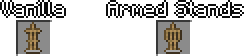
Also includes a new armor stand item texture with arms for consistency.
## 🔧 Installation
Download the latest release and drop the `.jar` file into the `mods` folder in your Minecraft directory.
## 🧩 Compatibility
Compatible with the data pack (https://modrinth.com/project/AWwzPxKg), incompatible with the mod (https://modrinth.com/project/vuA4mu4C).
Armor stands that are invisible, have the `Marker` NBT attribute, or have been summoned via commands will not be affected. The `DisabledSlots` NBT attribute is also respected.
## External links


## Partner Offer

📊 Mod Details
- Game
- Minecraft Mods
- Author
- Tschipcraft
- Version
- 1.1
- Downloads
- 34,597
- Endorsements
- 1
- Category
- decoration
- Created
- 3/16/2026
- Updated
- 8/23/2026
- Game Versions
- 26.1, 26.1.1, 26.1.2, 26.2
- Tags
- decoration, storage, utility
🔧 How to Install Minecraft Mods Mods
Download from Modrinth. Use Prism Launcher or drop into your mods folder.
📖 Full step-by-step install guide for Minecraft Mods →
Visit the official mod page for specific installation instructions for this mod.
🎮 Need cheat codes or console commands? Check ur gaming wiki for Minecraft Mods commands, item IDs, and more.
❓ Frequently Asked Questions
Which Minecraft Mods versions does Armed Stands support?
The author lists 26.1, 26.1.1, 26.1.2, 26.2. Other versions may work but are untested by the author.
What is the latest version of Armed Stands?
Version 1.1, published 2026-08-23 with 34,597 downloads recorded at the source.
Keep browsing — more Minecraft Mods mods await